
Vandaag of morgen in huis

Kwaliteit gegarandeerd

Welkomstaanbiedingen ontgrendelen: GRATIS bezorging | Tot 80% korting | Gratis 30 dagen JoyPlus-proefperiode
Download de app
A wireless mouse gives you more freedom to move around your desk, but not every model suits every device or working style. A Bluetooth mouse, for example, works differently from one with a USB receiver. In practice, a compact design, quiet buttons or an ergonomic shape may matter more than a high DPI rating.
So, before you buy, look out for these common pitfalls.
A wireless mouse with a USB receiver needs a free USB-A or USB-C port, depending on the receiver supplied. A Bluetooth mouse uses the Bluetooth function on your laptop, tablet or desktop instead. First, check which ports and connection types your device supports.
A USB receiver is often a practical choice for a desktop or work laptop without a stable Bluetooth connection. Bluetooth is more convenient if you don’t want to carry a dongle around, for example when you’re travelling.
Terms such as “silent” and “quiet click” describe product features, but noise levels can vary between buttons, scroll wheels and surfaces. Some manufacturers say in their product descriptions that the left and right buttons are designed to be quieter. That doesn’t automatically mean every action is silent.
Quiet main buttons are a useful feature in a mouse for the office, library or home working. Also check whether the scroll wheel and any side buttons are described as quiet.
DPI determines how far the cursor moves in response to a particular hand movement. A higher value isn’t automatically more comfortable. For documents, spreadsheets and browsing, a moderate DPI is often enough. Adjustable DPI is especially useful if you switch between a small laptop screen and a large external monitor.
Also consider the shape, weight, number of buttons and battery type. These features have more impact on everyday use than a high maximum DPI figure.
A Bluetooth mouse, such as the HP 240 Pike Silver, pairs directly with a compatible device via Bluetooth 5.1. The product specification says no dongle is needed. That frees up a USB port and means you don’t have to worry about losing a small receiver.
An RF model usually connects via a 2.4 GHz USB receiver. It’s a straightforward plug-and-play option for a laptop or desktop with a spare port. Some models support both options. This can be useful if you use Bluetooth with a laptop and the receiver with a desktop.
If you work with several devices, consider a multi-device mouse. The HP 635 supports connections to multiple devices via a nano receiver and Bluetooth, according to the product specification. Always check how many devices can be paired at once and how you switch between them.
An optical mouse uses an optical sensor to track movement across a surface. Most models for home and office use work well on a standard, matt mouse mat or desk. Reflective surfaces, such as glass, can interfere with tracking, according to safety information.
Many everyday models offer around 1,200 to 1,600 DPI. An adjustable range, such as 800 to 2,400 DPI on certain ergonomic models, gives you more control over cursor speed. For office work, accurate tracking and predictable movement are usually more important than an extremely high resolution.
A compact mouse is easy to carry around, but often offers less support for your palm. A vertical or larger ergonomic mouse may better suit a particular hand position, but is usually less suitable for left-handed users. So check:
Battery life claims such as “up to twelve months” or “up to three months” depend on usage, settings and conditions. Treat them as an indication from the product information, not as a guaranteed battery life.
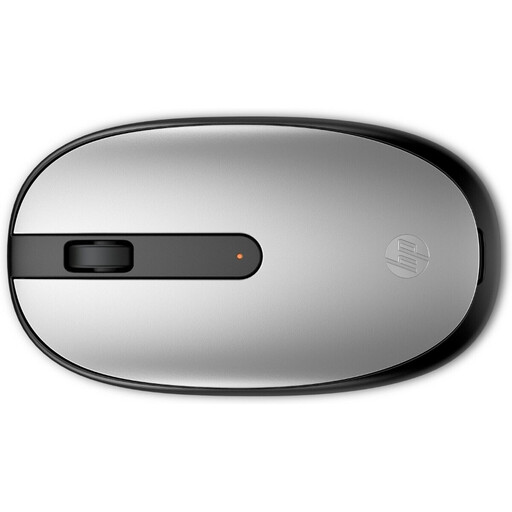
Why it suits this user: This Bluetooth mouse is designed for straightforward everyday use with a laptop, office computer or Chromebook, without the need for a separate dongle.
The connection type is clearly stated: Bluetooth 5.1, with no USB receiver. Just check beforehand that your device supports Bluetooth.
Optical sensor with 1600 DPI, three buttons, suitable for left- and right-handed use, and a stated battery life of up to 15 months.
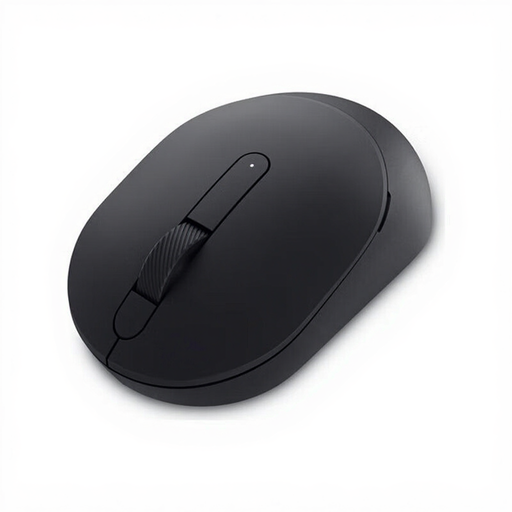
Why it suits this user: A practical choice for open-plan offices and home workspaces where you want to keep clicking noise to a minimum and benefit from multiple connection options.
The product description says that clicking, scrolling and movement are quiet. The mouse also supports both RF and Bluetooth, so you’re less reliant on a single connection type.
Ambidextrous design, optical sensor, adjustable resolution up to 4020 DPI and a stated battery life of up to 36 months.
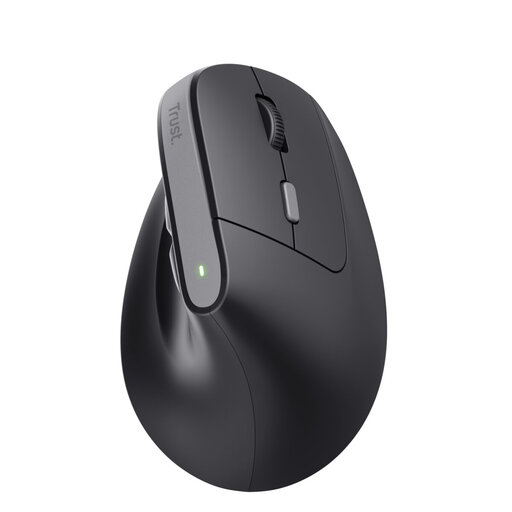
Why it suits this user: The vertical shape, angled at 57 degrees, is designed for right-handed users who want to try a different hand position during long working days.
The shape, hand orientation and DPI options are clearly specified. This helps you decide in advance whether a vertical mouse will suit your grip.
2.4 GHz USB receiver, rechargeable battery, quiet main buttons and adjustable DPI from 800 to 2400.
A wireless keyboard and mouse combo is a good option if you want to set up a permanent workstation in one go. According to the product specification, the Rapoo 9010M supports 2.4GHz and Bluetooth and can be paired with up to four devices. The set includes a low-profile keyboard and an optical mouse with multiple DPI settings.
With a set, be sure to check the keyboard layout. A QWERTY layout may differ from the one you’re used to. Also check the battery types, how the receiver connects and compatibility with Windows, macOS, Linux or ChromeOS.
We’ve put together a complete, up-to-date list of products that meet these strict selection criteria and comply with current European safety regulations.
Not every mouse works with every device. Check whether your laptop supports Bluetooth or has a free USB port for the receiver. Also check which operating systems it supports and whether any software is needed for programmable buttons.
It depends on the model and how you use it. Product information sometimes gives a battery life of several months to several years. A rechargeable mouse needs to be charged from time to time; a model with AA or AAA batteries can keep going as long as you have a spare battery to hand.
Yes, if you want to reduce clicking noise during meetings or in a shared space. Check whether only the main buttons are quiet or whether the scroll wheel is too. Choose a shape that feels comfortable in your hand, and use the mouse on a suitable, non-reflective surface.
