
Vandaag of morgen in huis

Kwaliteit gegarandeerd

Welkomstaanbiedingen ontgrendelen: GRATIS bezorging | Tot 80% korting | Gratis 30 dagen JoyPlus-proefperiode
Download de app
A wireless mouse gives you more freedom of movement at your desk, but not every model suits every user. A compact mouse for a laptop has different features from an ergonomic wireless mouse for long working days or a wireless gaming mouse with extra buttons.
Marketing copy often focuses on high DPI, long battery life or an ergonomic shape. This information is only useful when it matches the way you work. Below, you’ll find out what to look for and which models suit different situations.
DPI determines how far the cursor moves when you move the mouse. A higher value is not automatically more comfortable or accurate. For word processing, browsing the internet and administrative work, 1,000 to 1,600 DPI is often sufficient. Gamers or users with multiple screens may benefit more from a mouse with adjustable DPI.
Also check whether the stated DPI is fixed or can be adjusted. An optical mouse with a single fixed setting offers less flexibility than a model with multiple levels.
A mouse may be described as ergonomic, but its dimensions, hand orientation and grip determine whether it feels practical to use. A vertical mouse, for example, creates a different hand position from a traditional model. So, consider:
An ergonomic shape is no guarantee that discomfort will disappear. Take regular breaks during extended use and set up your workstation correctly.
A range of 8 or 10 metres sounds generous, but at a desk, the connection type and compatibility are more important. A mouse with a USB receiver generally uses 2.4GHz RF. You’ll need a free USB-A port for this. If your laptop only has USB-C ports, you may need an adapter.
Bluetooth is convenient if you want to work without a separate receiver. However, check that your computer supports Bluetooth. Some models combine Bluetooth with RF, while others work exclusively with a nano or micro USB receiver.
An optical mouse uses a light sensor to track movement across a surface. On a plain mouse mat, this is usually predictable. Glass, highly reflective surfaces or dirt can affect tracking.
For office work and studying, 1,000 to 1,600 DPI is often enough. For photo editing, large screen setups or gaming, a higher value may be useful. When gaming, also consider polling rate, response time, cable type and software support. DPI alone says little about the overall user experience.
A wireless computer mouse runs on an AA or AAA battery, or uses a built-in rechargeable battery. A replaceable battery is practical if you want to continue working straight away. A rechargeable model avoids disposable batteries, but needs to be charged in good time.
Bear in mind the difference between the stated operating time and your actual usage. According to Logitech’s own information, the MX Vertical can operate for up to four months on a full charge; battery life depends partly on usage and settings. Trust states that the Bayo II offers up to three months of use per charge.
Three buttons and a scroll wheel are enough for standard office work. Extra side buttons are useful for browser navigation or shortcuts. A silent mouse can be convenient in a library, shared office or during online lectures. Check whether only the click buttons are silent, or the scroll wheel as well.
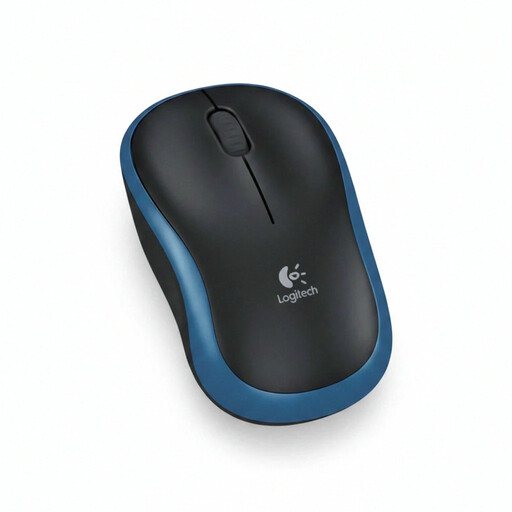
Why it suits this profile: This compact model is suitable for home use, studying and laptops. The 2.4GHz connection, three buttons and 1,000 DPI keep operation straightforward.
The specifications focus on everyday use, without making you pay for features you may not need. The receiver and AA battery are included.
Ambidextrous design, optical sensor, nano USB receiver and compact size for taking with you.

Why it suits this profile: This model is designed for right-handed users who work across multiple devices and value additional controls.
The choice here is not just about DPI: Bluetooth, Logi Bolt, horizontal scrolling and programmable buttons are clearly listed in the product specifications.
Adjustable 8,000 DPI, eight buttons, rechargeable battery and connection to up to three devices.
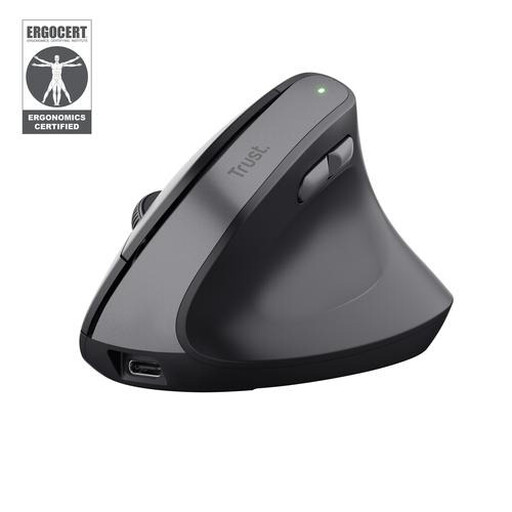
Why it suits this profile: The vertical shape with a 57-degree angle is designed for right-handed office and home workers looking for a different grip.
The hand orientation and vertical shape are clear from the outset. This helps you avoid choosing a left- or right-handed model that does not suit your grip.
Adjustable 800–2,400 DPI, two silent buttons, two thumb buttons, USB receiver and rechargeable battery.
We’ve put together a complete, up-to-date list of products that fully meet these strict selection criteria and the applicable European safety regulations.
A wireless mouse is convenient for a tidy desk and a laptop that you regularly take with you. A wired mouse does not need a battery and may be a good choice for gaming or a permanent workstation. The Razer DeathAdder Essential, for example, uses a USB cable, a 6,400 DPI optical sensor and five buttons. For competitive gaming, a cable can be a straightforward choice, while a wireless model offers greater freedom of movement.
Insert the battery or charge the rechargeable battery, connect the USB receiver and switch the mouse on. With Bluetooth models, enable Bluetooth on your computer and follow the pairing steps. Check beforehand which port and operating systems are supported.
This varies by model, battery type and usage. A mouse with AA or AAA batteries can run for months; a rechargeable model needs to be connected to the cable periodically. Manufacturer specifications are estimates. Switch the mouse off when you are not using it and store loose batteries in accordance with the safety instructions.
It can be, but in addition to the wireless connection, pay attention to the polling rate, sensor, weight, buttons and software. For simple games, an office-focused wireless computer mouse may be sufficient. For fast-paced games, models with programmable buttons, adjustable DPI and a suitable response speed are the more logical choice.
