
Vandaag of morgen in huis

Kwaliteit gegarandeerd

Welkomstaanbiedingen ontgrendelen: GRATIS bezorging | Tot 80% korting | Gratis 30 dagen JoyPlus-proefperiode
Download de app
A wireless mouse keeps your desk tidy and works well with a laptop, PC or tablet. But not every model is suitable for long periods of use. A low price, for example, could mean you have to replace the batteries frequently, while a high DPI rating doesn’t automatically mean more precise control.
As a Joybuy Product Recommendations Officer, I filter product information to focus on practical specifications. Read on to find out what to look for, which marketing claims to treat with caution and which type of mouse suits the way you use it.
DPI indicates how sensitively you can set the sensor. A higher value is most relevant for gamers, people with large screens and users who prefer quick cursor movements. For word processing, email and spreadsheets, an adjustable setting of around 1,000 to 3,200 DPI is often enough.
A high DPI rating tells you nothing about the shape, clicking experience or connection stability. So check the sensor type, number of buttons and available connection options too.
A Bluetooth mouse connects directly to a compatible device. This is useful with modern laptops and tablets because you don’t need a spare USB port. A mouse with a USB receiver may be a more practical choice for a desktop PC or a laptop without reliable Bluetooth.
Also check the type of receiver. Some models use USB-A, while others come with a USB-C receiver. You may need an adaptor if your laptop only has USB-C ports.
An ergonomic mouse can support a different hand position, but the right shape depends on your hand size, grip and how long you use it for. A vertical mouse feels different from a standard model at first. A compact mouse is handy when you’re on the go, but may offer less support for larger hands.
So, decide in advance whether you’re looking for a compact, standard or vertical shape. Also consider whether you need a mouse for left- or right-handed use.
Bluetooth is often the simplest option for a laptop. If you work with several devices, check whether you can switch between profiles. A multi-device mouse, for example, can connect to a laptop, PC and tablet.
The Trust Ozaa+ uses a 2.4GHz USB receiver and two Bluetooth channels. According to the product information, this lets you pair up to three devices. The HP 925 also supports connections to up to three devices via Bluetooth 5.3 and an HP Unifying dongle.
A rechargeable mouse means you won’t need to buy AA or AAA batteries regularly. Check the stated battery life and charging port, though. A USB-C port is handy because you can often use the same cable for other devices too.
A mouse that uses replaceable batteries may be a better choice if you don’t want to plan time for charging. The Logitech M705, for example, uses AA batteries and has a stated battery life of up to three years, according to the product information. Actual battery life depends on usage, settings and battery type.
For office work, quiet clicks, a comfortable thumb rest and a smooth scroll wheel are usually more important than an exceptionally high DPI. Horizontal scrolling can save time when working with wide spreadsheets. Gamers should also consider polling rate, weight, sensor response and the number of programmable buttons.
Check the dimensions too. A 150-gram model feels different from a lightweight mouse weighing around 60 grams. No single shape is automatically right for everyone.
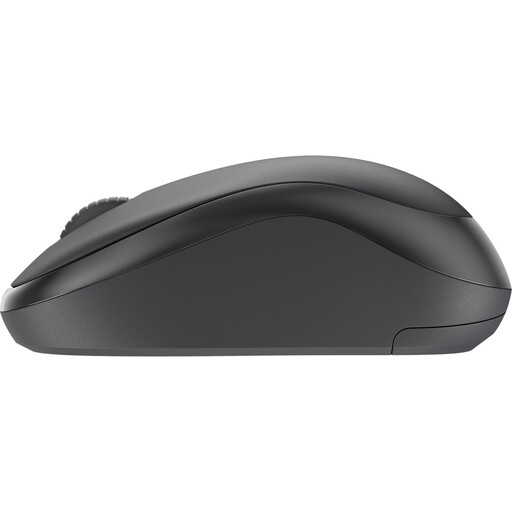
Why it suits this profile: This model is designed for everyday office, study and home use. It runs on an AA battery, is suitable for left- and right-handed users and offers an adjustable resolution of up to 4,000 DPI.
The specifications clearly state the power source, USB receiver connection and ambidextrous design. That way, you don’t have to rely on general terms such as “wireless” alone.
Optical sensor, adjustable DPI up to 4,000, weighs around 75 grams and is suitable for left- and right-handed users.

Why it suits this profile: This business mouse is designed for people who work extensively with documents, spreadsheets and multiple devices. Bluetooth, Logi Bolt and programmable buttons give you more ways to customise it.
The product information lists more than just 8,000 DPI: it also mentions horizontal scrolling, support for up to three devices and USB-C charging. That makes it easier to see how the features fit into your workflow.
Laser tracking, 8 programmable buttons, Bluetooth and Logi Bolt, rechargeable battery and support for up to three devices.
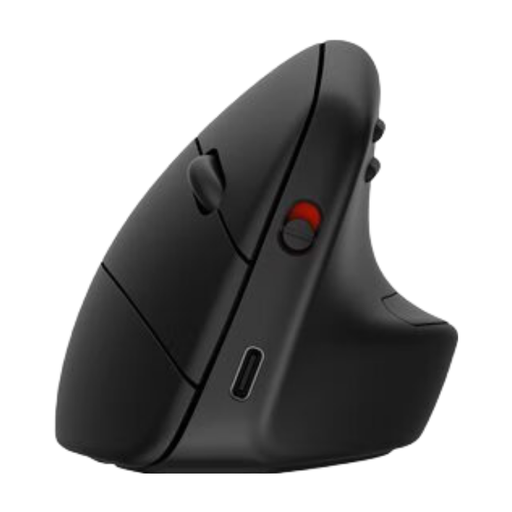
Why it suits this profile: The vertical shape is designed for right-handed users who want to try a different wrist and hand position during longer work sessions. This model supports Bluetooth and a USB receiver.
Rather than simply using the label “ergonomic”, the product information specifies the vertical shape, detachable wrist rest and hand orientation.
Vertical shape, up to 4,000 DPI, USB-C charging, Bluetooth 5.3, support for three devices and a stated battery life of up to 16 weeks.
A wireless gaming mouse needs different features from an office mouse. Look at the polling rate, connection mode, sensor, weight and whether you can programme the buttons. According to the product description, the AJAZZ AJ200 AI MC supports Bluetooth, 2.4GHz and USB-C. It lists a sensor of up to 24,000 DPI and a polling rate of up to 1,000 Hz in wired and 2.4GHz mode.
Don’t use these figures as your only selection criteria. Also check that the software works with your operating system and whether you’d find a charging dock or cable convenient.
We’ve put together a complete, up-to-date list of products that meet these strict selection criteria and comply with current European safety regulations.
No. A Bluetooth mouse needs your laptop to support Bluetooth. A model with a USB receiver requires a suitable USB port or adaptor. Check which operating systems it supports before you order, too.
Its lifespan depends on the buttons, battery, rechargeable cell and how intensively you use it. A rechargeable mouse will need charging again after a while. With a model that uses AA or AAA batteries, the battery type and battery life are the main factors affecting running costs.
A quiet mouse can be useful in a shared workspace, library or home office. Check the overall clicking experience, though: some models reduce click noise, but the scroll wheel or side buttons may still be audible.
