
Vandaag of morgen in huis

Kwaliteit gegarandeerd

Welkomstaanbiedingen ontgrendelen: GRATIS bezorging | Tot 80% korting | Gratis 30 dagen JoyPlus-proefperiode
Download de app
A wireless mouse keeps your desk tidy and is handy with a laptop, home office set-up or gaming PC. However, not every model is suited to every situation. A compact Bluetooth mouse can be useful on the go, while a wireless computer mouse with a USB receiver is often more practical for a permanent workstation.
When choosing, look beyond appearance and a high DPI rating. The connection, shape, power supply and compatibility all play a big part in how comfortable the mouse is to use day to day.
A Bluetooth mouse works without a separate dongle, but your laptop or PC needs to support Bluetooth. A model with a 2.4GHz USB receiver usually uses a spare USB-A port. This may mean you need an adapter if your modern laptop only has USB-C ports.
Before buying, check:
DPI indicates how sensitive the sensor is. A higher setting can be useful for gaming or large screens, but it doesn’t automatically make a mouse more accurate or comfortable. For office work, around 1,000 to 1,600 DPI is often enough. Gamers may benefit more from adjustable DPI and a higher polling rate.
Check the sensor, too. An optical mouse works on many standard desk surfaces, but glossy or glass surfaces can affect tracking.
Long battery life is useful, but check whether the mouse uses a replaceable battery or has a built-in rechargeable battery. With an AA or AAA battery, you can carry on as soon as you replace it. A rechargeable mouse needs to be plugged in from time to time, but saves you from buying disposable batteries.
Battery life depends on how you use the mouse. According to the product information, the HP 240 can last up to 15 months on a single AA battery, for example. Actual battery life depends on factors such as usage, settings and battery type.
A wireless mouse for a laptop is often more practical with Bluetooth, as there’s no USB receiver to carry around. The HP 240 Pike Silver uses Bluetooth 5.1 and, according to its specifications, works with Windows 10/11, macOS and ChromeOS.
A 2.4GHz connection via a nano receiver is suitable for plug-and-play use with a desktop or laptop. Models such as the Logitech M705 use a USB receiver and, according to the product information, have a range of up to 10 metres.
Want to switch between a laptop, PC and tablet? Choose a multi-device mouse. According to its specifications, the Trust Ozaa+ can connect to up to three devices: one via the USB receiver and two via Bluetooth.
An ambidextrous mouse is designed for both left- and right-handed use. This is useful in shared workspaces or if you regularly switch hands. Also check the width, height and weight. A compact mouse is easy to carry around, while a larger model may offer more support for your hand.
An ergonomic mouse isn’t automatically right for everyone. Check that its shape suits your hand size and grip. If you use a mouse for hours each day, the right size, quiet buttons and a stable wrist position matter more than eye-catching extra features.
A simple mouse with two or three buttons is often enough for browsing and word processing. Programmable buttons can save time when using software, creative applications or games. A horizontal scroll wheel can be handy for wide spreadsheets.
A quiet mouse is a good choice for shared offices, libraries or working from home alongside others. Check whether only the main buttons are quieter, or whether the scroll wheel is too. Claims such as “up to 90% noise reduction” are made by manufacturers, so treat them as manufacturer information rather than a universal test result.
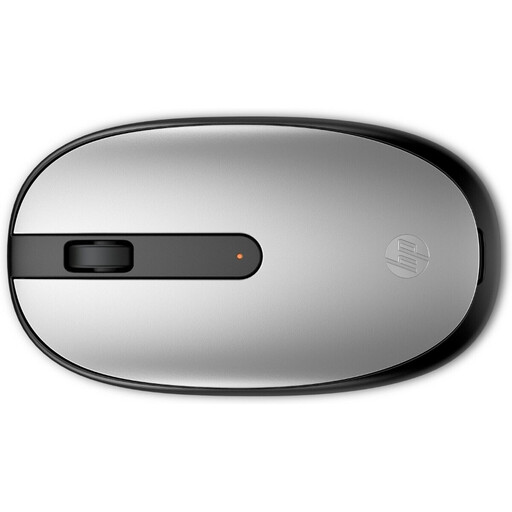
Why it suits this type of user: A straightforward Bluetooth mouse for everyday laptop and office work, with no separate dongle.
The product specifications list Bluetooth 5.1, a 1600 DPI optical sensor and compatibility with Windows, macOS and ChromeOS.
Ambidextrous design, three buttons plus a scroll wheel, and one AA battery with a claimed battery life of up to 15 months according to the manufacturer.

Why it suits this type of user: A full-size office mouse for anyone who switches between multiple devices and works with wide spreadsheets.
The mouse combines 2.4GHz and Bluetooth and has a rechargeable battery. That means you don’t have to rely on just one type of connection or use disposable batteries.
Connects to up to three devices, has six buttons, adjustable sensitivity up to 3200 DPI and an extra scroll wheel for horizontal scrolling.

Why it suits this type of user: Designed for gamers looking for a lightweight, right-handed wireless gaming mouse with programmable buttons.
DPI isn’t the only thing to consider here: the specifications list a weight of 64 grams, an optical Focus Pro sensor, a wireless HyperSpeed connection and five buttons.
According to the product information, the sensor can be adjusted up to 30,000 DPI and the stated battery life is up to 90 hours.
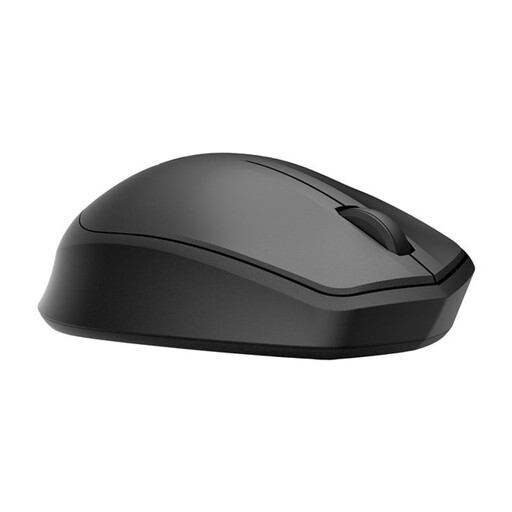
Why it suits this type of user: For home workers and office staff who value a quiet workspace and long battery life.
The mouse uses a 2.4GHz receiver, has a range of up to 10 metres and is listed as having quiet main buttons.
1200 DPI optical sensor, ambidextrous design and, according to the manufacturer, up to 18 months of battery life from one AA battery.
We’ve put together a complete, up-to-date list of products that meet these strict selection criteria and the current European safety regulations.
Not necessarily. A Bluetooth mouse needs Bluetooth support. An RF model usually uses a USB-A receiver. Before ordering, check your laptop’s ports and operating system.
It varies by model and usage. According to the product specifications, a mouse with an AA or AAA battery can last from several months to a few years. You’ll need to recharge a mouse with a built-in battery when its charge runs low. Manufacturer figures are estimates, so actual battery life may vary.
Yes, as long as the connection, polling rate, sensor and shape suit the games you play. For competitive gaming, low latency, a stable connection, light weight and programmable buttons are all worth considering. For casual gaming, a simpler wireless model with adjustable DPI is often enough.
