
Vandaag of morgen in huis

Kwaliteit gegarandeerd

Welkomstaanbiedingen ontgrendelen: GRATIS bezorging | Tot 80% korting | Gratis 30 dagen JoyPlus-proefperiode
Download de app
A wireless mouse gives you more freedom to move around your desk, but not every model is right for every user. A small mouse can be handy when you’re out and about, while a compact model may feel less comfortable during long working days. Terms such as “silent click”, “high DPI” and “multi-device” can also make a product sound appealing, even if those features aren’t essential for you.
As a Joybuy Product Recommendation Officer, I filter through the key product specifications so you can compare options with confidence and avoid buying the wrong mouse.
A Bluetooth mouse connects directly to a compatible device. It’s handy for laptops and tablets without a spare USB port. A mouse with a USB receiver works via a small dongle, usually using a 2.4 GHz wireless connection.
Check the following first:
A model with both connection options offers more flexibility, but may also require more set-up.
DPI determines how sensitive the cursor is. A higher number doesn’t automatically mean the mouse is more comfortable or accurate to use. For office work, an adjustable setting of around 1,200 to 3,200 DPI is often enough. Gamers may need a higher adjustable DPI, especially with large screens or fast-paced games.
Also consider the sensor, weight and polling rate. For gaming, a high polling rate may reduce response time, according to the product description, but it can also increase CPU usage.
An ergonomic mouse should suit your hand size, grip and working posture. A right-handed model isn’t automatically suitable for left-handed users. A vertical mouse also takes some getting used to compared with a traditional design.
Look for:
A wireless computer mouse can connect via Bluetooth, a USB receiver or both. For a mouse for laptops and PCs, Bluetooth and RF connectivity are handy if you switch between devices. Multi-device models can remember several devices. According to the product specifications, the Logitech M720 Triathlon supports up to three paired devices and has a 1,000 DPI optical sensor.
Also check which operating systems are supported. Windows, macOS, ChromeOS, Linux, Android and iPadOS aren’t supported to the same extent by every model.
A mouse that uses AA or AAA batteries is ready to use straight away, but you’ll need to keep spare batteries handy. A rechargeable mouse means you won’t have to buy disposable batteries regularly, but you’ll need to charge it via a USB cable when required.
Check the difference between:
The stated battery life depends on the settings, connection method and frequency of use. Treat a brand’s claim as a guide from the product information, rather than a guarantee of how long it will last each day.
A quiet mouse is useful in a shared workspace, library or home office. Check whether only the main buttons are quieter, or whether the scroll wheel and side buttons are too. Programmable buttons are useful for shortcuts, but not everyone needs them.
A free-spinning scroll wheel helps with long documents. For spreadsheets and wide timelines, horizontal scrolling may be more important than a high DPI.
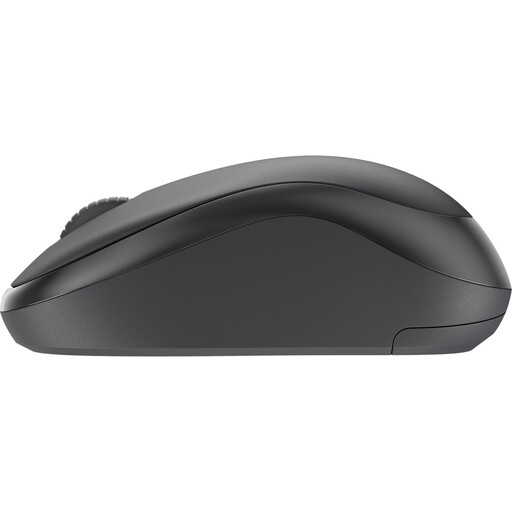
Why it suits this user profile: This model is well suited to everyday office and home use, with simple controls, optical tracking and support for both left- and right-handed use.
The specifications list quiet operation, adjustable DPI and an included AA battery, so you won’t need to buy extra accessories straight away.
Up to 4,000 DPI according to the product information, an optical sensor, three buttons and support for both left- and right-handed use.

Why it suits this user profile: This model is designed for office professionals who do a lot of scrolling, use multiple devices and appreciate extra customisation options.
The mouse combines Bluetooth with a Logi Bolt receiver, so you’re not limited to one connection type. It’s also specifically described as having an ergonomic shape.
8,000 DPI, eight programmable buttons, horizontal scrolling, USB-C charging and support for up to three devices.

Why it suits this user profile: This gaming mouse is for users who value low weight, programmable buttons and a high polling rate.
The product information lists the weight, battery life and CPU impact of an 8K polling rate, so you can weigh these features against your PC configuration.
53 grams, a polling rate of up to 8,000 Hz, 26,000 DPI, ten programmable buttons and a stated battery life of up to 750 hours at 1,000 Hz.
We’ve put together a complete, up-to-date list of products that meet these strict selection criteria and current European safety regulations.
Not all mice work in the same way. A Bluetooth mouse needs your laptop to support Bluetooth. A model with a USB receiver needs a suitable USB port. Also check that your operating system is supported.
It depends on the battery type, connection and how you use the mouse. According to the product specifications, models with an AA battery can last from several months to a few years. You’ll need to charge a rechargeable mouse periodically via USB-C or another included cable. Treat the stated battery life as a guide.
A quiet mouse is mainly designed to reduce click noise in office and home settings. For gaming, sensor resolution, polling rate, weight, shape and button response also matter. So compare the full specifications rather than looking at noise level alone.
