
Vandaag of morgen in huis

Kwaliteit gegarandeerd

Welkomstaanbiedingen ontgrendelen: GRATIS bezorging | Tot 80% korting | Gratis 30 dagen JoyPlus-proefperiode
Download de app
A wireless mouse keeps your desk tidy and is handy with a laptop, in a home office setup or with a gaming PC. Yet many models look alike, even though differences in connectivity, comfort and power can make a noticeable difference. A low price also says little about whether a mouse is right for the way you use it.
Watch out for these three common pitfalls:
A Bluetooth mouse is handy for modern laptops, tablets and computers without a spare USB-A port. For example, the HP 240 Black Bluetooth Mouse uses Bluetooth 5.1, needs no dongle and, according to the stated compatibility information, works with Windows 10, Windows 11, macOS and ChromeOS.
A mouse with a USB receiver can be a good choice for desktops or work computers where Bluetooth is disabled. Make sure you check the connector type. Many nano receivers use USB-A, while some laptops only have USB-C ports. A multi-device mouse often combines both options, so you can connect a laptop via Bluetooth and a desktop via a receiver, for example.
Before you buy, check:
DPI indicates how sensitively the cursor responds to movement. For word processing, browsing the internet and working with spreadsheets, a range of around 1,000 to 1,600 DPI is often enough. A mouse with adjustable DPI is more flexible if you switch between a large screen, laptop or high-resolution monitor.
An optical sensor is common for everyday use. Use the mouse on a flat, non-reflective surface if the manufacturer recommends it. For gaming, polling rate, latency, sensor tracking and weight also matter. A wireless gaming mouse with a high maximum DPI is most useful if you actually use those settings in your game or software.
Look out for impressive specifications that aren’t clearly explained. A brand’s claim about accuracy or performance isn’t a universal result. Treat this information as a product feature stated by the manufacturer, and compare it with specifications you can verify.
A mouse powered by AA or AAA batteries can last for months, but battery life depends on usage, settings and battery type. According to the product information, HP gives the Wireless Mouse 220 a battery life of up to 15 months. Up to 12 months is stated for the HP 635. These are figures provided by the manufacturer, not a guarantee for every user.
A rechargeable wireless mouse means you won’t need spare batteries. Check:
A quiet mouse can be more pleasant in a shared workspace. The HP 285 claims up to 90% noise reduction on the left and right buttons. The Logitech M240 and Trust Ozaa+ are also described as quiet models. “Quiet” doesn’t always mean completely silent; you may still hear the scroll wheel and other buttons.
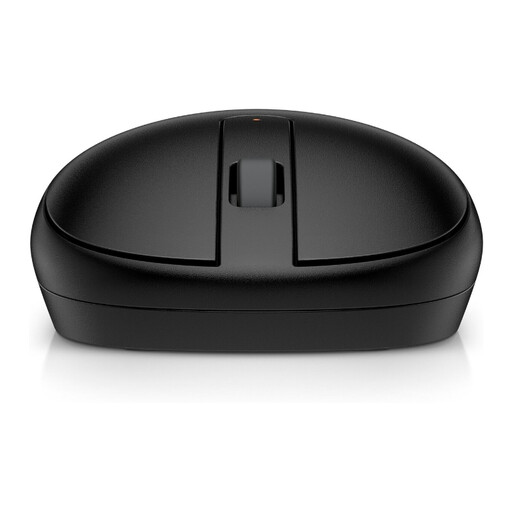
Why it suits this profile: A straightforward wireless mouse for laptop users who want to work without a separate dongle. Its ambidextrous shape suits both left- and right-handed use.
It connects via Bluetooth 5.1, so you don’t need to carry a USB receiver. The product information lists 1600 DPI and three buttons with a scroll wheel.
Bluetooth 5.1, optical sensor, 1600 DPI and support for Windows, macOS and ChromeOS.
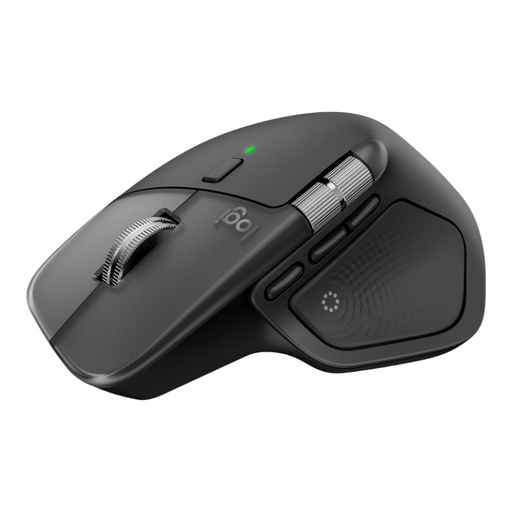
Why it suits this profile: Designed for people who work long days, scroll frequently and switch between several devices.
Its shape, thumb scroll wheel and customisable buttons offer more options than a basic model. Do check that it’s the right size for your hand.
Eight programmable buttons, Bluetooth and Logi Bolt, connection to up to three devices and a built-in rechargeable battery.
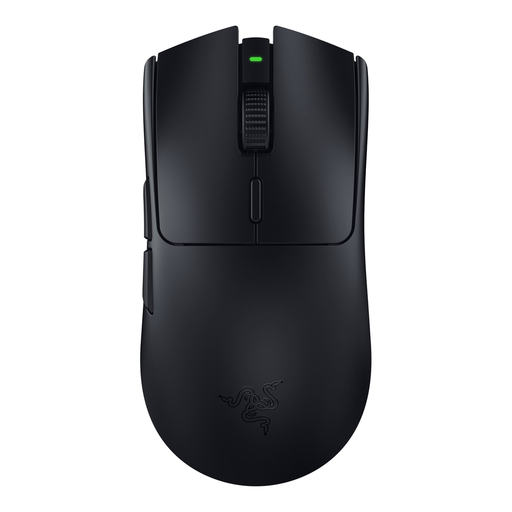
Why it suits this profile: A wireless gaming mouse for players looking for a lightweight model, programmable buttons and adjustable sensitivity.
The specifications list an optical sensor, six buttons and adjustable DPI. The mouse runs on an AA battery, so bear in mind that you’ll need to replace it.
Up to 30,000 DPI according to the product information, a weight of 82 grams and a wireless connection via Razer HyperSpeed.

Why it suits this profile: A good choice if you use a laptop, desktop and tablet, and often work with wide spreadsheets or timelines.
Combining a USB receiver with Bluetooth means you’re not dependent on just one type of connection. Its larger shape is less suitable if you’re mainly looking for a compact travel mouse.
Connects to up to three devices, quiet buttons, a rechargeable battery, side scrolling and adjustable DPI up to 3200.
We’ve put together a complete, up-to-date list of products that meet these strict selection criteria and current European safety regulations.
Not always. A Bluetooth mouse needs Bluetooth support, while a mouse with a USB receiver needs a compatible USB port. Also check which operating systems are supported and whether any software is needed for programmable buttons.
It varies by model and usage. For some battery-powered models, manufacturers quote battery life ranging from a few months to several years. You’ll need to charge a rechargeable wireless mouse periodically, but it saves you from buying separate batteries. Treat the stated battery life as a guide.
Yes, a quiet mouse can be useful in a shared workspace. Check which buttons are quieter and whether the scroll wheel is quiet too. For gaming, click feel, response speed and sensor settings are usually more important than noise levels.
