
Vandaag of morgen in huis

Kwaliteit gegarandeerd

Welkomstaanbiedingen ontgrendelen: GRATIS bezorging | Tot 80% korting | Gratis 30 dagen JoyPlus-proefperiode
Download de app
A wireless mouse gives you more space on your desk and is handy alongside a laptop, PC, Mac or tablet. However, the wrong choice can quickly prove disappointing. For example, a mouse may not connect to your device, be too small for your hand or start making an irritating amount of noise after a short time.
As a Joybuy Product Recommendation Officer, I filter the most important product specifications and compare them with practical usage scenarios. This helps you see which features are relevant and which marketing claims you should check before placing your order.
A Bluetooth mouse does not need a USB receiver, but your laptop, PC or tablet must support Bluetooth. Check the operating system as well. For example, the Microsoft Surface Arc Mouse is designed for Bluetooth devices and, according to the product information, requires Bluetooth 4.0 or higher. This means older Windows devices or some Apple devices may not be compatible.
A mouse with a 2.4GHz connection usually works via a USB dongle. This can be practical for a desktop computer, but less convenient when your laptop only has USB-C ports. A model with both Bluetooth and 2.4GHz offers greater flexibility, provided the correct receiver is included.
DPI indicates how sensitively the cursor responds. For office work, an adjustable range of around 800 to 2,000 dpi is sufficient for many users. A higher, adjustable dpi setting can be useful for graphic design or gaming, but accuracy also depends on the sensor, surface and software.
An optical mouse is suitable for many desks. Always check the product specifications when using glass or glossy surfaces. Some models work on glass, while others require a mouse mat.
An ergonomic mouse needs to suit your hand and working posture. Consider the following:
A vertical mouse changes the position of your hand, but often requires a short adjustment period. According to Logitech’s product description, the MX Vertical is designed with a 57-degree angle and so-called handshake position. Consider this a design feature, not a medical benefit or guarantee of reduced discomfort.
Consider whether you need a Bluetooth mouse, USB receiver or both. Bluetooth is convenient for a mouse used with a laptop, tablet or Mac without a spare USB port. A 2.4GHz receiver, on the other hand, can provide a fast connection on a desktop PC. The stated range for many models is around 5 to 10 metres, but walls, other wireless devices and the position of the receiver can affect real-world performance.
Models with a switching function are worth considering if you use several devices. According to the product specifications, the Logitech M720 Triathlon supports connections with up to three devices. Some tri-mode gaming mice also combine Bluetooth, 2.4GHz and a USB cable.
A mouse powered by AA or AAA batteries is easy to use, but you will need to buy replacement batteries. A rechargeable mouse avoids these recurring costs, but does require a charging cable, and its built-in battery has a limited lifespan.
Check whether batteries are included and which type is required. Remove the batteries from a mouse that you will not use for several months to help prevent leakage. For models with a built-in lithium battery, use the supplied or suitable USB cable and avoid exposing the mouse to heat or moisture.
A silent mouse can be useful in a shared study, library or office. Logitech states that the Signature M650 and M330 reduce click noise by up to 90 per cent compared with traditional mice. This is a brand claim; the sound you actually perceive depends on the surface and surroundings.
For productivity, a horizontal scroll wheel, fast scrolling and a mouse with programmable buttons can save time. Check whether the settings app supports your operating system. According to the product information, the programming software for the ET Wireless Gaming Mouse is only available for Windows and only works in wired mode.
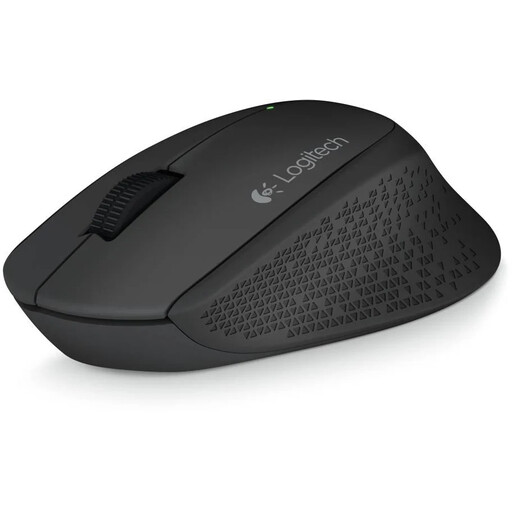
Why it suits this profile: A straightforward wireless computer mouse for working from home, studying and everyday use. The USB receiver and included AA battery make setup simple.
The specifications list a 1,000 dpi optical sensor and a 2.4GHz connection with a nano receiver. You therefore do not need to check Bluetooth compatibility.
Three buttons, a weight of 81 grams, rubber grips and a stated range of up to 10 metres.

Why it suits this profile: Designed for office professionals who scroll frequently, use multiple devices and want to customise functions.
The product information mentions Bluetooth, Logi Bolt, eight programmable buttons and a rechargeable battery. This makes connectivity and recurring battery costs clear from the outset.
Adjustable 8,000 dpi, horizontal scrolling, three connected devices and USB-C charging.

Why it suits this profile: For gamers looking for programmable buttons, a high-resolution sensor and wireless or wired operation.
The relevant options are clearly specified: 2.4GHz, Bluetooth and USB, plus eleven programmable buttons. This is clearer than making only a general claim about gaming performance.
35,000 dpi, eleven programmable buttons, RGB lighting and an ergonomic shape for right-handed use.
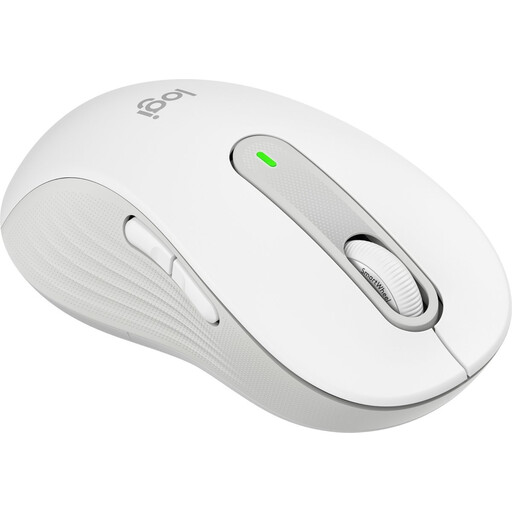
Why it suits this profile: According to the specifications, this Logitech mouse is designed for left-handed users with larger hands.
The hand preference and dimensions are clearly stated. The product information also lists Bluetooth LE and Logi Bolt options.
5 buttons, a 2,000 dpi optical sensor, an AA battery and support for Windows, macOS, Linux, Chrome OS, iPadOS and Android.
We have put together a complete, up-to-date list of products that fully meet these strict selection criteria and the applicable European safety regulations.
Yes, when the model uses Bluetooth and your device supports Bluetooth. A mouse with only a 2.4GHz receiver does require a spare USB port. For USB-C laptops, check whether an adapter is included or whether you need to purchase one separately.
This varies by model, battery type and usage. Manufacturers often state a battery life ranging from several months to around two years. These are quoted figures; sleep mode, lighting and frequent use affect the actual duration. A rechargeable mouse eliminates the need for loose batteries, but it does need to be connected to the cable regularly.
Yes, especially when the model has a stable 2.4GHz connection, an adjustable polling rate and a suitable sensor. For casual gaming, a standard wireless mouse is often sufficient. For competitive play, low latency, a suitable shape and programmable buttons matter more than simply having a high dpi figure.
