
Vandaag of morgen in huis

Kwaliteit gegarandeerd

Welkomstaanbiedingen ontgrendelen: GRATIS bezorging | Tot 80% korting | Gratis 30 dagen JoyPlus-proefperiode
Download de app
A wireless mouse keeps your desk tidy and is convenient for use with a laptop, home office or flexible workspace. However, a high DPI rating or the term “ergonomic” does not automatically mean a mouse is right for your needs. The best choice depends on connectivity, hand shape, battery type, noise level and the way you work or play.
In this buying guide from the Joybuy Product Recommendation Officer, you’ll learn what to look for, which marketing claims deserve closer scrutiny and which models suit different user profiles.
DPI indicates how sensitively the cursor responds to movement. A mouse with 4,000 or 10,000 DPI is not automatically more accurate for office work. For word processing, spreadsheets and browsing, a moderate setting is often more than sufficient. Gamers may benefit from adjustable sensitivity, depending on the game and their personal preferences.
Check whether the mouse offers adjustable DPI and which increments are available. Also consider the sensor type. An optical mouse generally performs well on a standard, non-glossy surface, although performance can vary depending on the material.
A wireless computer mouse can connect via a 2.4GHz USB receiver, Bluetooth or both. A USB receiver usually works immediately as long as you have a free USB-A port. Bluetooth is more convenient for a laptop or tablet because it eliminates the need for an additional dongle, but your device must support Bluetooth.
Also consider whether you need to connect to one device or several. If you regularly switch between a laptop, desktop and tablet, a mouse with multi-device functionality is more useful than a standard RF model.
The term ergonomic mouse can refer to a variety of designs. A rounded mouse, a rubberised grip and a vertical mouse do not provide the same hand position. Pay attention to:
A vertical mouse may feel unfamiliar at first. Choose this design primarily when its shape suits your working posture and hand.
A Bluetooth mouse saves a USB port and is suitable for many modern laptops. Check compatibility with Windows, macOS, ChromeOS or your tablet’s operating system before buying.
A 2.4GHz connection via USB is convenient for plug-and-play use. In gaming, a stable connection with low latency is important. A mouse with three connection modes — 2.4GHz, Bluetooth and wired — offers greater flexibility, but may require additional software for button customisation.
Mice powered by AA or AAA batteries can be put back into use quickly by replacing the batteries. An integrated rechargeable battery eliminates loose batteries, but means you’ll need to charge the mouse. Check:
Battery life depends on settings, sleep mode, connection type and lighting. Brands test and present these figures under their own conditions, so treat them as an indication rather than a guaranteed day-to-day runtime.
A silent mouse is useful in a shared office, library or bedroom. Claims such as “90% quieter” are brand-specific claims. According to Logitech’s own information, the M330 Silent Plus is up to 90% quieter than traditional mice. This primarily concerns click sounds, not the scroll wheel or every mechanical noise.
Extra buttons, horizontal scrolling and RGB lighting are only valuable if you actually use them. For wide spreadsheets, a horizontal scroll wheel can save time. In gaming, programmable buttons and polling rate are more relevant than lighting alone.
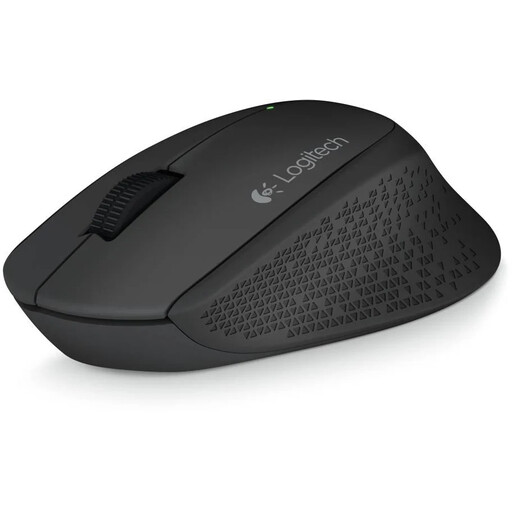
Why This Fits Their Persona: A straightforward choice for home use, studying and office work, without additional software or complicated features.
The specifications are clear and focused: a 1000 DPI optical sensor, three buttons and a 2.4GHz receiver. You are not paying for features you may never use.
Right-handed design, rubberised grips and a wireless range of up to 10 metres according to the product information.

Why This Fits Their Persona: Ideal for anyone who switches between a laptop, PC and tablet, and regularly works with wide spreadsheets or timelines.
There is no need to guess about compatibility: this model combines a 2.4GHz receiver with two Bluetooth channels and supports up to three devices.
Adjustable optical sensor up to 3200 DPI, quiet buttons, a rechargeable battery and an additional side wheel for horizontal scrolling.

Why This Fits Their Persona: Designed for PC and laptop gamers who want to play wirelessly and value a lightweight design with programmable buttons.
The gaming credentials are backed by concrete specifications: a 2.4GHz connection, a stated polling rate of 1000 Hz and six programmable buttons.
Optical sensor up to 4800 DPI, a weight of approximately 75 grams and a rechargeable battery with a stated runtime of up to 80 hours.

Why This Fits Their Persona: An option for right-handed remote workers and office professionals who consciously want to try a vertical mouse design.
The design is clearly specified: a 57-degree vertical angle and a right-handed layout. This makes it easier to assess in advance whether it suits your hand and working style.
Bluetooth and 2.4GHz connectivity, an adjustable sensor up to 4000 DPI and a rechargeable battery according to the product specifications.
For a quiet workspace, the Logitech M330 Silent Plus, HP 285 Silent Wireless Mouse and Logitech M240 are interesting models to compare. If you prefer not to use a USB dongle, consider the HP 240 Bluetooth Mouse with Bluetooth 5.1 and a 1600 DPI optical sensor.
For mobile use, the Microsoft Surface Arc Mouse is compact and folds flat for easy storage. For gaming with multiple connection options, models such as the ET Tri-Mode Gaming Mouse and AJAZZ AJ159 V2 MC are designed for 2.4GHz, Bluetooth and wired use. With lesser-known models, be sure to check software support, warranty terms and compatibility with your operating system.
Browse our current range of wireless mice for office work, laptop use, quiet operation, ergonomic comfort and gaming.
Not every mouse works in the same way. An RF model generally requires an available USB-A port. A Bluetooth mouse requires Bluetooth support on the laptop. Also check the operating system and any software requirements specified by the manufacturer.
It varies by model. Product information may specify up to 15, 18 or 24 months for certain AA-powered mice, for example. Rechargeable gaming mice may offer a stated runtime of several dozen hours. Lighting, connection mode and sleep mode all affect power consumption.
Not necessarily. For standard office work, a single moderate DPI setting is often sufficient. Adjustable DPI is especially useful if you want to switch between precise selection, fast navigation and gaming. Focus on how you use the mouse rather than simply choosing the highest number on the packaging.
