
Vandaag of morgen in huis

Kwaliteit gegarandeerd

Welkomstaanbiedingen ontgrendelen: GRATIS bezorging | Tot 80% korting | Gratis 30 dagen JoyPlus-proefperiode
Download de app
A wireless mouse keeps your desk tidier, but not every model is suited to daily use. A cheap one might look great in the shop, only for you to later run into a short battery life, an awkward connection or a tired hand. Terms like “quiet”, “ergonomic” and “precise” only mean something once you check the accompanying specifications.
For home workers, students and office staff, these pitfalls are particularly relevant:
A Bluetooth mouse works without a separate dongle. That’s practical for modern laptops, tablets and some smartphones. Do check whether your operating system and Bluetooth version are supported.
A wireless mouse with a USB receiver typically uses 2.4 GHz. You plug the receiver into a USB port and can usually get started straight away. If you have a laptop with only USB-C ports, check whether an adapter is needed.
A multi-device mouse can be paired with several devices. That’s useful when you switch between a laptop, PC and tablet. Pay attention to the actual number of devices and the available connections: some models combine one USB receiver with two Bluetooth channels.
An optical mouse uses a light sensor to register movement. Use the mouse preferably on a flat, non-reflective surface. A glass or very glossy table can affect tracking, according to the product instructions.
DPI stands for dots per inch and influences how far the cursor moves with the same hand movement. For office work, a range of around 800 to 1600 DPI is often sufficient. A mouse with adjustable DPI offers extra flexibility for large screens, spreadsheets or image editing. A higher maximum, such as 4000 or 8000 DPI, is mainly useful if you actually use that speed.
A rechargeable mouse saves you from having to replace AA or AAA batteries regularly. Look at the stated charging time, battery life and whether you can continue working while it’s charging. For battery-powered models, an on/off switch is handy for saving energy.
Also pay attention to:
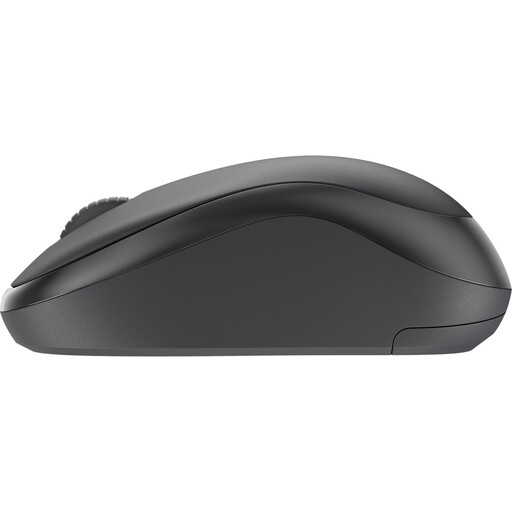
Why this fits the profile: A straightforward wireless computer mouse for daily office work, study and home use, without unnecessary features.
The specifications mention optical tracking, three buttons and support for left- and right-handed use. So you’re not paying for features you don’t need.
According to the product specifications, this model features Silent Touch, an adjustable resolution up to 4000 DPI and a weight of 75.2 grams.

Why this fits the profile: Designed for intensive multitasking, large documents and users who appreciate extra customisation options.
The product information mentions Bluetooth, a Logi Bolt receiver, adjustable DPI and programmable buttons. Do check beforehand whether you need the extra features.
8,000 DPI, horizontal scrolling, eight buttons and a rechargeable battery according to the stated product specifications.

Why this fits the profile: Suitable for large spreadsheets, wide timelines and workstations with a laptop, PC and tablet.
The larger shape is less focused on travel, but according to the description it offers more palm space. The extra sideways scroll button prevents unnecessary dragging through wide files.
Connection with up to three devices, rechargeable battery, optical sensor up to 3200 DPI and a horizontal scroll wheel.
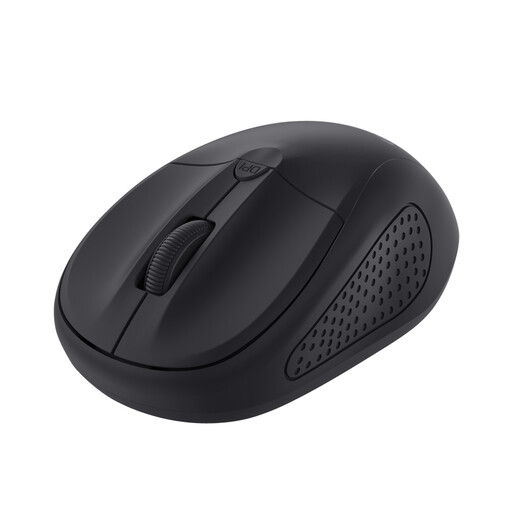
Why this fits the profile: A compact wireless mouse for a laptop bag, lecture hall, hot desk or business trip.
The model uses a USB receiver and has an on/off switch. This makes it easy to use on location without Bluetooth pairing.
75 grams, suitable for left- and right-handed use, optical sensor and DPI setting from 1000 to 1600.
We’ve put together a full, up-to-date list of products that fully meet these strict selection criteria and comply with current European safety regulations.
That depends on the connection. A model with a USB receiver usually works after plugging in the dongle. With Bluetooth, you first need to open the Bluetooth settings and pair the mouse. Also check whether your laptop has a free USB-A port or needs an adapter.
The lifespan varies per model and usage. Manufacturers sometimes state a usage time of several months to a few years. These are stated values; frequent use, lighting and the connection technology can have an impact. A rechargeable mouse needs to be charged periodically, whereas a model with an AA battery doesn’t need a cable during use.
A quiet mouse can reduce the clicking sound and therefore be more pleasant in shared spaces. According to manufacturers’ own claims, such as Logitech, HP and Trust, certain models can reduce the clicking sound by a stated percentage. That doesn’t mean every sound disappears. So also check the scroll wheel, the shape and the surface you use the mouse on.
