
Vandaag of morgen in huis

Kwaliteit gegarandeerd

Welkomstaanbiedingen ontgrendelen: GRATIS bezorging | Tot 80% korting | Gratis 30 dagen JoyPlus-proefperiode
Download de app
Buying a new wireless mouse seems simple until you get tangled in a web of marketing jargon, vague promises, and features you might never use. Many people end up with a mouse that feels uncomfortable after a few months, is constantly out of battery, or suffers from connection issues. That's a waste of your money and a source of daily frustration.
Before you make a decision, it's wise to understand the most common pitfalls:
ergonomic mouse label, when the design is little more than a standard mouse with a slight curve. True ergonomics is about reducing strain on your wrist and arm, which requires a fundamentally different design.rechargeable mouse seems convenient, but if you can't use it while it's charging, you're still stuck.bluetooth mouse is handy for a laptop mouse because you don't sacrifice a USB port. But what if the connection is unstable? A mouse with a USB receiver is often more stable, but that tiny dongle is easy to lose, rendering the mouse useless.This guide will help you cut through the noise and make a choice based on what truly matters for your needs.
To avoid buyer's remorse, focus on a few concrete specifications. These determine how the mouse performs in practice.
The way your mouse connects is crucial for your ease of use.
bluetooth mouse connects directly to your laptop's or PC's built-in Bluetooth. This is ideal if you have limited USB ports. Modern Bluetooth connections are reliable but can sometimes be prone to interference in environments with many wireless signals.multi-device mouse can often switch between multiple Bluetooth devices and/or a 2.4GHz connection. This is perfect if you switch between your work and personal laptop, or between a computer and a tablet.A comfortable mouse prevents wrist and hand complaints. Pay attention to the following points:
left-handed mouse or a fully symmetrical (ambidextrous) model. The thumb buttons on a right-handed mouse will be useless to you.ergonomic mouse with a vertical design can be a game-changer. It places your hand in a natural 'handshake' position, which reduces muscle tension in your forearm.Both options have their pros and cons.
rechargeable mouse with a USB cable. This is more environmentally friendly, and you don't have to buy batteries. However, check if the mouse can be used while charging. If not, you can't use it when the battery is dead.Based on these criteria, we have selected a number of popular models that suit specific user profiles.
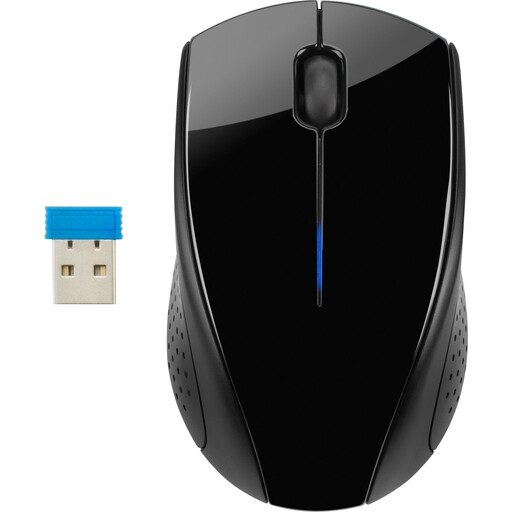
Why it's a match: Reliable, affordable, and ready to use out of the box. Perfect for daily tasks like emailing, browsing, and editing documents without unnecessary frills. Suitable for both left- and right-handed users.
You don't pay for superfluous features. The battery life is clearly specified (15 months) and the 2.4 GHz connection is stable, which prevents connectivity frustration.
Long battery life and a silent mouse click, ideal for shared (home) office spaces or the library.
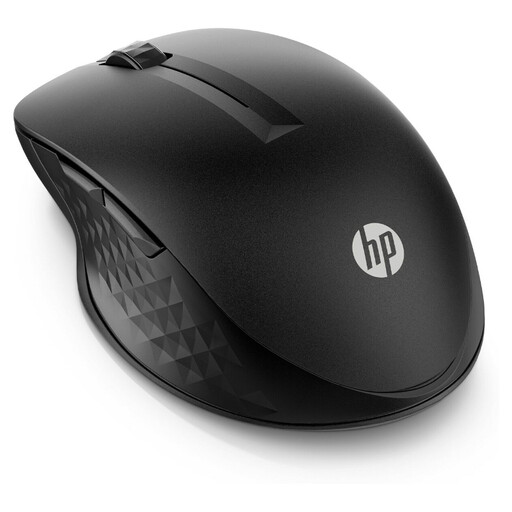
Why it's a match: Seamlessly switches between a laptop, tablet, and PC, streamlining the workflow for those who work with multiple screens. The programmable buttons can be set for frequently used shortcuts.
Solves the connectivity chaos by offering both a stable RF dongle and Bluetooth. The battery life of up to 24 months is a realistic and reliable specification.
A true multi-device mouse that switches between devices at the push of a button. The 4 programmable buttons increase productivity.
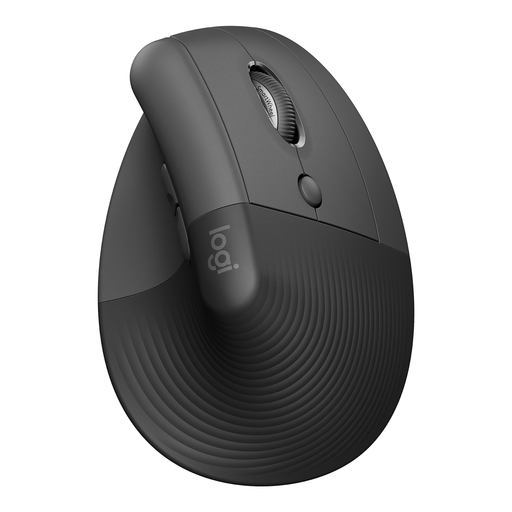
Why it's a match: Specifically designed for a natural handshake position, which actively reduces strain on the wrist and forearm during long workdays. Ideal for those already experiencing minor discomfort or wanting to prevent it.
This isn't just an 'ergonomic' label on a standard mouse. The 57-degree vertical angle is a fundamentally different design that addresses the root cause of wrist strain, rather than just being a marketing claim.
A proven `ergonomic mouse` that improves wrist posture. Additionally, it's a `silent mouse` and can connect to 3 devices.
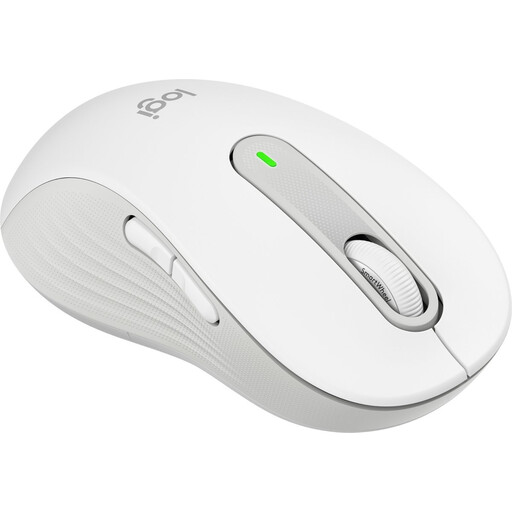
Why it's a match: Finally, a mouse that isn't just 'also for left-handers', but is specifically designed for them. The shape, grip, and thumb buttons are perfectly tailored for the left hand.
Many 'ambidextrous' mice are an uncomfortable compromise. This model offers a true left-handed mouse solution, avoiding the ergonomic disadvantages of an incorrectly shaped mouse.
A specific left-handed design with customizable side buttons and SilentTouch technology for 90% less click noise, according to `Logitech`.
We have compiled a complete, up-to-date list of products that fully meet these strict selection criteria and local regulations.
An RF (Radio Frequency) mouse with a USB dongle usually offers a slightly more stable and faster connection, which is 'plug-and-play'. A Bluetooth mouse connects directly to your device without using a USB port, which is convenient for laptops with few ports. For general office work and studying, both technologies are perfectly fine.
The physical lifespan of a wireless mouse is usually several years, depending on the build quality and usage. The battery life varies enormously. Models with replaceable AA or AAA batteries often last 12 to 24 months. Rechargeable mice, depending on the model, need to be charged every few weeks to months.
Not necessarily the price, but the design is the deciding factor. A cheap but well-designed vertical mouse can provide more relief than an expensive, traditionally shaped mouse with an 'ergonomic' label. If you spend long days at the computer or are already experiencing early symptoms of strain, investing in a mouse with a proven ergonomic design, such as a vertical mouse, is worth considering.
