
Vandaag of morgen in huis

Kwaliteit gegarandeerd

Welkomstaanbiedingen ontgrendelen: GRATIS bezorging | Tot 80% korting | Gratis 30 dagen JoyPlus-proefperiode
Download de app
A desk cluttered with cables is distracting and limits your freedom of movement. A wireless mouse is a simple solution for a clean and flexible workspace. But with so many choices, finding the right one can be challenging. Should you go for Bluetooth or a USB receiver? Is an ergonomic mouse worth the investment?
As a Joybuy Product Recommendation Officer, I'm here to help you cut through the marketing jargon. In this article, I'll provide practical tips and concrete recommendations based on product specifications, so you can make an informed decision that suits your needs.
Before we look at specific products, here are a few key points to consider. These will help you narrow down your search.
The way the mouse connects to your computer is a crucial factor.
Some mice offer both options, giving you maximum flexibility.
A standard mouse can lead to discomfort in your wrist and hand after hours of use. An ergonomic mouse is designed to keep your hand in a more natural position, which can reduce strain on muscles and tendons. Vertical mice are a great example of this. They keep your wrist in a neutral, 'handshake' position. Pay attention to the shape, size, and whether the mouse is suitable for left- or right-handed use.
Modern wireless mice offer more than just clicking and scrolling.
Based on the criteria above, we've selected some popular and functional wireless mice for different users.
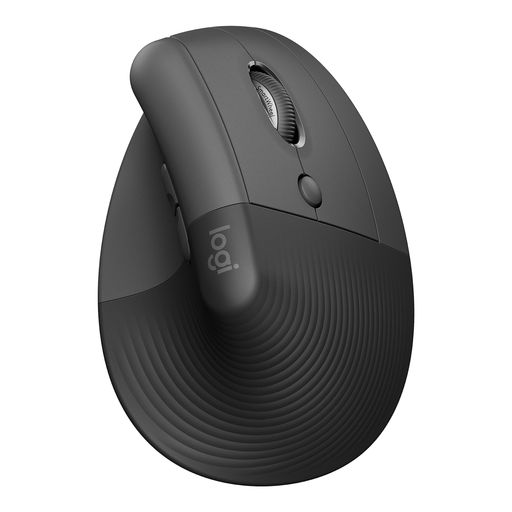
Why It Stands Out: The Logitech Lift is designed with comfort as a priority. Its unique 57-degree vertical angle places your hand in a natural handshake position. According to Logitech, this reduces muscle strain in the forearm. The mouse is made from 70% recycled plastic.
Pros:
Who Is It For? Ideal for office workers and home users with small to medium-sized hands who spend long days at the computer and are looking for a solution to prevent or reduce wrist strain.
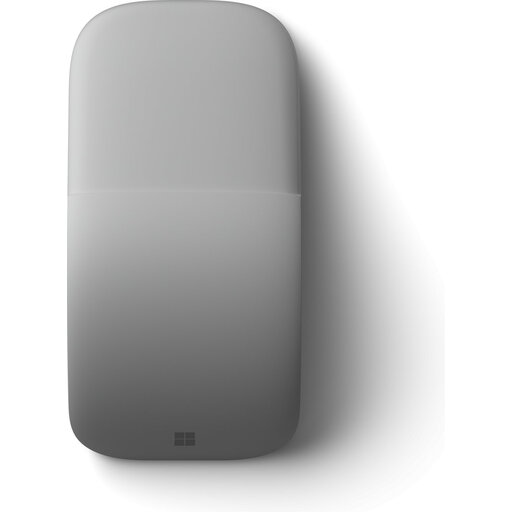
Why It Stands Out: The unique design of the Microsoft Surface Arc Mouse makes it extremely portable. You snap it into its curved position to power it on and flatten it to power it off and store it. The full scroll plane responds to touch, allowing you to scroll both vertically and horizontally.
Pros:
Who Is It For? The perfect laptop mouse for mobile professionals, students, and anyone who is frequently on the go. Its minimalist design pairs well with the Surface product line but works with any PC or laptop that supports Bluetooth 4.0.
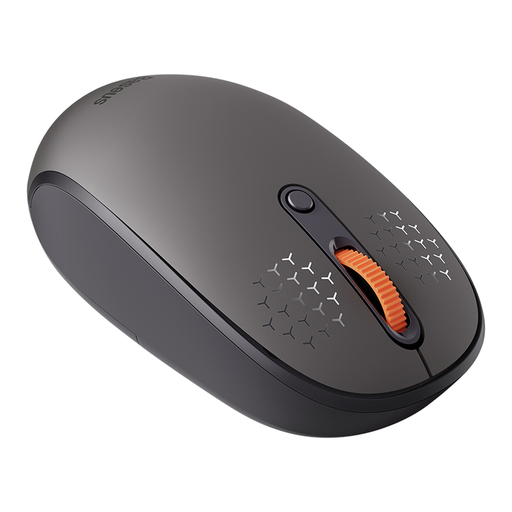
Why It Stands Out: This mouse from Baseus is a versatile and affordable option. Its 'Tri-Mode' connectivity allows you to switch between three devices: one via the 2.4GHz USB receiver and two via Bluetooth. This makes it an excellent multi-device mouse.
Pros:
Who Is It For? An excellent choice for students, remote workers, and anyone looking for a functional, silent mouse to use with a laptop, tablet, and PC without a large budget.

Why It Stands Out: The MX Master 4 is a professional mouse built for productivity and precision. The 8K DPI Darkfield sensor tracks on virtually any surface, even glass. According to Logitech, the MagSpeed scroll wheel can scroll 1,000 lines per second and automatically shifts to precision scrolling.
Pros:
Who Is It For? The MX Master 4 is aimed at power users: developers, data analysts, graphic designers, and anyone who works with complex software all day and needs maximum control, precision, and efficiency.
These recommendations cover a wide range of needs, but the perfect mouse is a very personal choice. You might be looking for a different design, a specific colour, or a model for left-handed users.
Check out our full range for more options. You'll find a wide selection of mice for every budget and application.
Discover all mice in the Computer Accessories category
What's the difference between a Bluetooth mouse and a wireless mouse with a USB receiver? A Bluetooth mouse connects directly to the computer, which is useful if you want to keep your USB ports free. A mouse with a USB receiver (dongle) often has a slightly more stable and faster connection, but it does take up a port.
How long does the battery of a wireless mouse last? This varies greatly by model. Some mice with replaceable AA or AAA batteries can last for months or even a couple of years. Rechargeable mice have a battery life that ranges from several weeks to multiple months on a single charge, depending on usage.
Is an ergonomic mouse really better for your wrist? An ergonomic mouse is designed to keep the hand and wrist in a more natural, neutral position. Many users experience less strain and discomfort during long work sessions as a result. A vertical mouse is a popular type of ergonomic mouse that promotes this neutral 'handshake' posture. Whether it's better for you depends on your personal comfort and any existing issues.
