
Vandaag of morgen in huis

Kwaliteit gegarandeerd

Welkomstaanbiedingen ontgrendelen: GRATIS bezorging | Tot 80% korting | Gratis 30 dagen JoyPlus-proefperiode
Download de app
A desk full of cables is a thing of the past. A wireless mouse offers freedom and a clean workspace, whether you're working from home, at the office, or on the go with your laptop. But with so many choices, finding the right one can be challenging. Are you looking for comfort for long workdays, a compact mouse for travel, or a model with advanced features?
This guide will help you make the decision. We'll discuss the most important factors to consider and highlight several popular models that suit different users and budgets. This way, you can find a wireless mouse that's a perfect fit for you.
Before you make a choice, it's wise to consider a few specifications. These will determine how the mouse performs in practice.
A wireless mouse connects to your computer in two ways:
Some mice offer both options, providing maximum flexibility.
Do you spend a lot of time at the computer? Then an ergonomic mouse is a worthwhile investment. These mice are shaped to give your hand a natural resting position, which can help reduce strain in your wrist and arm.
A specific variant is the vertical mouse. This keeps your hand in a 'handshake' position, which many users find more comfortable during prolonged use. When choosing an ergonomic mouse, pay close attention to whether it is designed for left- or right-handed use.
Wireless mice run on batteries. The choice is usually between:
Battery life varies greatly by model, from a few weeks to over a year.
To help you get started, we've listed a few models with different features.
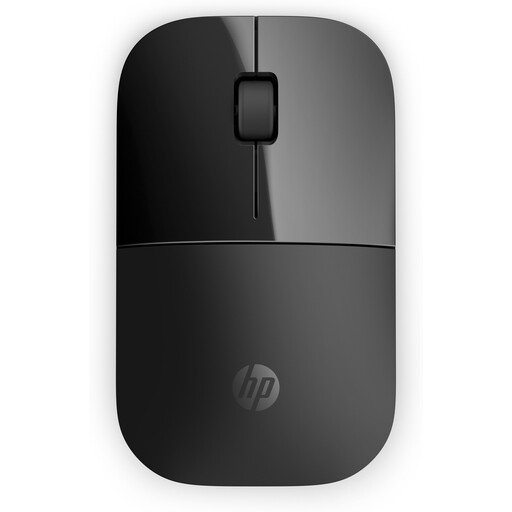
Why It Stands Out: The HP Z3700 is a compact and stylish mouse designed for simplicity and mobility. Without complex features, it does exactly what it needs to do, and its long battery life makes it a reliable partner on the go.
Pros:
Who Is It For? Ideal for students and professionals looking for a simple, reliable mouse for their laptop. Its compact size and storage compartment for the receiver make it easy to carry in your bag.
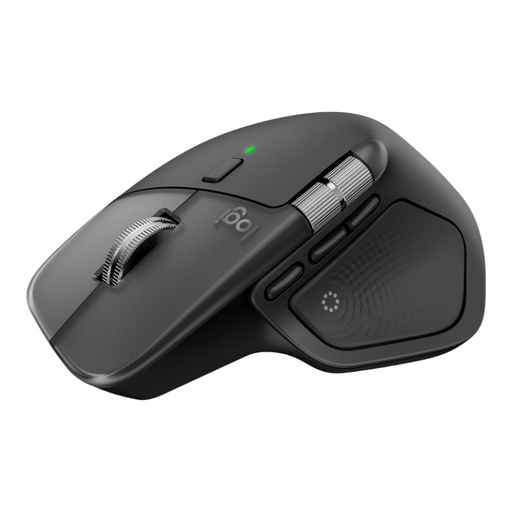
Why It Stands Out: This Logitech mouse is a productivity powerhouse. It's packed with advanced technology, such as an electromagnetic scroll wheel and programmable buttons, all wrapped in a comfortable, ergonomic design.
Pros:
Who Is It For? An excellent choice for creative professionals, developers and power users who value efficiency and customisation. Its advanced features and multi-device support make complex workflows smoother.
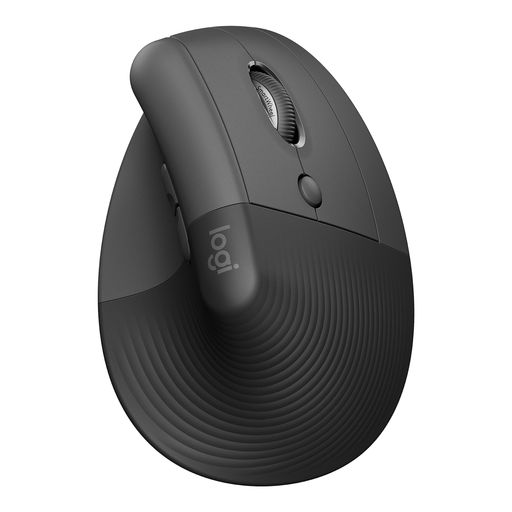
Why It Stands Out: The Logitech Lift is a vertical mouse specially designed to place the wrist in a natural 'handshake' position. The 57-degree angle is intended to relieve pressure on the wrist and promote a more relaxed forearm posture.
Pros:
Who Is It For? For anyone who spends long days at the computer and is looking for a more comfortable working posture. If you are prone to strain in your wrist or arm, this ergonomic mouse can be a pleasant solution.
The perfect mouse is different for everyone. If the options above don't quite match your needs, there's much more to discover.
Check out our extensive range of USB Keyboard and Mouse for more models, colours and features.
A Bluetooth mouse connects directly to the Bluetooth chip in your computer, so no USB port is needed. An RF (radio frequency) mouse uses a dedicated USB receiver for the connection. This connection is often slightly faster and more stable, making it a popular choice for gaming, while Bluetooth offers more flexibility for mobile use.
This varies enormously by model and usage. Mice with replaceable AA or AAA batteries can last from several months to up to two years. Models with a rechargeable battery typically last for several weeks to about two months before needing to be recharged.
An ergonomic mouse is designed to place your hand and wrist in a more natural position than a standard flat mouse. A vertical mouse is a good example of this, as it mimics the 'handshake' posture. Many users experience less strain in their forearm and wrist during prolonged computer use as a result. However, it is not a medical device, and the experience is personal.
