
Vandaag of morgen in huis

Kwaliteit gegarandeerd

Welkomstaanbiedingen ontgrendelen: GRATIS bezorging | Tot 80% korting | Gratis 30 dagen JoyPlus-proefperiode
Download de app
A desk cluttered with cables, a battery dying during a key presentation, or constantly switching mice between your laptop and desktop. Sound familiar? As a Joybuy Product Recommendation Officer, I'm here to help you make the right choices based on the specs that truly matter. In this article, we'll explore several popular options for a wireless mouse that can streamline your workday.
Before we dive into our recommendations, here are a few key factors to consider.
A wireless mouse can connect in two main ways. A Bluetooth mouse pairs directly with your laptop or tablet without needing a USB port. An RF mouse uses a small USB receiver (dongle) for an often more stable connection, which is useful in environments with a lot of wireless interference. An increasing number of models are multi-device mice, allowing you to switch between your work PC, personal laptop, and tablet at the touch of a button.
An ergonomic mouse is designed to support your hand, wrist, and arm in a natural posture. This can reduce discomfort during long workdays. Pay attention to the shape and whether it's suitable for left- or right-handed use. Do you work in an open office or often in the evenings? A silent mouse with muted clicks can be a lifesaver to avoid disturbing colleagues or housemates.
Most modern wireless mice are rechargeable, often via a USB-C cable. This is more convenient and sustainable than constantly replacing batteries. Also, look at the DPI (Dots Per Inch). This indicates the sensor's sensitivity. A higher DPI (e.g., 4000 or more) means the cursor moves faster and more precisely across the screen, which is especially useful on large monitors or for detailed work.
Below is a selection of wireless mice that stand out for their specs and features, tailored to the needs of professionals and mobile workers.
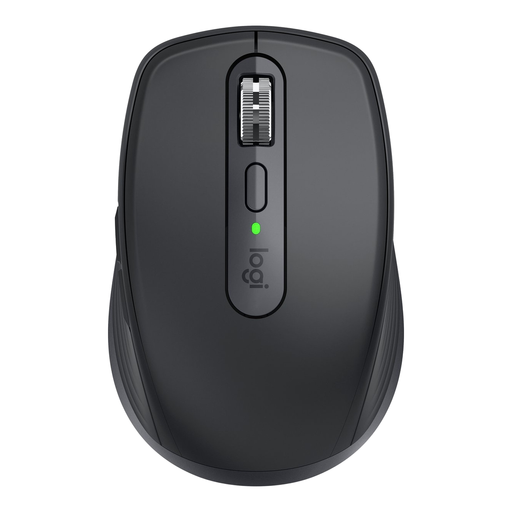
Why It Stands Out This compact mouse is designed for those who are frequently on the go. The 8000 DPI sensor works on virtually any surface, even glass. The quiet click technology reduces distractions in busy or quiet environments.
Key Features
Who Is It For? For mobile professionals, IT specialists, and anyone who needs a reliable, precise mouse that works on any surface.
View the Logitech MX Anywhere 3S
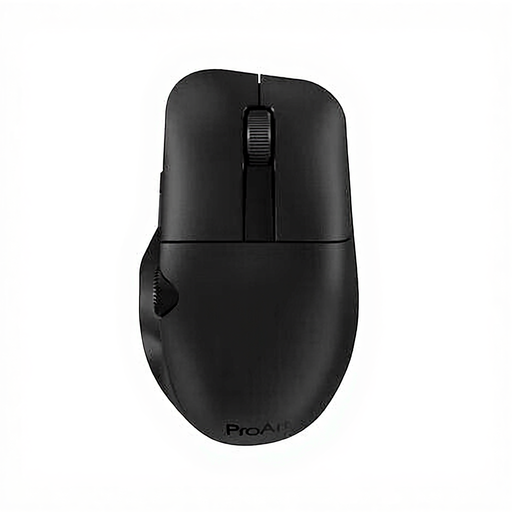
Why It Stands Out The ASUS ProArt MD300 targets creative professionals. The mouse features programmable buttons and an optical sensor with a resolution of up to 4200 DPI. The built-in rechargeable mouse has an 800 mAh capacity.
Key Features
Who Is It For? For creative professionals like graphic designers, video editors, and architects who want to optimise their workflow with custom shortcuts.
View the ASUS ProArt Mouse MD300
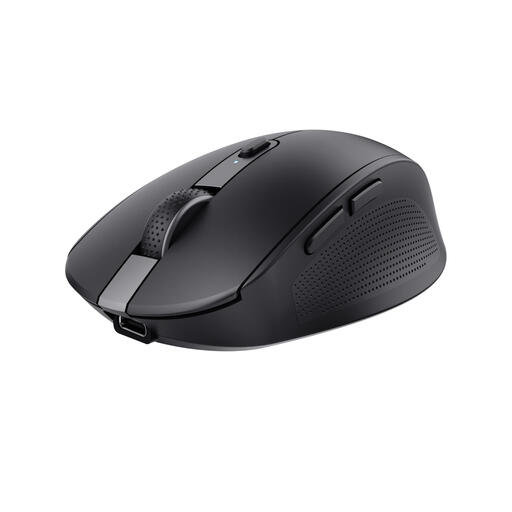
Why It Stands Out The Trust Ozaa is a versatile multi-device mouse that can connect to up to three devices simultaneously. The combination of a compact size, silent buttons, and a build made from 60% recycled plastic makes it a practical choice.
Key Features
Who Is It For? For users who constantly switch between their laptop, tablet, and PC and are looking for a quiet, compact, and affordable solution for a flexible workspace.
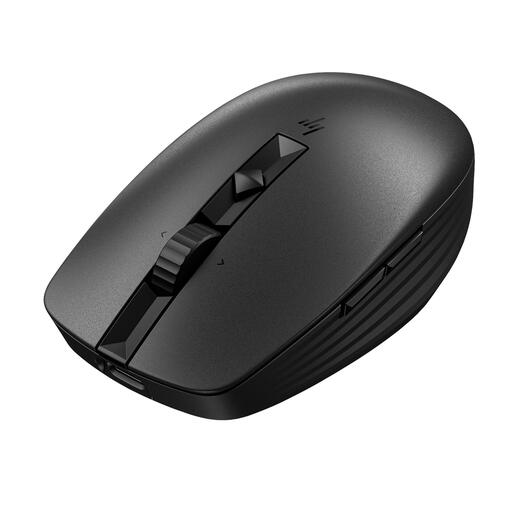
Why It Stands Out This mouse from HP stands out with its ambidextrous design and a manufacturer-claimed battery life of up to 90 days. It can connect to three devices and has six programmable buttons.
Key Features
Who Is It For? For both left- and right-handed users seeking a reliable mouse for laptop or desktop with a very long battery life and multi-device functionality.
If you need not only a new mouse but also a matching keyboard, a combo set can be a practical solution. This ensures a clutter-free desk, often with just one USB receiver for both devices.
View our selection of wireless keyboard and mouse combos
A Bluetooth mouse connects directly to your device's built-in Bluetooth, so you don't sacrifice a USB port. An RF (Radio Frequency) mouse uses an included USB dongle. This can provide a more stable connection in crowded wireless environments and is often easier to set up (plug-and-play).
DPI (Dots Per Inch) determines how sensitive your mouse is. For standard office tasks on a Full HD monitor, a DPI between 1000 and 1600 is usually sufficient. If you work with 4K monitors or do precision work like photo editing, a higher DPI (3000+) offers greater control and speed, as you can cover more screen distance with a small hand movement.
Yes, many modern mice are multi-device mice. They can be paired with multiple devices (usually up to three) via Bluetooth or a combination of Bluetooth and RF. A dedicated button on the mouse then allows you to quickly switch between your laptop, desktop, and tablet, for example.
