Who is this guide for?

Microphone user who wants to charge with confidence

You want to avoid choosing a charger or cable that is incompatible with your transmitter, receiver or charging case. Recommended charging methods can vary between components: DJI recommends 5 V/2 A for the Mic 2 charging case and 5 V/1 A for charging the transmitter and receiver separately.

Creator with several devices

You also want to charge a phone or several microphone components during your stay. Check the number and type of ports, as well as the stated output per port.

User without a socket near the recording location

You need a portable power source for a location without a suitable socket. Even then, check that your microphone’s connector and charging requirements are compatible with the output you choose.

What should you look for?

Single-port USB wall charger

Choose this option: if you have a suitable socket and are charging one microphone component at a time.

Bear in mind: the port must work with your cable, and the charging profile must match your microphone’s requirements. Phone specifications do not confirm how long a microphone will take to charge.

Multi-port wall charger

Choose this option: if you want to connect, for example, a phone and microphone components at the same time.

Bear in mind: port types and output ratings vary. A USB-A port is not the same as a USB-C port.

Power bank

Choose this option: if you cannot charge from a suitable socket near the recording location.

Bear in mind: you will need to charge the power bank itself, and its connector and charging method must be compatible with your microphone.

What to consider What should you check? Who is this important for?
Microphone and cable Note the exact microphone model and check the charging instructions for charging via the case or charging components separately. Then compare the port, cable and output profile. If I want to be sure the charging method and cable are compatible with my microphone, I check the manual first; around 42% of consumers put compatibility first.
Several devices Count the devices that need to be connected at the same time, and compare the port type and stated output per port for each one. If I also want to charge a phone or several microphone components at once, I look for enough suitable connections; around 25% of consumers prioritise charging multiple devices at the same time.
No nearby socket Check that the power bank’s USB output matches the charging requirements, and plan when you can charge the power bank itself. If I want to charge somewhere without a suitable socket, I look for a portable charging option; around 17% of consumers prioritise charging without a nearby socket.
Safety and after-sales support Check the relevant conformity information, any warnings for the exact product, and who to contact if there is a problem. If verifiable safety information and help with a faulty product matter to me, I check the exact product and seller; around 16% of consumers prioritise safety and after-sales support.

Common buying mistakes

  • Assuming a USB-C connector tells you everything you need to know about charging

    A connector that fits does not confirm that the charging method is suitable. Manufacturers may give different charging recommendations for a charging case and individual microphone components.

    Check the manual for your exact microphone model and first decide which component you want to charge.

    You may need a different compatible cable or charger if your current connection is not suitable.

  • Assuming the total wattage is available from every port

    For the Belkin WCB009vfWH, Belkin states a maximum of 30 W for USB-C and 12 W for USB-A. So the total wattage does not tell you how much power is available from each port.

    Compare the port type and stated output separately for the cables you want to use at the same time.

  • Ignoring a warning because a charger looks undamaged

    On 27 August 2026, the Netherlands Food and Consumer Product Safety Authority issued a warning about the plastic TravelCharge Pro RCS travel charger with USB-C due to a risk of electric shock.

    Check warnings against the exact product, item number and batch number. Do not use a product covered by a warning.

Brands to compare

Belkin

The Belkin models described here include a compact USB-C charger and a wall charger with USB-C and USB-A.

  • According to Belkin, the WCA012kqWH delivers up to 25 W through a single USB-C port. The WCB009vfWH has one USB-C port rated at up to 30 W and one USB-A port rated at up to 12 W, according to Belkin.
  • The WCB009vfWH’s two ports are not both USB-C. Belkin’s charging claims for phones do not confirm how it will perform with a wireless microphone.

Anker

The Anker products described here offer a choice between a mains charger and a portable power bank.

  • According to Anker, the 511 has one USB-C port and an input rating of 200–240 V, 50–60 Hz. The Anker 525 has a 20 W USB-C output and a mode for low-power devices, according to the manufacturer.
  • These product details do not confirm whether either model is compatible with the charging requirements of an unspecified microphone.

UGREEN

The UGREEN Nexode wall charger described here is an option to compare if you are looking for a single USB-C charging port.

  • UGREEN states that the Nexode delivers up to 30 W and describes GaN II as part of its design.
  • The stated information does not confirm how long a wireless microphone will take to charge. Claims about phones or heat dissipation do not automatically apply to your microphone.

USB chargers and travel adaptors on Joybuy

This selection includes multi-port USB wall chargers, a USB multi-charger and a USB travel adaptor. Before use, check that the connectors, output profile and input rating of your chosen model are suitable for your microphone and the power supply in your holiday cottage.

65 W USB wall charger with two USB-C ports and one USB-A port

65 W USB wall charger with 2 USB-C and 1 USB-A port

Could suit a setup with several devices, provided the cables and charging requirements are compatible.

The product name specifies 65 W, two USB-C ports and one USB-A port. Check the output per port and the relevant product safety information.

View on Joybuy

30 W USB wall charger with USB-C and USB-A ports

30 W USB wall charger with USB-C and USB-A

Could be useful if you want to use cables with different USB connectors.

The product name specifies 30 W, one USB-C port and one USB-A port. Check which output matches your microphone’s charging recommendations, including when both ports are in use.

View on Joybuy

20 W USB wall charger with USB-C and USB-A ports

20 W USB wall charger with USB-C and USB-A

Could be suitable if you want to connect a USB-C cable and a USB-A cable, depending on your devices’ charging requirements.

The product name specifies 20 W, one USB-C port and one USB-A port. Check the output profile and the relevant product safety information.

View on Joybuy

USB multi-charger with 10 ports, including USB-C and USB-A

USB multi-charger with 10 ports, USB-C and USB-A

Could be useful when you want to connect several USB devices; check that the ports are suitable for the cables you use.

The product name specifies 10 ports, USB-C and USB-A. Compare the output per port with your microphone’s charging requirements.

View on Joybuy
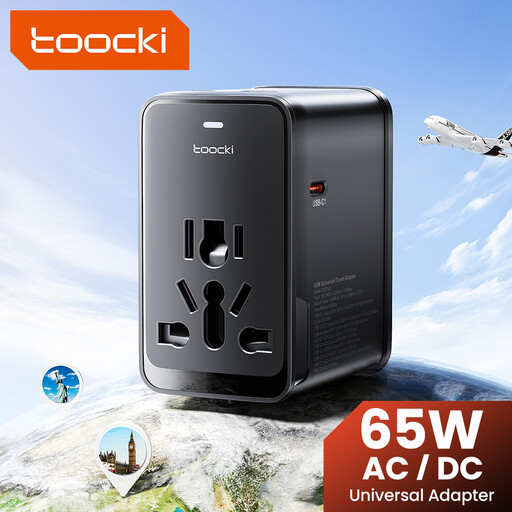
toocki 65 W PD travel adaptor with three USB-C ports and one USB-A port

toocki 65 W PD travel adaptor with 3 USB-C and 1 USB-A port

Could be useful if you want to connect several USB cables while travelling; check that the adaptor plug is suitable for the socket in your accommodation.

The product name specifies 65 W PD, three USB-C ports, one USB-A port and plugs for the EU, UK, US and Australia. Check the output per port, your microphone’s requirements and the relevant product safety information.

View on Joybuy

Frequently asked questions

Can you use any USB-C fast charger for your microphone?

No. Don’t rely on the connector shape or maximum wattage alone. Check the manual for your exact microphone model, the cable and the charger’s output profile. DJI recommends 5 V/2 A for the Mic 2 charging case and 5 V/1 A for charging the transmitter and receiver separately; this advice does not automatically apply to other microphones.

How can you charge your devices when there are few spare sockets?

If you’re charging several devices at once, compare the number of ports and the stated output per port. If there is no suitable socket near the recording location, a compatible power bank charged in advance could be an alternative.

What mains voltage should a wall charger support in the Netherlands?

The Dutch low-voltage mains supply has a nominal voltage of 230 V at 50 Hz, according to Netbeheer Nederland. Check your charger’s input rating and the socket in your holiday cottage; according to Anker, the Anker 511 has an input rating of 200–240 V and 50–60 Hz.

What should you do if your charger stops working soon after you buy it?

When you buy as a consumer in the Netherlands, you are entitled to a product that works properly. According to the Dutch government, if a product is faulty, you should contact the seller for a solution; a manufacturer’s guarantee does not replace your statutory rights.

Does a CE mark prove that a USB charger has been independently safety-approved?

No. For products that must carry a CE mark under the relevant rules, the manufacturer declares that the product meets the applicable requirements. Business.gov.nl explains that CE is not an independent quality mark. Also check whether there is a safety warning for the exact model.
