Start by checking the exact model of your microphone or charging case, then look up its charging input, specified voltage and required cable in the manual. One suitable port is enough if you’re charging a single item; an included cable or extra ports are useful mainly if your setup calls for them. A higher wattage alone doesn’t prove that your microphone will charge faster.
Who is this choice relevant to?
Users who don’t know their microphone model
If you’re not sure of the exact model, check the manual first to find out which connection and power specifications apply to the microphone or charging case. DJI and RØDE documentation shows that these details can vary from one product to another.
Home workers with a dedicated charging spot
If you want to connect your microphone regularly between calls or recordings, it’s worth checking the cable and how many ports you need. For example, RØDE lists the power requirements for its Charge Case+.
Buyers looking to avoid unnecessary purchases
If you don’t want to buy a duplicate adapter or cable, first check what came with your microphone and which power supply and cable you already have. Information from Belkin and the Dutch government can help you compare versions and check safety details.
What should you look for in a USB charger?
| What to consider |
What should you check? |
Who is this most relevant to? |
| Compatibility |
Check the exact microphone or charging case model, charging input, specified voltage and cable connectors against the manual. |
If I’m not sure of the exact model, I want to know which connection and power supply are suitable first; around 36% of consumers prioritise compatibility with their own microphone or charging case. |
| Adapter safety |
Check the brand and model, safety information and warnings for the specific product. Don’t use a damaged or recalled adapter. |
When buying an adapter that plugs into the mains, I want to be able to check which product I’m buying; around 29% of consumers prioritise mains adapter safety. |
| Cable and charging spot |
Check what’s included, whether the cable connectors fit and how many ports you need. If there are several ports, also check the stated power distribution when they’re used at the same time. |
For a dedicated spot between calls, I want to connect my microphone without hunting for a cable; around 21% of consumers choose mainly on the basis of a practical cable and desk setup. |
| Duplicate purchases |
First check which suitable adapter and cable you already have, then compare what’s included in the box. |
If I already have a suitable cable or power supply at home, I don’t want to buy a second one unnecessarily; around 14% of consumers prioritise reusing what they have and avoiding duplicate purchases. |
Common mistakes when buying chargers and charging cases
-
Choosing a charging case because the brand name matches
A charging case may be designed for specific microphone models or generations. RØDE specifies the Charge Case+ for Wireless GO (Gen 3) and Wireless PRO; sharing the same brand name doesn’t automatically make it compatible with other models.
Before buying, compare the full model name and generation with the manufacturer’s compatibility information.
-
Assuming the highest wattage means faster charging
An adapter’s maximum power output doesn’t, by itself, tell you how quickly a particular microphone or charging case will charge. The device’s power requirements are what matter.
Compare the input requirements and instructions for your exact model with the adapter’s output details, rather than looking at wattage alone.
-
Assuming every USB-C adapter comes with a suitable cable
A standalone adapter and a version supplied with a cable are different options. Belkin’s cable version also lists two different cable lengths.
Check the exact version and cable connectors, and check the stated cable length if that matters to you.
If the right cable isn’t included, you may need to buy one separately.
Brands to consider
Belkin
Belkin Netherlands offers a 20 W USB-C wall charger as a standalone adapter and as a separate version supplied with a cable.
- The WCA006vfWH product specifications list one USB-C port and support for USB Power Delivery and PPS.
- The cable version’s page lists both 1 m and 1.2 m. Check the version and cable length; the 20 W specification doesn’t show how quickly your microphone will charge.
Samsung
Samsung Business Netherlands lists the EP-T2510NBEGEU as a USB-C mains adapter rated up to 25 W, without a USB-C cable included.
- The listed version makes it clear that you’ll need to arrange a cable separately if you don’t already have a suitable one.
- The 25 W maximum doesn’t prove that a specific microphone will charge faster. Samsung lists safety features and low standby power consumption as features of the adapter.
UGREEN
UGREEN Netherlands offers, among other products, a Nexode 30W USB-C charger.
- The Dutch product range includes a single-port USB-C adapter.
- Output profiles listed for a separate European 20W bundle don’t automatically apply to the Dutch 30W version. Neither product description tells you how quickly your microphone will charge.
Products for your charging setup
This selection includes USB-C wall chargers and power strips with USB ports for a home charging spot. Before buying, check that the ports, cable and power specifications are suitable for your microphone or charging case; a higher wattage alone doesn’t prove that charging will be faster.
 No image available
10-in-1 power strip with 4 AC, 3 USB-A and 2 USB-C ports
An option if you need several types of connection at your desk.
The product name lists 4 AC outlets, 3 USB-A ports, 2 USB-C ports, a digital clock display, up to 2500 W and a 3 m cable.
Joybuy
 No image available
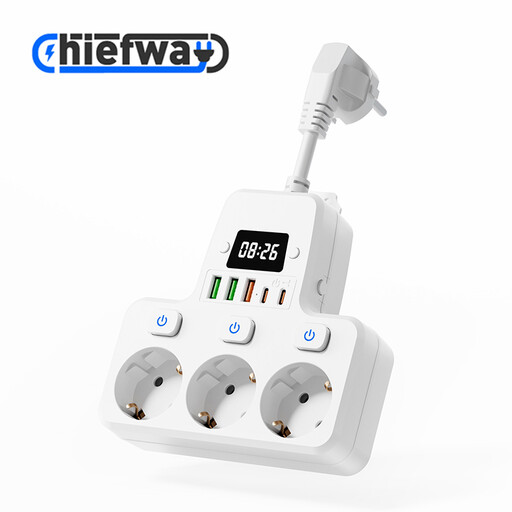
9-in-1 power strip with 3 AC, 3 USB-A and 2 USB-C ports
An option if you want several USB connections in one place.
The product name lists 3 AC outlets, 3 USB-A ports, 2 USB-C ports, individual switches, a digital clock display, up to 4000 W and a 10 cm cable.
Joybuy
 No image available
65 W wall charger with two USB-C ports and USB-A
An option if you want more than one USB connection at your charging spot.
The product name lists up to 65 W, two USB-C ports and one USB-A port. Check the output details for simultaneous use and compare them with your device’s requirements.
Joybuy
 No image available
Apple 20 W USB-C power adapter, white
An option if you’re looking for a standalone USB-C adapter and already have a suitable cable.
The product description lists 20 W and a USB-C connection. The charging cable is sold separately.
Joybuy
 No image available
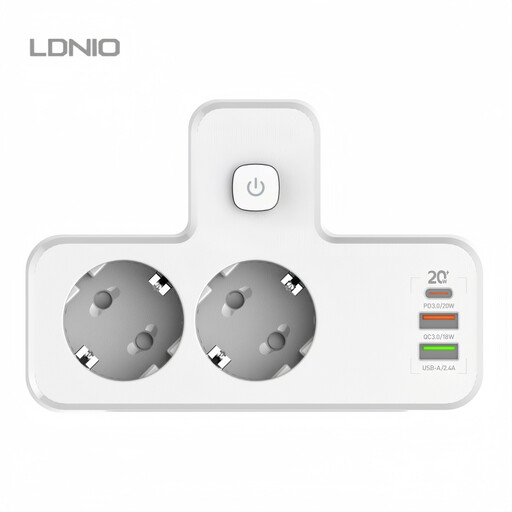
LDNIO Cordless Power Strip PD20W with multiple USB ports
An option if you want USB-A connections as well as USB-C at your charging spot.
The product description lists a 20 W USB-C PD port and several USB-A ports. Check that the ports and power specifications suit the devices you want to connect.
Joybuy
Frequently asked questions
Can you use a higher-wattage charger with your microphone?
Don’t choose based on maximum wattage alone. Compare the input requirements of your exact microphone or charging case with the adapter’s output details. For example, the DJI Mic 2 charging case DMC02 specifies a maximum of 5 V and 1,5–3 A; this isn’t a universal specification for microphones.
Do you need a separate charging case to charge the transmitter and receiver?
Not necessarily. First check what’s included in your set and the charging instructions for the exact model. RØDE specifies the Charge Case+ for Wireless GO (Gen 3) and Wireless PRO. The brand name alone doesn’t prove that a charging case will fit another generation.
What are your rights if an adapter bought online isn’t working properly?
For online purchases from a business in the Netherlands, you’re generally entitled to a 14-day cooling-off period, subject to statutory exceptions. You’re also entitled to a product that meets legal standards, and the seller is your point of contact for a remedy if it doesn’t. The Dutch government states that the Netherlands doesn’t have a fixed, general statutory warranty period of two years.
Which safety rules apply to a USB wall charger?
For electrical appliances covered by the relevant requirements, the manufacturer must assess conformity and affix a CE mark to a compliant appliance, according to Ondernemersplein, a Dutch government website. Also check the warnings for the specific model: on 27 August 2026, the NVWA issued a warning about a specifically identified TravelCharge Pro RCS travel charger. That warning doesn’t automatically apply to other chargers.
Does your existing wireless microphone need a USB-C connection because of USB-C rules?
Don’t assume that the rules for new devices determine the connection on a device you already own. The Dutch government says common charging connections apply to new devices from 28 December 2024, with laptops covered separately from April 2026. Check the actual connection and manual for your exact microphone model.


