Who are these charging solutions for?

Wireless microphone system owner

You want to charge transmitters and, possibly, a receiver neatly without buying a new system unnecessarily. The exact model determines whether a separate charging case will fit; RØDE and DJI list specific compatible systems.

User with several USB devices

You want to use one socket for your microphone and other USB devices. The number of suitable ports and how power is distributed when charging several devices at once are important considerations, as Belkin and Anker explain in their specifications.

Mobile creator without a compatible case

You want to top up your charge while travelling or are considering buying a complete microphone system. RØDE and DJI describe different systems and bundles, so check which components and receiver are included with the exact version.

What should you consider when choosing?

Model-specific charging case

Choose this option: if the manufacturer names your exact microphone model and you want to charge its components in a case designed to fit them.

Keep in mind: cases aren’t universal. RØDE lists Charge Case+ for Wireless GO (Gen 3) and Wireless PRO; DJI specifies its Mic 2 case for DJI Mic 2.

Multi-port USB wall charger

Choose this option: if your microphone manual allows USB charging and you want to connect other USB devices to the same socket.

Keep in mind: the available power may be shared across multiple ports. Belkin states that the WCH013 delivers 65 W through one USB-C port or 45 W + 20 W through two ports; Anker states that the A2669 delivers 67 W for one, 65 W for two and 64.5 W for three connected devices.

New microphone system with case

Consider this option: if you need a complete system or also want to replace microphone components.

Keep in mind: you’ll be buying more than just a charging solution. DJI lists two transmitters, one receiver and a case with a Mic Mini bundle; RØDE includes a case with the Wireless Micro Camera Kit. Check that the receiver connects to your recording device.

What to consider What should you check? Which consumers is this important for?
Compatibility with your system Compare the full model names of the transmitters and receiver with the compatibility information, and check how many components fit in the case at once. I want to keep using my existing transmitters and receiver, and first find out whether the case fits my exact model. Around 36% of consumers prioritise compatibility with their existing system.
Charging several devices Compare the USB-A and USB-C ports with your cables, and check how power is distributed across the number of ports you’ll use at once. If I want to connect other USB devices as well as my microphone, I want to know whether one socket will be enough. Around 29% of consumers prioritise charging several devices from one socket.
Topping up without a socket Check whether the manufacturer says the case itself can be charged without a socket, and find out which cable or adapter is needed. When I’m out and about, I want to be able to top up the charge when there’s no socket available. Around 21% of consumers prioritise charging without a socket.
Buying a complete system Check what’s included in the bundle, the number of transmitters, the receiver and the connection to your phone or camera. If I also need a microphone or receiver, I want to know in advance what the bundle includes. Around 14% of consumers prioritise buying a new, complete microphone system.

Common buying mistakes

  • Choosing a case by brand or USB-C connector

    A USB-C connector doesn’t tell you which microphone components will fit the charging contacts. Manufacturers design their cases for specific models.

    Check the full model names of both the microphone system and the case in the compatibility information.

  • Expecting one port’s maximum output when charging several devices

    With a multi-port charger, power distribution may change as soon as you connect more devices. So the stated maximum for one port doesn’t automatically tell you what several ports deliver together.

    Read the specifications for the exact number of ports you want to use at once.

  • Assuming a separate case includes a complete system

    A bundle with microphones and a receiver is different from a replacement case. For example, Shure states that microphones aren’t included with the AMV-CHARGE case.

    Compare the listed bundle contents with the components you already have and want to replace.

Brands to consider

RØDE

RØDE offers cases for specific microphone systems and also lists a case with the Wireless Micro Camera Kit.

  • According to RØDE, Charge Case+ charges two transmitters and a receiver from the Wireless GO (Gen 3) or Wireless PRO using one USB-C cable.
  • The separate Charge Case is designed for Wireless GO II. Check which case is right for your exact system.

DJI

DJI lists a separate charging case for Mic 2 and a Mic Mini bundle with a charging case.

  • According to DJI, the Mic 2 case can charge and store the matching components, and pair them automatically.
  • The Mic 2 case doesn’t prove compatibility with Mic Mini; check what’s included in your chosen bundle too.

Shure

Shure describes AMV-CHARGE as a replacement case for MoveMic lavalier microphones.

  • The case is intended as a replacement or spare for the specified MoveMic microphones.
  • Shure states that microphones aren’t included; check separately which receiver you need.

Anker

Anker offers multi-port USB wall chargers for anyone who wants to connect several USB devices to one socket.

  • For model A2669, Anker lists two USB-C ports and one USB-A port, with a different total output depending on the number of connected devices.
  • A wall charger doesn’t have model-specific charging contacts or storage space. Check your microphone manual to see whether USB charging is suitable.

Belkin

Belkin lists the WCH013 as a multi-port USB-C wall charger.

  • According to Belkin, the WCH013 delivers 65 W through one port or 45 W + 20 W when both USB-C ports are in use.
  • These are charger specifications, not measured charging times for wireless microphones. Check your system’s charging instructions.

USB charging solutions on Joybuy

This selection features multi-port USB charging solutions for anyone who wants to charge microphone equipment and other USB devices from one socket. Check your microphone manual to make sure charging through the chosen connection is suitable.

65 W USB charger with two USB-C ports and one USB-A port

65 W USB charger, 2 USB-C + USB-A

An option for connecting several USB devices to one socket.

The product name lists 65 W, two USB-C ports and one USB-A port.

View at Joybuy

10-port USB charging station with USB-A and USB-C

10-port USB charging station

Could suit a setup where you want to connect several USB devices at once.

The product name lists 10 ports and USB-A and USB-C connections.

View at Joybuy
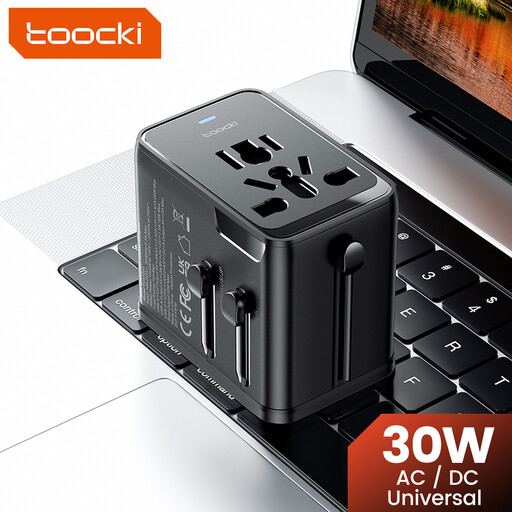
toocki Universal Travel Adapter 30W PD with one USB-A and two USB-C ports

toocki Universal Travel Adapter 30 W PD

A travel adapter for connecting several USB devices; check that the supplied plug types are suitable for your destination.

The product name lists 30 W, one USB-A port, two USB-C ports and plugs for the EU, UK, US and AUS.

View at Joybuy
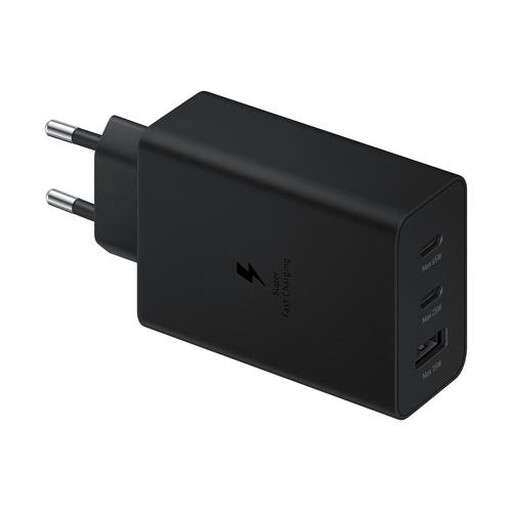
Samsung 65W Travel Charger Trio

Samsung 65 W Travel Charger Trio

A travel charger for anyone who wants to charge several devices from one socket.

The product title lists 65 W. The product description mentions two USB-C ports and one USB-A port.

View at Joybuy
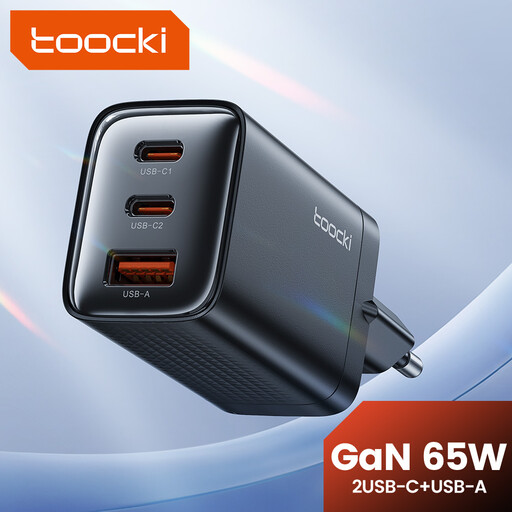
toocki 65W GaN USB-C wall charger with three ports

toocki 65 W GaN USB-C wall charger, 3 ports

A multi-port option for anyone who wants to connect USB devices to one socket.

The product name lists 65 W and GaN; the product specification lists three ports with USB-A and USB-C.

View at Joybuy

Frequently asked questions

Can any USB-C charging case charge my wireless microphone?

No. A USB-C connection doesn’t automatically make a case compatible with every microphone. RØDE specifies Charge Case+ for Wireless GO (Gen 3) and Wireless PRO; DJI specifies its Mic 2 case for DJI Mic 2.

How can I charge a case safely when there’s little space by the socket?

Follow the manufacturer’s charging instructions and leave the charger unobstructed so heat can escape. The fire service advises against using damaged cables and counterfeit chargers, and warns not to charge devices with a battery under a pillow or duvet.

What if a charger or charging case breaks too soon during normal use?

If you’re a consumer in the Netherlands, the seller is responsible for the statutory guarantee. According to the Netherlands Authority for Consumers and Markets, there’s no fixed statutory time limit; what matters is what you could reasonably expect from the product. Any manufacturer’s guarantee is separate.

What safety requirements apply to a mains-powered charger in the Netherlands?

Electrical appliances placed on the Dutch market must comply with the applicable European rules. According to Ondernemersplein, the manufacturer must affix the CE marking to an appliance that meets the requirements and draw up an EU declaration of conformity. The rules that apply depend on the product; a product listing alone doesn’t prove conformity.

Do I need a licence for a new wireless microphone system in the Netherlands?

According to the Dutch Radiocommunications Agency, a licence is usually not required for wireless microphones, but you must use the correct frequency band. The available spectrum for UHF microphones may vary by location. So check the frequencies used by the exact system and where you intend to use it.
