
Team with one microphone set
You want the transmitters and receiver to be returned to the same place after use. RØDE and DJI describe cases designed for specific sets, so check compatibility with your exact model.


If colleagues use the same microphone set, choose a charging case that matches the exact model and version. If you use different sets, a multi-port desk charger can provide a shared power source, but it won’t replace a compatible case or guarantee that every microphone can charge through the same cable or port.
You want the transmitters and receiver to be returned to the same place after use. RØDE and DJI describe cases designed for specific sets, so check compatibility with your exact model.
You share a desk with colleagues who don’t all use the same set. A multi-port charger can bring power connections together, but it won’t automatically house microphones or receivers in a compatible case. Belkin describes its P-WCH010 as a desk charger.
You want to replace a lost or faulty case without buying a whole new microphone set. Shure states that the AMV-CHARGE is supplied without microphones; also check which version and components the replacement case supports.
Choose this option: if you know the exact set and want to store and charge the transmitters and receiver together. RØDE and DJI describe cases for two transmitters and a receiver.
Bear in mind: a matching brand name doesn’t prove that a case will fit a different model. The RØDE Wireless GO II case also doesn’t function as a data hub.
Choose this option: if you already have compatible MoveMic lavalier microphones and want to replace their storage and charging case. Shure sells the AMV-CHARGE as a separate case.
Bear in mind: with the MoveMic Two Receiver Kit, the receiver must be charged separately; the replacement case doesn’t include microphones.
Choose this option: if different devices need power at the same desk and can be charged through the available ports according to their own instructions.
Bear in mind: a charger’s total power output alone won’t tell you which charging cable, input or charging speed is suitable for a microphone.
Choose this option: if you specifically use the mobile version of the Hollyland LARK M2 and are looking for a replacement case for it.
Bear in mind: Hollyland also offers Camera and Combo versions, so check the version rather than relying on the LARK M2 name alone.
| What to consider | What to check before buying | Who should consider this? |
|---|---|---|
| Model compatibility | Compare the full model name and version of the transmitters and receiver with the manufacturer’s compatibility information. | If I want a dedicated case for my existing set, I’ll first check that all the components fit inside. Around 36% of consumers put model compatibility first. |
| Components included | Check which components fit in the case and whether the receiver needs to be charged separately. | If colleagues take turns using the same set, I want to know whether the components can be stored and charged together. This is the top priority for around 29% of consumers. |
| Charging at the same time | Count the cases and individual components that need power at the same time, then check the specified cables and connections. | At a desk with several sets, I want enough compatible connections for everything that needs charging at once. Around 21% of consumers prioritise simultaneous charging. |
| Requirements and contents | Read what’s included and check whether you already have the compatible microphones, case, cables and power supply. | If I buy a replacement case or desk charger, I don’t want to assume that it also includes a complete microphone set or all the components I need. Around 14% of consumers look at this first. |
Compatibility can vary by model and version, even within the same brand family.
Before buying, compare the full model and version name with the manufacturer’s compatibility information.
A case that doesn’t fit won’t meet your charging needs, so you’ll still need a suitable charging solution.
With the Shure MoveMic Two Receiver Kit, the receiver must be charged separately.
Make a list of the transmitters, receiver and required charging connections for each set before arranging your desk.
You’ll then need a separate connection at the desk for the receiver.
RØDE says the Wireless GO II case is designed to provide power, not to transfer recordings or work as a data hub.
For data transfer or firmware updates, connect the components directly to a computer via USB-C.
Shure states that the AMV-CHARGE is supplied without microphones.
Check the package contents and only buy this replacement case if you already have the compatible microphones.
If you don’t have the microphones, the case alone isn’t enough to put together a complete set.
The Charge Case is designed for existing Wireless GO II sets with two transmitters and a receiver.
The Mic 2 Charging Case is designed for users of the corresponding DJI Mic 2 set.
The AMV-CHARGE is a separate replacement case for MoveMic lavalier microphones.
The LARK M2 Charging Case (Mobile, Shine Charcoal) is a version-specific replacement case.
According to the Dutch product page, the P-WCH010 is a multi-port desk charger, not a model-specific microphone case.
These product picks focus on multi-port power and microphone sets supplied with a charging case. A set with a case isn’t the same as a separate replacement case, so check which product type you need.
 No image available
For a desk where several devices need a dedicated connection; check which USB connection and cable are specified for each microphone set.
The product name lists 4 AC sockets, 3 USB-A ports, 2 USB-C ports, a digital clock and a 3 m cable.
 No image available
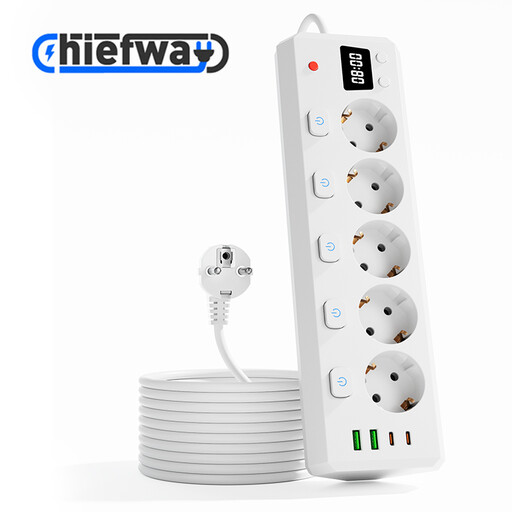
For a shared workspace where different devices need to be connected in one place; check that the connections match the microphone’s charging requirements.
The product name lists 5 AC sockets, 2 USB-A ports, 2 USB-C ports, individual switches, a digital clock and a 3 m cable.
 No image available
For anyone looking for a complete microphone set with a case included, rather than just a separate replacement case.
The product name lists 2 transmitters (TX), 1 receiver (RX) and a Charging Case. Check that this model matches the microphone set used at the shared desk.
 No image available
For anyone looking for a complete RØDE Wireless Micro set with a charging case for use with a camera and smartphone; this isn’t a separate replacement case.
The product name lists two microphones, a camera receiver, a smartphone receiver and a Charging Case.
 No image available
For anyone looking for a complete DJI Mic 3 set with a charging case included and a dedicated place to store the components.
The product name lists two transmitters (TX), one receiver (RX) and a Charging Case. Before buying, check that this is the right product version for your needs.
Compare the full model name and version of the transmitters and receiver with the manufacturer’s compatibility information. RØDE and DJI’s compatibility tables make it clear that cases aren’t automatically interchangeable just because they’re from the same brand or product family.
No. RØDE says the case provides power and doesn’t work as a data hub; for data transfer or firmware updates, connect the components directly to a computer via USB-C.
It depends on the set. The cases for the RØDE Wireless GO II and DJI Mic 2 are designed for two transmitters and a receiver; Shure states that the receiver for the MoveMic Two Receiver Kit needs to be charged separately.
Count the devices that need power at the same time and check the specified power supply and cable for each microphone or case. The four ports on the Belkin P-WCH010 don’t, by themselves, confirm that it’s suitable for a specific microphone. For charging the Wireless GO II case, RØDE specifies a power source of up to 5 V and 3 A.
According to the Dutch Authority for Digital Infrastructure, a licence is usually not needed to use wireless microphones, but you must follow the permitted frequency bands and equipment requirements. UHF availability can vary by location. This applies to the transmitting microphone, not to the USB charger itself.
For online purchases from a business, the Dutch government says you will often have a 14-day cooling-off period; the applicable exceptions and type of seller are relevant. This is separate from any rights you may have if a product is faulty, damaged or not as described.