
Wireless microphone set owner
You want to charge your existing transmitters and receiver together, and keep them organised. Whether a case fits depends on the exact model and generation.


If you already have a wireless microphone set, choose a charging case that matches its exact model and generation. This lets you store the compatible components together and, depending on the case, charge them without a socket. A multi-port USB charger is more convenient if you want to charge other USB devices from a single socket in line with their charging requirements, but it doesn’t have its own battery.
You want to charge your existing transmitters and receiver together, and keep them organised. Whether a case fits depends on the exact model and generation.
You’re recording in a holiday cottage and want to top up your charge even when you’re away from a socket. If so, look for a compatible case with a built-in battery.
You want to charge other equipment as well as your microphone using a single available socket. Check which USB connections you need and follow the charging requirements.
Choose this if: you already have the compatible microphone set and want to store its components together or charge them on the go.
Bear in mind: the fit is specific to certain models and generations; a separate case isn’t automatically a complete microphone set.
Choose this if: your microphone can charge via USB according to its instructions, and you want to charge other devices from the same socket.
Bear in mind: this charger isn’t a storage case and needs a socket; its power is shared between the connected ports.
Choose this if: you don’t yet have a microphone set and need both the recording equipment and its compatible case.
Bear in mind: check the version and box contents so you don’t buy a complete set when you only need a replacement case.
| What to consider | What to check before buying | Who is this important to? |
|---|---|---|
| Compatibility | Compare the full model name and generation with the case’s compatibility information, and check which components fit inside. | If I want to charge my existing set together, I need to know for certain that the case is designed for my exact model. Around 36% of consumers put compatibility first. |
| Charging without a socket | Check whether the case has its own battery and how many extra charges the manufacturer specifies for the stated set. | When recording somewhere without a socket, I want to be able to top up between sessions. Around 29% of consumers say this is their main requirement. |
| Charging several devices | Count the USB-C and USB-A ports you need, and check the cables and charging requirements. If charging several devices at once, check how the power is shared. | If I want to charge other USB devices in the holiday cottage too, I need a charger with the right ports. Around 21% of consumers prioritise charging several devices. |
| A safe place to charge | Use undamaged cables and chargers, keep the area around them clear for heat to escape, and charge battery-powered equipment in a room with a working smoke alarm, as advised by the Netherlands Fire Service. | If space for charging is limited in the holiday cottage, I want to be able to place equipment somewhere open and dry. Around 14% of consumers say a safe charging setup is their main buying priority. |
Even within the same brand, charging cases aren’t necessarily interchangeable between different microphone models or generations.
Check the full model name, generation and compatibility information for the specific case.
Contents vary by version. A separate case won’t necessarily include transmitters and a receiver.
Check the contents of the version you’ve chosen before placing your order.
You may need to buy transmitters and a receiver separately if you choose a case on its own.
With a multi-port mains charger, the stated total power is shared between connected devices. How it’s shared can vary by model.
Check how the ports share power when charging several devices at once, and compare this with your devices’ charging requirements.
Offers a separate Charge Case for the Wireless GO II.
Offers a separate Charging Case for the Mic 2, as well as a version with transmitters, a receiver and a case.
Offers a separate Charging Case for a specific mobile version of the LARK M2.
Offers multi-port mains chargers as an alternative if you also want to charge other USB devices from a socket.
Offers multi-port mains chargers, with power distribution varying by model.
These products are USB chargers and multi-port adapters. They’re suited to charging from a socket; check that your microphone can charge using the available connection and power supply in line with its own charging requirements.
 No image available
A multi-port wall charger for devices that can charge through a compatible USB connection in line with their charging requirements; requires a socket.
65 W total power; two USB-C ports and one USB-A port.
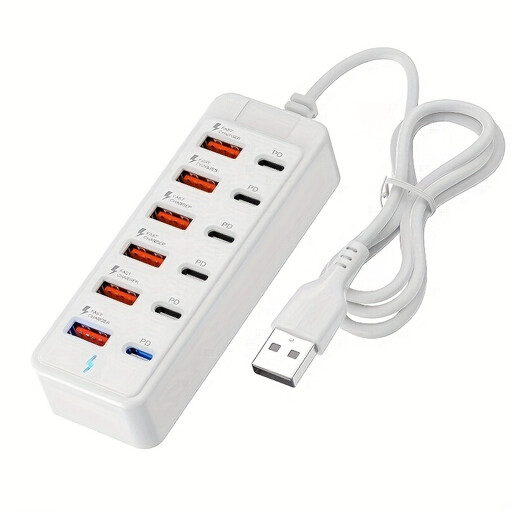 No image available
A charging station for several USB devices; check that your microphone’s charging requirements and connections are compatible.
The product name specifies six USB-C ports with PD and six USB-A ports, with up to 25 W per port.
 No image available
A multi-port USB charger for home or travel; only use it for your microphone if it can charge through a compatible USB connection.
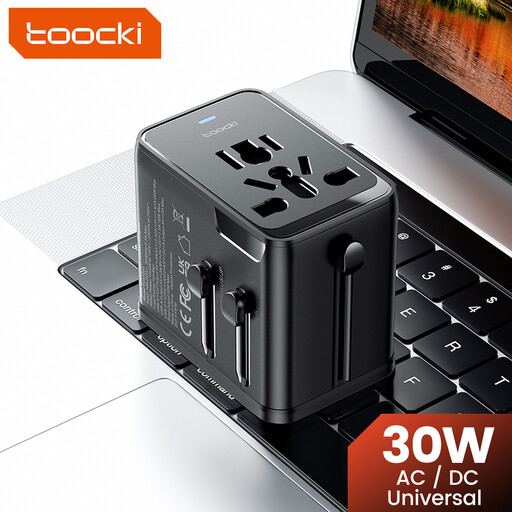 No image available
A travel adapter with several USB ports; check your microphone’s charging requirements before using it as a charging solution.
30 W PD; one USB-A port and two USB-C ports. The product name specifies plug support for the EU, UK, US and AUS.
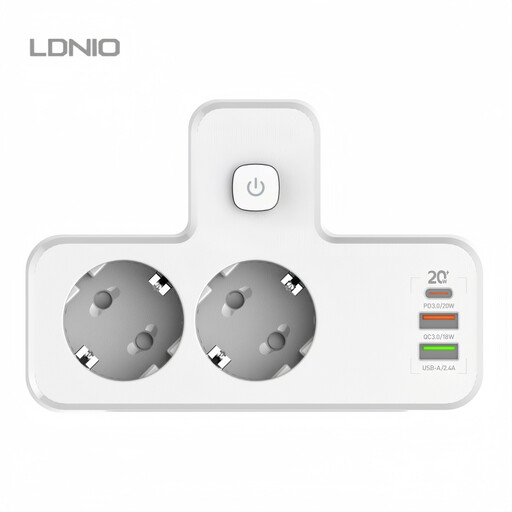 No image available
A USB charging solution for several devices; check that the connections match your microphone’s charging requirements.
The product description specifies a USB-C port with PD 20 W and several USB-A ports.
No. Check the full model name and generation. RØDE says the Wireless GO II Charging Case is compatible with the Wireless GO II, but not with the original Wireless GO or the Wireless PRO, among other models.
Not with a standard mains charger on its own: it needs a socket. A case with its own battery can provide extra charges for the microphone set it’s designed for; RØDE specifies this for the Wireless GO II Charge Case, for example.
The Netherlands Fire Service advises choosing a spot where heat can escape, using undamaged cables and chargers, and charging in a room with a working smoke alarm. Don’t cover a charger.
According to the Netherlands Authority for Consumers and Markets’ ConsuWijzer, your statutory rights may apply alongside any manufacturer’s warranty. If a product doesn’t meet what you could reasonably expect during normal use, the seller must offer an appropriate free solution, such as a repair or replacement. There isn’t one fixed warranty period that automatically applies to every case.
According to the Dutch Authority for Digital Infrastructure, a licence usually isn’t needed for wireless microphones, although one is required for some frequency bands. Check the frequency range and conditions for your microphone and where you’ll use it; buying a charger won’t change its frequency range.