A rechargeable Bluetooth keyboard can work without a mains cable while you type and, if your computer supports Bluetooth, without a USB receiver. Then choose between a compact model that leaves room for recipe materials and a full-size model with a number pad for entering lots of figures. Before buying, check the layout and switch type of the exact version, how it charges and whether it has the required CE marking.
Who is this choice relevant to?
Recipe formatter without a spare port
Someone who doesn’t want to use a power socket for their keyboard while working, and would preferably rather not use a USB port for a receiver either. Bluetooth is only an option if your device supports it. Logitech and CHERRY describe Bluetooth as a connection option for the models mentioned here.
Recipe formatter with a crowded desk
Someone who needs space for recipe notes or proofs and wants to weigh up the size of a compact keyboard against having fewer keys immediately to hand. Logitech offers both a compact MX Mechanical Mini and a version with a number pad.
Frequent user of numerical inputs
Someone who often enters figures and may prefer to use the keyboard space for a dedicated number pad. Logitech lists an integrated number pad on the full-size MX Mechanical.
What should you look for?
First, check whether you can work without a power cable and, potentially, without a USB receiver. Then decide how much space you need for recipe materials and whether a number pad is important for the figures you enter.
| Factor to consider |
What to look for |
Who it matters to |
| Connection without a port |
Check that your computer supports Bluetooth and find out how the exact version charges. It will still need charging. |
If I don’t want to use a power cable or USB receiver while typing, Bluetooth needs to work with my computer. Around 33% of consumers prioritise a connection that doesn’t require a port while typing. |
| Space for recipe materials |
Compare the dimensions and visible key layout. Consider which keys you want to have immediately to hand while formatting. |
I want to be able to put notes or proofs beside my keyboard, so I’m weighing up a compact design against having keys immediately to hand. Around 27% of consumers make clear desk space their top priority. |
| Entering figures |
Check that the version you’ve chosen actually has a number pad and that its layout suits the way you enter figures. |
When entering lots of recipe quantities, I want to use a dedicated number pad. Around 20% of consumers prioritise entering figures over a more compact model. |
| Key feel and sound |
Check the switch type on the exact model, and try the key feel before buying if possible. |
If I type for long periods, I want the key feel and sound to suit my workspace. Around 20% of consumers put this preference first. |
Common pitfalls
-
Assuming wireless means you’ll never need to charge it
A wireless connection doesn’t eliminate the need for power. You may also need a cable or USB port while charging.
Check how the exact version charges, whether a cable is included and whether you can keep working while it charges. CHERRY says the MX 3.0S Wireless can be used with a cable while charging; don’t assume this applies to other models.
-
Assuming all switches in a product range are the same
Switch types can vary between versions. For example, Keychron says the “Black - Fully Assembled” version of the K10 Pro is not hot-swappable.
Compare the full version name and specifications of the one you want to order. Don’t assume it has features listed for another version.
-
Choosing a compact model without checking the keys you use for formatting
A compact layout may omit keys you use often. Logitech distinguishes between the MX Mechanical Mini and the MX Mechanical, which has an integrated number pad.
Before buying, consider how you enter quantities, navigate text and use shortcuts. If you later find you need a number pad, you may have to buy one separately.
Relevant brands
Logitech
Logitech describes the MX Mechanical as a full-size model and the MX Mechanical Mini as a more compact version.
- Logitech says the models mentioned are available with several switch types and can connect to up to three devices.
- The layout and switch type depend on the version you choose; the Mini doesn’t have the full-size model’s integrated number pad.
CHERRY
The CHERRY MX 3.0S Wireless is an option to consider if you want to compare Bluetooth, a 2.4 GHz receiver and wired use.
- CHERRY lists Bluetooth, 2.4 GHz and a USB cable as connection options for this model.
- The 2.4 GHz mode uses a receiver port, while wired use requires a cable. The layout and switch type can vary between versions.
Razer
The Razer BlackWidow V4 Mini HyperSpeed is a compact mechanical model with Bluetooth.
- Razer lists a 65% layout, arrow keys and hot-swappable switches for this model.
- Check which keys you need immediately to hand for formatting; a compact layout may omit others.
8BitDo
According to the manufacturer, the Retro Mechanical Keyboard is an 87-key model with Bluetooth and programmable buttons.
- The manufacturer lists programmable buttons for the version described.
- Windows and Android are listed as supported systems for this version. Check compatibility with your computer; don’t assume it supports macOS unless this is confirmed.
Keychron
The K10 Pro is worth considering if adjustable key functions and a choice of Windows or macOS keys are important to you.
- Keychron lists keycaps for both Windows and macOS as included.
- According to Keychron, the “Black - Fully Assembled” version is not hot-swappable. Be sure to check the exact version.
Products on Joybuy
These Joybuy products offer wireless mechanical layouts to compare in terms of desk space, available keys and connectivity. Before choosing, also check the exact version, compatibility with your computer and how it charges.
 No image available
AULA F75, 75% layout, US QWERTY
If you need room for recipe materials beside your keyboard, the listed 75% layout is a compact option to consider.
The product name specifies a US QWERTY layout and three-mode wireless connectivity. Check which keys and connections suit your computer and formatting work.
View on Joybuy
 No image available
AJAZZ AK980 V2, 98% layout, QWERTY
If you’re weighing up a larger layout against a more compact workspace, the product name specifies a 98% layout.
The product name lists QWERTY, Bluetooth, 2.4 GHz, wired use and a 10,000 mAh battery. Check the layout and preferred connection method for the exact version.
View on Joybuy
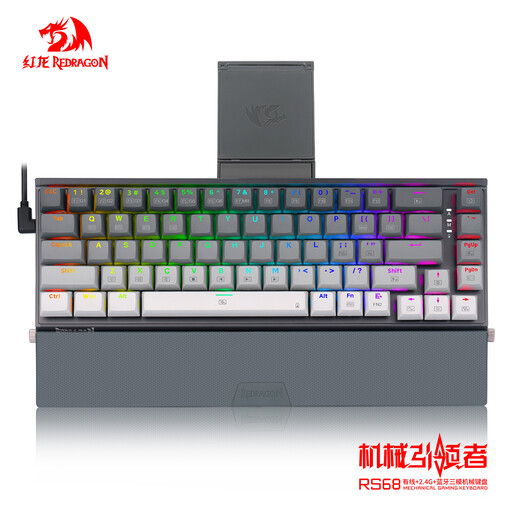 No image available
RS68 The Third Mock Examination
If you want to work wirelessly, the product name lists Bluetooth. Check that your computer supports this connection.
The product name also lists wired use and a detachable wrist rest. Check the key layout of the exact version before ordering.
View on Joybuy
 No image available
AJAZZ AK820 MAX, 75% layout, US QWERTY
The listed 75% layout is worth considering if you want to balance space for recipe materials with having keys immediately to hand.
The product name lists US QWERTY, an 8000 mAh battery and hot-swappable switches. Check that the layout and switch type suit your preferences.
View on Joybuy
 No image available
AJAZZ AK820 Pro, US QWERTY, Flying Fish Switch Purple
If you’re considering a more compact layout, the product name lists a 75% layout.
The product name lists US QWERTY, Bluetooth, 2.4 GHz, wired use and the Flying Fish Switch Purple switch type. Check the full version details and preferred connection method.
View on Joybuy
Frequently asked questions
Do I need a USB receiver for Bluetooth?
No, not for the Bluetooth connection itself, as long as your computer supports Bluetooth. Logitech and CHERRY describe Bluetooth as a connection option alongside a possible 2.4 GHz mode; the latter may use a receiver.
How can I use the keyboard if the battery runs out?
Plan a time to charge it and check which charging cable and USB port the version needs. CHERRY says the MX 3.0S Wireless can also be used with a cable while charging; don’t assume this applies to other models without checking.
Which product compliance requirements are relevant in the Netherlands?
According to the Dutch Authority for Digital Infrastructure, electrical and electronic equipment must carry the correct CE marking; radio equipment must meet the applicable European requirements. Check the marking and product information for the exact version. This alone doesn’t confirm whether a specific model complies.
What are the warranty and returns rules in the Netherlands?
ACM ConsuWijzer explains that if a product is faulty, you’re entitled to a product that meets what you could reasonably expect; there is no fixed general two-year time limit. Online purchases usually come with a 14-day cooling-off period. The cooling-off period for changing your mind is separate from your rights if a product is faulty.


