
Vandaag of morgen in huis

Kwaliteit gegarandeerd

Welkomstaanbiedingen ontgrendelen: GRATIS bezorging | Tot 80% korting | Gratis 30 dagen JoyPlus-proefperiode
Download de app
A wireless mechanical keyboard can transform your entire computing experience, whether you're a gamer, programmer, or content creator. But the market is flooded with technical jargon and marketing promises, making it easy to end up with buyer's remorse. Many users fall into the same traps: paying too much for features they don't use or choosing a model that disappoints after just a few months.
As a Joybuy Product Recommendation Officer, I'm here to help you cut through the noise. We won't focus on the hype, but on the specifications that truly matter. Let's discuss the three most common pitfalls and how you can avoid them.
To make a durable and satisfying choice, there are a few technical features you need to understand. These aren't marketing buzzwords, but the building blocks of a great keyboard.
A hot-swappable keyboard is perhaps the most important feature for anyone seeking flexibility. It means you can replace the mechanical switches without any soldering. This has two major advantages:
The layout, or form factor, determines the physical size and number of keys. The most common choices are:
The materials and the way the internal components are mounted have a huge impact on the sound and feel.
Based on objective specifications, we have selected a few models that suit different user profiles.
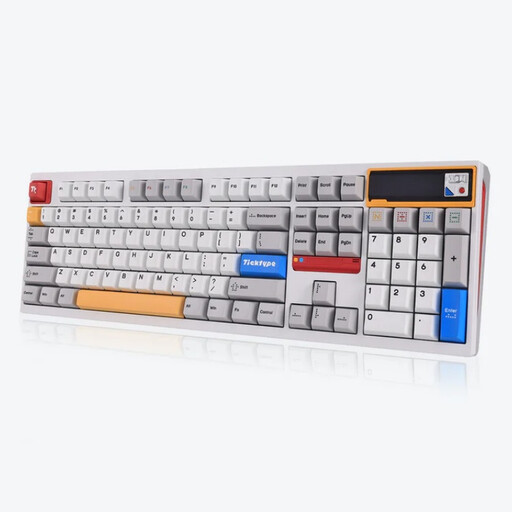
Why This Fits Their Persona: Ideal for those who value productivity and a clean desk setup. The full-size layout with a numeric keypad is practical for administrative work, while the wireless connectivity and sleek white finish provide a professional look.
This model avoids the pitfall of a cheap build. The full aluminium chassis and leaf spring mount (an advanced form of gasket mount) offer a solid and comfortable typing feel not found in standard office keyboards.
Hot-swappable sockets for future customisation and a large 8000mAh battery for long-lasting wireless use without constant recharging.
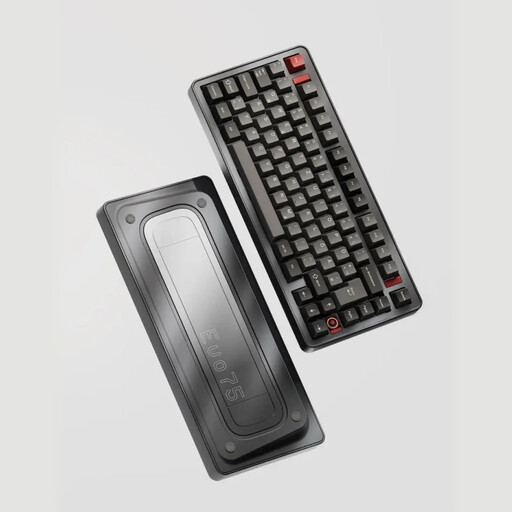
Why This Fits Their Persona: For the user who wants complete control and a premium experience. The compact 75% layout is perfect for gaming, while advanced features like VIA compatibility and the leaf spring mount form the core of a true custom mechanical keyboard.
This keyboard shatters the "custom" illusion. It's not only hot-swappable, but also fully VIA programmable. This is open-source software that lets you remap any key without being dependent on a manufacturer's limited software.
Full aluminium gaming keyboard with an advanced leaf spring mount for a soft and consistent typing feel. The VIA compatibility offers unparalleled customisation possibilities.
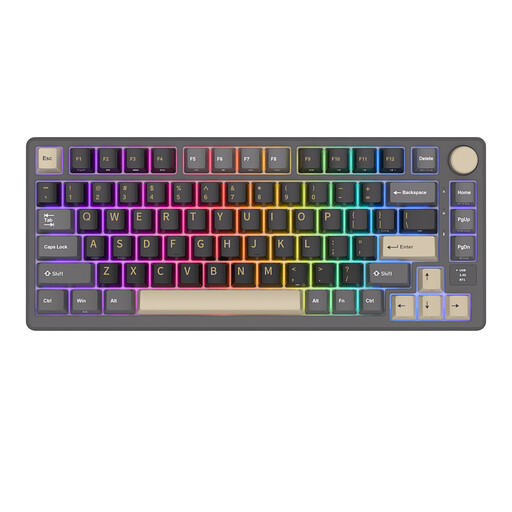
Why This Fits Their Persona: For the user seeking a balance between aesthetics, functionality, and value. This 75% keyboard has a sleek design but is packed with useful features like an OLED screen and a multi-function rotary knob.
This model focuses on concrete, user-friendly extras instead of vague promises. The gasket mount and PBT keycaps provide a premium typing feel and durability, while the rotary knob and screen offer immediate practical use.
The OLED screen displays useful information like battery status and connection mode. The metal keyboard with a volume knob makes adjusting volume or other settings fast and intuitive.
We have compiled a complete, real-time list of products that fully satisfy these strict selection criteria and UK safety regulations.
Battery life varies greatly by model and depends on the capacity (measured in mAh) and your usage. Factors that shorten the duration include the brightness of the RGB keyboard lighting and the connection method (2.4GHz often consumes more power than Bluetooth). Models with a large battery, like 8000mAh, can last for weeks or even months with average use and the lighting turned off.
Yes, absolutely. It offers an accessible way to experiment with different switches without technical knowledge or soldering tools. If you decide you want a different typing feel down the line, you can easily modify your keyboard instead of having to buy a completely new one. It's a future-proof investment.
In a standard (tray mount) keyboard, the PCB is screwed directly into the case. This can lead to a stiff typing feel and more vibrations. With a gasket mount, the plate assembly (with the switches) is suspended between flexible gaskets. This isolates the plate from the case, resulting in a softer, more dampened, and often more pleasant typing experience. It is considered a premium feature that enhances comfort and acoustics.
