
Vandaag of morgen in huis

Kwaliteit gegarandeerd

Welkomstaanbiedingen ontgrendelen: GRATIS bezorging | Tot 80% korting | Gratis 30 dagen JoyPlus-proefperiode
Download de app
A wireless mechanical keyboard combines the responsive feel of mechanical switches with fewer cables on your desk. That sounds simple, but models vary considerably in layout, connectivity, battery life and options for replacing parts. Gamers, programmers, content creators and professionals who type long documents every day should look beyond RGB lighting and a striking case.
A keyboard with US QWERTY has a different layout from a Dutch keyboard. The positions of keys such as Enter, punctuation marks and the right Shift key can vary. US QWERTY can be convenient for programming, but if you touch-type on a Dutch layout, you’ll need to allow time to adjust.
Always check:
For example, the AJAZZ AK820 MAX in the reference list has a German QWERTZ layout. This may suit users who work with QWERTZ, but it isn’t necessarily the obvious choice if you’re looking for US QWERTY or a Dutch layout.
A wireless keyboard with an 8000mAh battery has a generous capacity on paper. However, battery life depends on RGB lighting, wireless mode, polling settings and charge level. Manufacturers may quote battery life under specific conditions, so the figures aren’t necessarily comparable across brands.
Also, take care when charging. Product information for several Ticktype models warns about heat, damage to the lithium battery and unsuitable adapters. Use the supplied or a suitable USB-C cable, keep the keyboard out of direct sunlight and stop using it if it gets unusually hot or gives off a burning smell.
A keyboard with RGB lighting can look appealing, but lighting usually increases power consumption. Check whether you can adjust the lighting for each key and switch it off completely.
An aluminium mechanical keyboard often feels sturdy, but there’s more to its construction than the material used for the top. Also consider the plate, mounting, stabilisers and weight. A leaf spring mount or gasket-style construction can affect how the keyboard feels to type on, but it comes down to personal preference. Marketing claims about a particular sound or softness won’t necessarily hold true for everyone.
A tri-mode keyboard typically supports:
Check whether the receiver is included, how to switch between devices and whether the software works with your operating system. For competitive gaming, a wired USB-C connection or 2.4GHz mode may be the most practical choice.
With a hot-swappable keyboard, you can replace switches without soldering. Check compatibility: some models support both 3-pin and 5-pin switches, while others accept only one type.
Switch the keyboard off and unplug the USB cable before replacing switches. Use a suitable switch puller and pull the switch straight upwards. Pulling at an angle could damage the hot-swap socket or circuit board. Hot-swapping makes a keyboard customisable, but it doesn’t mean every switch will fit.
A 75% mechanical keyboard usually keeps the arrow keys and a function row, but leaves out the separate number pad. This saves space for your mouse and works well on a compact desk.
A full-size mechanical keyboard with 108 keys is a better option for spreadsheets, bookkeeping and anyone who regularly needs a number pad. The choice is simple: go compact if desk space matters, or choose full-size if you use the number pad every day at work.
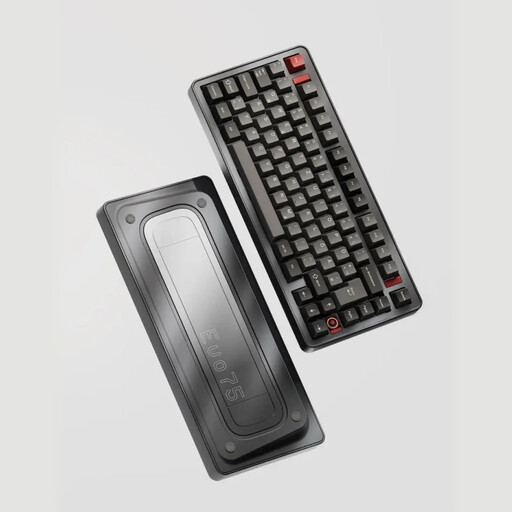
Why it suits this profile: The 75% layout includes arrow keys and function keys without taking up the space of a number pad. This makes it a practical choice for working from home, programming and gaming at a compact desk.
The product listing mentions tri-mode connectivity, hot-swap support for 3-pin and 5-pin switches, and an 8000mAh battery. Before buying, check that the US layout suits the way you type.
75% layout, aluminium case, RGB, VIA compatibility according to the product listing, and three connection modes.
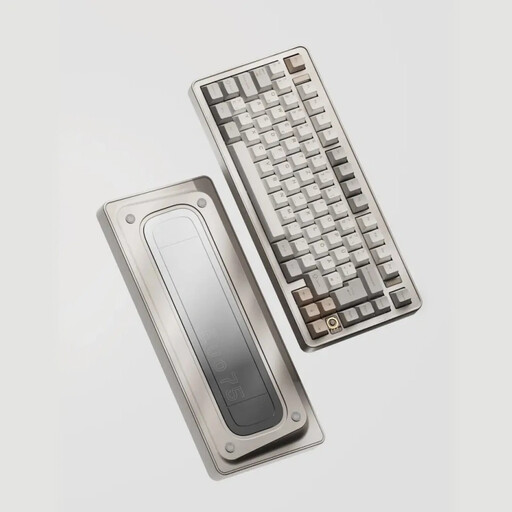
Why it suits this profile: This model is aimed at users looking for a customisable mechanical keyboard with an aluminium case, a compact layout and settings via VIA, according to the product information.
The specifications list USB-C, Bluetooth and 2.4GHz connectivity, so you’re not tied to a single connection method. Battery capacity and RGB use are still worth considering for everyday wireless use.
Anodised aluminium case, 80 keys, 8000mAh battery, RGB and hot-swap support for 3-pin and 5-pin switches.
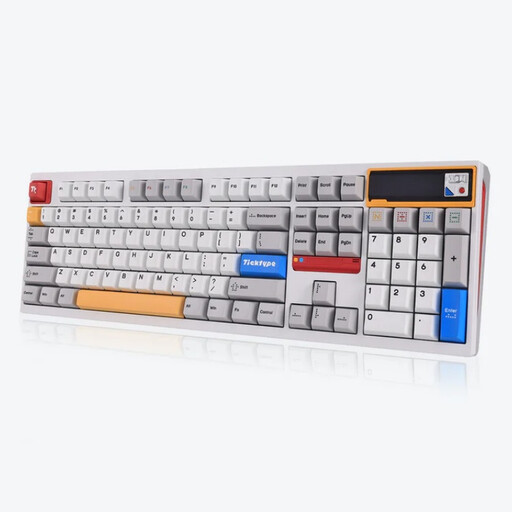
Why it suits this profile: The full-size layout with 108 keys is practical for spreadsheets, administration and intensive typing when you regularly use a number pad.
The product information mentions tri-mode connectivity, hot-swap support and a customisable pixel display. Check which software is available and choose a switch option that suits a shared workspace.
108 keys, full aluminium construction, 8000mAh battery, RGB and a leaf spring mount according to the product listing.
We’ve put together a complete, up-to-date list of products that meet these strict selection criteria and the applicable European safety requirements.
It can be, particularly if the model has a 2.4GHz connection and a wired USB-C mode. Check the connection method, polling settings and software. For competitive gaming, a wired connection may be a practical choice.
Its lifespan depends on the switch type, how intensively it’s used, the stabilisers, battery and maintenance. A hot-swappable keyboard may stay useful for longer if you can replace worn switches. Keep liquids, heat and harsh cleaning products away from the electronics.
RGB lighting uses extra power. The actual battery life of a wireless keyboard with an 8000mAh battery varies depending on brightness, animations and connection mode. If you want to work wirelessly for longer, dim or switch off the RGB and check the battery level regularly.
