
Vandaag of morgen in huis

Kwaliteit gegarandeerd

Welkomstaanbiedingen ontgrendelen: GRATIS bezorging | Tot 80% korting | Gratis 30 dagen JoyPlus-proefperiode
Download de app
A wireless mechanical keyboard can make your desk tidier and is suitable for gaming, programming, working from home and creative software. However, it is not wise to focus only on terms such as RGB, “gaming” or a large battery. The layout, connection and internal construction have a much greater impact on everyday use.
In this buying guide, you’ll find out what to look for and which models suit different use cases.
Many models use a US QWERTY layout. This means that the Enter key, Shift key and some punctuation marks are positioned differently from those on a Dutch ISO layout. The keys may also have English legends.
A US layout is not automatically a problem. For programmers and users who are already familiar with ANSI QWERTY, this layout can actually be practical. However, check the product images and specifications beforehand. Otherwise, an attractive compact mechanical keyboard may be less comfortable to use than expected.
There are three common connection options:
A tri-mode keyboard generally supports all three. Check whether the USB receiver is included and whether your computer has a suitable USB port.
A mechanical keyboard with RGB can look attractive, but lighting does not automatically make a keyboard more comfortable or durable. Also consider the switches, keycaps, battery and software.
A display or volume knob is mainly useful if you actually use those functions. Otherwise, you may be paying for extras that add little to your workflow.
Mechanical switches determine the feel and sound of every keystroke.
The included switch is only a starting point. With a hot-swappable keyboard, you can replace compatible 3- or 5-pin switches without soldering. Always check that your chosen switches are technically compatible.
The size has a direct impact on your desk and your way of working:
A keyboard with a volume knob can make media and system functions quicker to access. With models featuring a smart display or pixel screen, you should also check what information is actually shown and whether software installation is required.
Do not look only at the battery capacity in mAh. Battery life also depends on RGB lighting, connection mode and brightness. A larger battery can also make the keyboard heavier.
Also check:
A keyboard with a built-in lithium battery should be kept away from water, extreme heat and direct sunlight. When charging, use the recommended cable and power source.

Why it suits this profile: The 80% layout keeps the arrow keys and function row available without a full numeric keypad. This suits gamers, programmers and home workers with limited desk space.
The specifications state tri-mode connectivity, hot-swap switches and a US QWERTY layout. This makes the key choices clear in advance.
80% size, 4000mAh battery, PBT keycaps, programmable knob and RGB lighting.
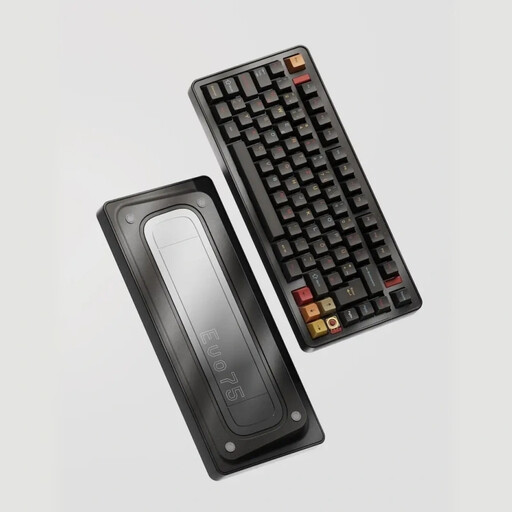
Why it suits this profile: This model is aimed at users who value materials, customisation and a permanent set-up. The aluminium case and VIA compatibility are ideal for creating a personalised keyboard configuration.
You are not limited to the standard switch: according to the product information, the PCB supports 3- and 5-pin hot-swap switches. The connection works via Bluetooth, 2.4G or USB-C.
75% layout with 80 keys, aluminium case, 8000mAh battery, RGB and VIA compatibility.
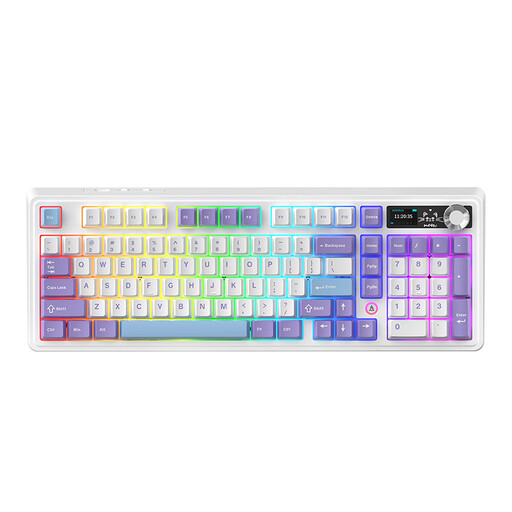
Why it suits this profile: The 98% layout provides plenty of keys in a more compact footprint. It is practical for users who want to combine a volume knob, display and numeric keys with wireless flexibility.
The product information explicitly mentions a hot-swappable PCB, three connection modes and a US QWERTY layout. However, check that the 97 keys and layout suit the way you work.
TFT display, metal volume knob, gasket structure, RGB, tri-mode connectivity and a battery with a stated capacity of 8000mAh with the screen on.
We have put together a complete, up-to-date list of products that fully meet these strict selection criteria and the applicable European safety regulations.
Use this short checklist:
It can be, especially if the model has a 2.4G wireless connection and a USB-C mode. For competitive games, a stable connection is more important than RGB. Also check the polling rate and compatibility if those details are relevant to you.
This varies by model and usage. RGB lighting, brightness and connection mode affect power consumption. A manufacturer may state a battery life under specific conditions. Therefore, treat such a figure as a product specification under those conditions, not as a fixed battery life for every situation.
The main recurring task is charging. A USB-C cable and suitable power source are usually sufficient. With a hot-swappable keyboard, you can replace individual switches or keycaps later, but check compatibility beforehand. Regularly removing dust and avoiding liquids will help keep the keyboard usable for longer.
