
Vandaag of morgen in huis

Kwaliteit gegarandeerd

Welkomstaanbiedingen ontgrendelen: GRATIS bezorging | Tot 80% korting | Gratis 30 dagen JoyPlus-proefperiode
Download de app
A wireless mechanical keyboard means fewer cables and often more features than a standard office keyboard. However, not every model is suitable for every user. Gamers focus on connectivity and response times, programmers on layout and comfort, while streamers may value RGB lighting, a display and a rotary knob above all else.
Marketing copy often highlights eye-catching features. The most important differences, however, are found in details such as the keyboard layout, battery, switches and repairability.
Many models use a US QWERTY layout. The Enter and Shift keys, along with symbols such as @, " and €, are positioned differently from those on a Dutch ISO layout. Windows or macOS can configure the keys differently, but the physical key labels remain unchanged.
Before buying, check the following:
A full-size mechanical keyboard generally includes a numeric keypad, while a 75% mechanical keyboard is more compact and usually retains the function keys. A 96% mechanical keyboard combines many keys in a smaller form factor, often without large gaps between key groups.
A Bluetooth mechanical keyboard is convenient for laptops, tablets and multiple devices. However, Bluetooth can behave differently from a 2.4G wireless connection, particularly when gaming or in a busy wireless environment. A supplied USB receiver often provides a direct connection to a desktop computer or gaming PC.
Look for the following:
A tri-mode keyboard supports all three modes in one device. Check, however, whether the USB receiver is included and where it can be stored.
RGB lighting, a screen and a rotary knob are useful extras, but they do not determine typing comfort on their own. A keyboard without hot-swap functionality requires soldering if you want to replace the switches. With a hot-swappable keyboard, you can generally change compatible switches without a soldering iron. Check whether the PCB supports 3-pin, 5-pin or both.
The construction also deserves attention. A gasket mount keyboard uses soft mounting materials between parts of the case. Depending on the product design, this can create a softer typing feel, but the final experience also depends on the plate, switches, keycaps and sound dampening.
Also check which switch is included and whether you can replace it later. A hot-swap model offers greater flexibility if you want a different typing feel over time.
PBT keycaps are generally less prone to developing a smooth, greasy surface than ABS keycaps. That does not mean they are indestructible: prolonged use, dirt and harsh cleaning products can affect the finish.
Use a soft, dry or slightly damp cloth, and prevent liquid from entering the case. For models with a battery, it is advisable to follow the manufacturer’s safety instructions and avoid leaving the keyboard in direct sunlight or in a very hot car.
A larger battery capacity can help extend usage time, but actual battery life depends on RGB brightness, display use, connection mode and firmware. Therefore, do not compare only the number of mAh.
A display can show battery status, connection mode, volume or media information. A rotary knob can be useful for controlling volume, lighting or other functions, but check whether its function can be customised through the software.
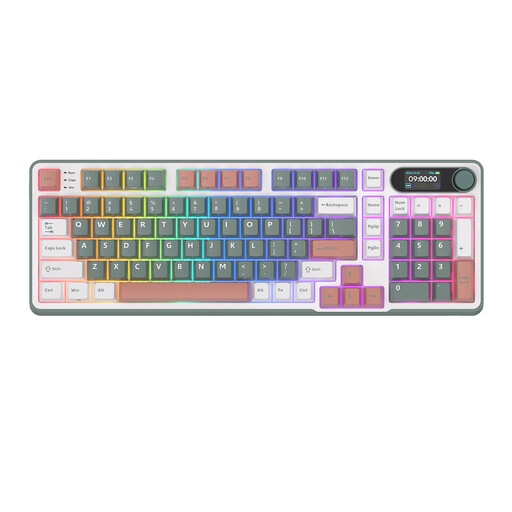
Why it suits this profile: The 96% layout provides plenty of keys in a more compact format than a traditional full-size model. This is practical for working from home, programming and casual gaming.
According to the product information, this model combines Bluetooth, 2.4G and USB-C. The hot-swap function means you do not need to solder every time you change a switch.
96% layout, tri-mode connectivity, RGB, metal rotary knob, smart display and PBT keycaps according to the listed specifications.
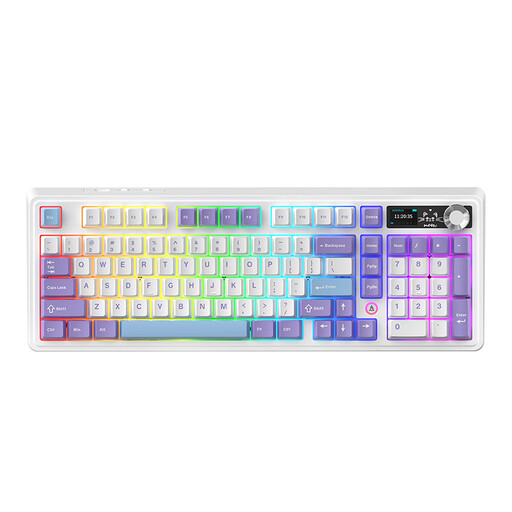
Why it suits this profile: This 98% model is aimed at users who want a rotary knob, display and customisable layout without choosing a fully compact keyboard.
The listed gasket construction, hot-swap PCB and five layers of sound dampening provide several customisation options. However, check the selected version and layout.
Bluetooth, 2.4G and wired use, 97 keys, rotary knob, TFT display, RGB and a battery option of up to 8000 mAh according to the product description.
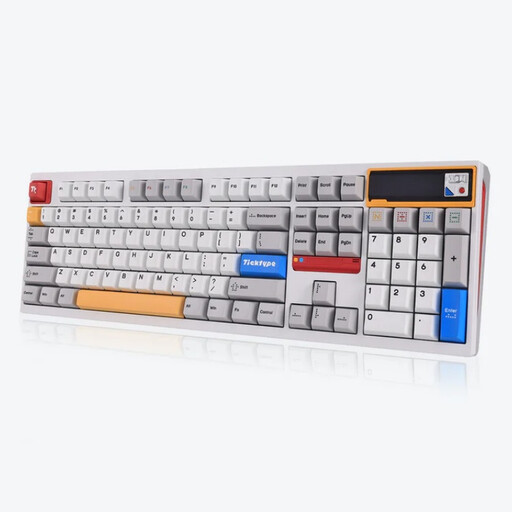
Why it suits this profile: With 108 keys, this full-size model is designed for users who need a numeric keypad for administration, spreadsheets or intensive office work.
The product information lists a hot-swappable layout for 3- and 5-pin switches. The selected version also includes silent tactile or linear switches; check the variant before ordering.
Aluminium case, leaf-spring mount, tri-mode connectivity, customisable pixel display, RGB and 8000 mAh battery according to the stated specifications.
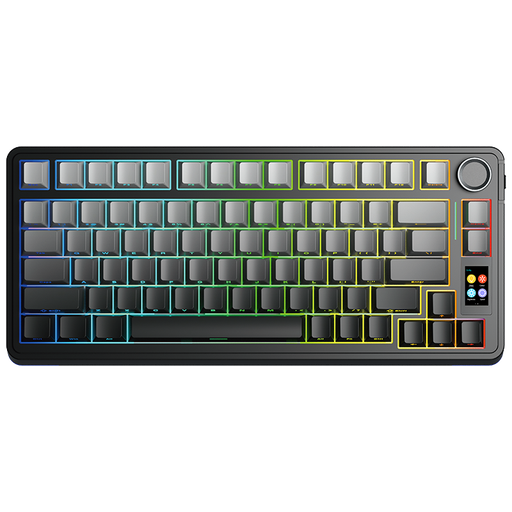
Why it suits this profile: The compact 75% layout keeps important function keys within easy reach and leaves room for a mouse, microphone or other streaming equipment.
The listed gasket construction, five layers of padding and hot-swap function focus on customisation. The TFT display and rotary knob provide additional control without separate software windows.
75% layout, tri-mode connectivity, TFT display, rotary knob, RGB and Star Vektor switches according to the product listing.
We have put together a complete, up-to-date list of products that fully meet these strict selection criteria and the applicable European safety regulations.
A 2.4G connection with a USB receiver is generally designed to provide a direct wireless link to a computer. For competitive gaming, it can be more practical than Bluetooth. If you want maximum consistency, USB-C wired use is a suitable alternative. Always check the connection modes and the receiver included.
Its lifespan depends on the switches, keycaps, battery, usage and maintenance. A hot-swap model can remain usable for longer when worn or unsuitable switches are replaced. With wireless models, the battery is also a component to consider. The stated battery capacity does not guarantee a fixed usage time; RGB lighting and a display increase power consumption.
That depends on how you use it. A display can show battery status, volume, time or connection information. It is not essential for a simple office setup. For streamers and users who want to personalise their setup, a mechanical keyboard with a display can offer additional convenience. Also check whether the software and screen functions are compatible with your operating system.
