
Vandaag of morgen in huis

Kwaliteit gegarandeerd

Welkomstaanbiedingen ontgrendelen: GRATIS bezorging | Tot 80% korting | Gratis 30 dagen JoyPlus-proefperiode
Download de app
Are you tired of the cable clutter on your desk? Or the spongy, imprecise feel of a standard membrane keyboard? You're not alone. A growing number of people who value a pleasant and efficient typing experience, whether for work or gaming, are switching to wireless mechanical keyboards. However, the market is vast, and the specifications can be overwhelming.
As a Joybuy Product Recommendation Officer, my job is to help you navigate the options. In this article, we'll highlight the most important features and present several popular choices, helping you find a model that fits your needs—without the marketing fluff.
Before we dive into the products, it's helpful to understand a few key concepts. This will help you determine what's important for you.
A keyboard's layout determines its physical size and the number of keys.
One of the biggest advantages of many mechanical keyboards is the potential for personalisation. A hot-swappable keyboard allows you to replace the mechanical switches (the mechanisms under the keycaps) without any soldering. This means you can experiment with different types of switches—for example, linear (smooth and quiet), tactile (with a noticeable 'bump'), or clicky (with an audible click)—to find the perfect typing feel for you.
Wireless freedom is the core appeal, but how you connect also matters.
Based on functionality, specifications, and user needs, we have selected a few interesting models.
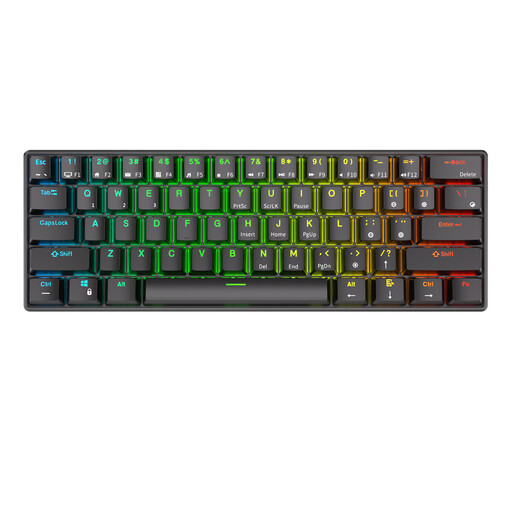
Why It Stands Out The RK61 is a classic in the world of compact mechanical keyboards. Its 60% keyboard form factor makes it extremely space-efficient. With its tri-mode connectivity (Bluetooth, 2.4Ghz, and wired), it's a flexible choice for various setups.
Key Features
Who Is This a Good Choice For? For users aiming for a minimalist setup, who travel frequently, or who want maximum mouse space for gaming. It's an excellent entry point into the world of customisable mechanical keyboards.

Why It Stands Out The AJAZZ AK980 V2 is a feature-packed powerhouse. Most notable are its TFT colour screen and multi-function volume knob. The screen can display status information or even custom GIFs. The massive 10,000mAh battery ensures exceptionally long usage.
Key Features
Who Is This a Good Choice For? For the power user, gamer, or professional looking for a feature-rich RGB gaming keyboard without compromise. If you need a numpad and appreciate the extra functionality of a screen and knob, this is a strong contender.
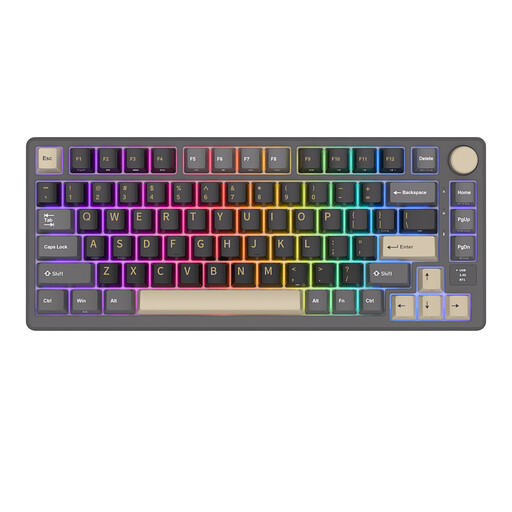
Why It Stands Out The RK M75 strikes a great balance between compactness and functionality. The 75% keyboard layout is efficient while retaining essential keys. The combination of an OLED screen, a metal volume knob, and a 'gasket-mounted' design (for a softer and quieter typing feel) gives it a premium character.
Key Features
Who Is This a Good Choice For? For typing enthusiasts and professionals seeking a high-quality, comfortable typing experience in a compact form factor. The combination of the gasket structure and convenient extras makes it an excellent all-rounder for both work and leisure.
These recommendations are a starting point, focused on specific needs like compactness, features, or typing comfort. For those looking for more variety in lighting and style, we have a broader assortment. Check out our full collection of RGB keyboards for more options.
What is the advantage of a hot-swappable keyboard? A hot-swappable keyboard allows you to easily change the mechanical switches yourself without technical knowledge or soldering. This gives you the freedom to customise the typing experience. For example, if you want quieter switches for the office or faster switches for gaming, you can simply swap them out.
Is a wireless mechanical keyboard suitable for gaming? Yes, absolutely. Modern wireless technology has improved significantly. For the most demanding gamers, the 2.4Ghz connection (via a USB dongle) offers a response time that is virtually indistinguishable from a wired keyboard. A bluetooth keyboard is fine for casual gaming and excellent for productivity tasks.
How do I choose the right size (60%, 75%, etc.)? Think about your usage. Do you need the numpad daily for your work? Then choose a 98% or full-sized model. Do you want maximum space for your mouse and rarely use the F-keys? Then a 60% or 65% model is a good option. A 75% layout is often the 'sweet spot' that offers a good balance between functionality and a compact size for most people.
