
Vandaag of morgen in huis

Kwaliteit gegarandeerd
Download de app
Categorieën

The search for a new mechanical keyboard can be overwhelming. The market is saturated with terms like hot-swappable, gasket mount, and various layouts. A poor choice can lead to a typing experience that falls short of your expectations or a product that doesn't suit your work or gaming style.
This guide is designed to provide clarity. We will navigate the most important specifications and features, enabling you to make an informed decision based on concrete product parameters.
Before we highlight a few models, it's helpful to understand the key characteristics. These define the typing experience, functionality, and durability of a wireless mechanical keyboard.
The layout determines the physical size and the number of keys. Popular choices include:
The switches beneath the keycaps define the typing feel. A hot-swappable keyboard offers the flexibility to replace switches without any soldering. This allows you to customize the typing experience or easily replace a faulty switch. You can choose between linear (smooth), tactile (with a noticeable 'bump'), or clicky (with an audible click) switches.
The build quality is largely determined by the case material and mounting style.
Modern wireless keyboards often offer three connection modes (Tri-Mode):
Extras like a keyboard with a rotary knob for volume or brightness control, programmable software (like VIA/QMK), and a customizable RGB keyboard offer added convenience and personalization.
Below is a selection of models that offer various combinations of the features mentioned above. These recommendations are based on product specifications.
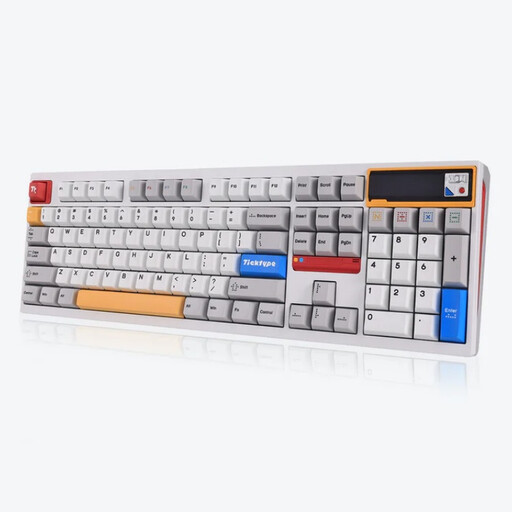
Why We Chose It The DP104 combines a traditional full-size layout with modern, customizable features. Its full aluminium case and leaf spring mount structure are aimed at delivering a premium and comfortable typing experience.
Key Features
Who Is This For? Professionals and enthusiasts who want the productivity of a full-size layout with a numeric keypad but are unwilling to compromise on the build quality and customizability of a custom mechanical keyboard.
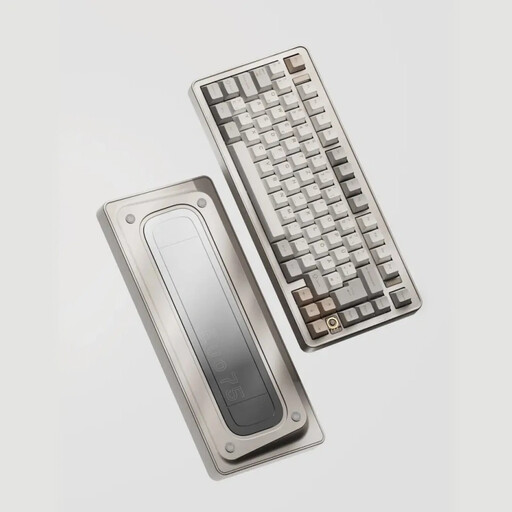
Why We Chose It The EVO75 is designed for the keyboard enthusiast. The combination of a 75% keyboard layout, an anodized aluminium case, VIA compatibility, and a leaf spring mount makes this a highly customizable and high-end model.
Key Features
Who Is This For? Programmers, writers, and keyboard hobbyists seeking a compact, programmable, and aesthetically refined keyboard. The focus is on customization and a superior typing experience.
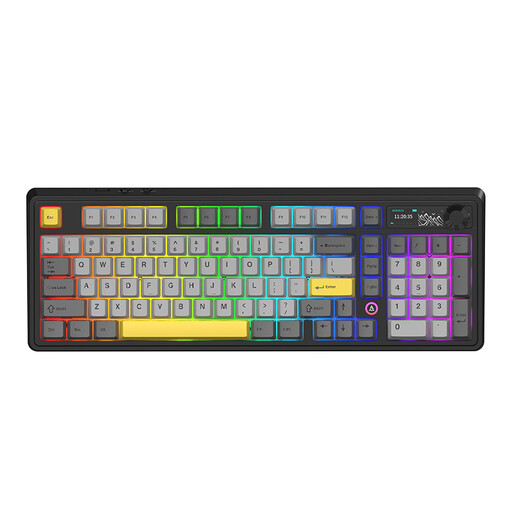
Why We Chose It The AJAZZ AK980 V2 is aimed at users who value functionality and instant feedback. Its 98% layout, TFT screen, and multi-function rotary knob make it a versatile tool for both gaming and productivity.
Key Features
Who Is This For? Gamers and power users looking for a feature-rich gaming keyboard. The screen and rotary knob provide direct control and visual feedback, which is practical in many scenarios.
The models listed above focus on linear or tactile switches for a smooth or quiet typing experience. Perhaps you are specifically looking for a keyboard with a distinct 'clicky' typing feel. In that case, models with Blue switches could be an interesting option. These switches are known for their clear, audible click with every keystroke.
For a selection of keyboards with this type of switch, you can browse our Blue Switch Keyboards category.
1. What is the advantage of a hot-swappable keyboard? A hot-swappable keyboard allows you to easily remove and replace the mechanical switches without soldering tools. This gives you the freedom to experiment with different types of switches (linear, tactile, clicky) to find your perfect typing feel, or to quickly repair a faulty switch.
2. Is an aluminium keyboard better than a plastic one? An aluminium keyboard typically offers greater durability, more weight (which provides stability on the desk), and a different acoustic profile than a plastic case. Plastic can be lighter and more budget-friendly, but aluminium is often associated with a more premium build quality and feel. The choice depends on your budget and personal preference for weight and sound.
3. What is the difference between 2.4GHz and Bluetooth connectivity? Both are wireless technologies, but with different strengths. 2.4GHz (via a USB dongle) offers a faster, more stable connection with lower latency, making it the preferred choice for competitive gaming. Bluetooth is more versatile, as it can connect to a wide range of devices (laptops, tablets, phones) without requiring a dongle and often supports switching between multiple devices.