
Vandaag of morgen in huis

Kwaliteit gegarandeerd

Welkomstaanbiedingen ontgrendelen: GRATIS bezorging | Tot 80% korting | Gratis 30 dagen JoyPlus-proefperiode
Download de app
A wireless mechanical gaming keyboard gives you more freedom on your desk, fast input and often plenty of customisation options. However, a long list of features does not automatically mean a model will suit the way you use it. Gamers may focus on connectivity and layout, while programmers and homeworkers often prioritise comfort, noise levels and the number of available keys.
Before buying, pay particular attention to these three potential pitfalls:
A tri-mode keyboard can generally be used in three ways: via Bluetooth, via 2.4G with a receiver, and wired via USB-C. Bluetooth is practical for laptops, tablets and multiple devices. The 2.4G connection is designed for use with a PC or console to which you can connect a USB receiver. USB-C is useful when you want to charge the battery or need a wired connection.
Also check:
A 75% mechanical keyboard saves space, but usually does not have a separate numeric keypad. The arrow keys and function keys are often still included. A 96% mechanical keyboard retains almost all the important keys, including the numeric keypad, but arranges them more compactly than a traditional full-size model.
A numpad is practical for financial administration, spreadsheets and entering lots of figures. For gaming, programming or a small home office, a 75% layout may be easier to manage. Also check whether the model is a QWERTY US keyboard and, if necessary, change the keyboard language in your operating system.
Mechanical switches differ in feel and sound profile. According to product descriptions, a blue switch usually provides a clearly tactile and audible keystroke, while a linear switch has a smooth movement without a perceptible click point. The actual experience also depends on the case, keycaps and internal dampening.
Look out for the following terms:
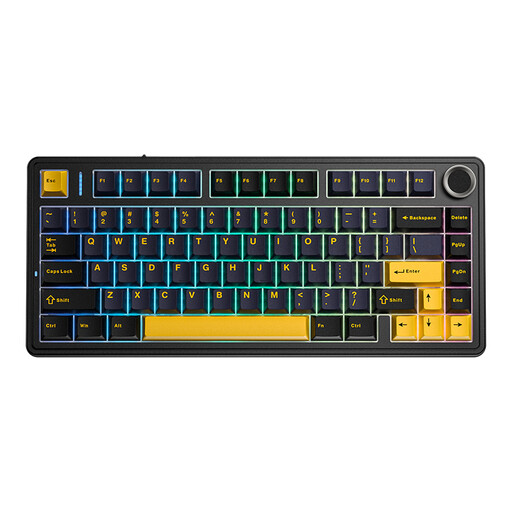
Why it suits this profile: The compact 75% layout is suitable for a smaller workspace and combines wireless use with RGB, PBT keycaps and a QWERTY US layout.
The product description mentions 3-mode wireless connectivity, so you are not limited to just one connection method. However, check the included receiver and layout before buying.
75% format, RGB lighting, PBT keycaps and gasket construction according to the product listing.
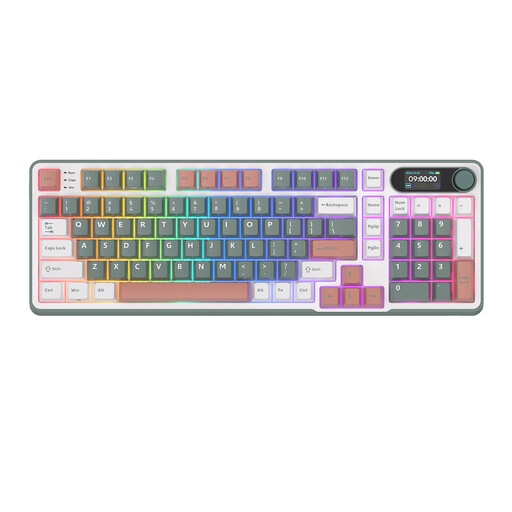
Why it suits this profile: This model is aimed at users looking for a compact keyboard with a numeric keypad, smart display and control knob.
The 96% layout means you do not immediately need a separate numpad. The product listing mentions Bluetooth, 2.4G and USB-C, along with hot-swappable support.
98 keys, PBT colour-block keycaps, smart display, RGB and a metal knob according to the product description.
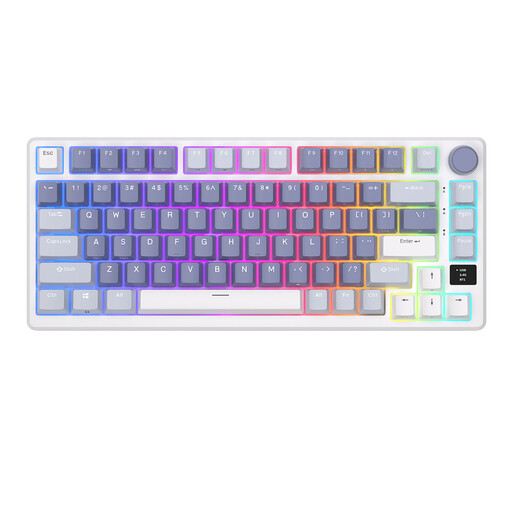
Why it suits this profile: Streamers, gamers and programmers looking for a compact layout with quick controls get a 75% layout with a display and volume knob.
The listing specifies 2.4G, Bluetooth and USB-C. It also mentions gasket mount and hot-swappable switches; check the exact switch compatibility before making modifications.
81 keys, OLED smart display, volume knob, RGB, tri-mode connectivity and gasket mount according to the product information.
We have put together a complete, up-to-date list of products that fully meet these strict selection criteria and the applicable European safety regulations.
Use this quick checklist:
Yes, but pay attention to the noise level and choice of switch. A blue switch may be louder than a linear variant. This can be disruptive in a shared office. A compact 75% model saves space, while a 96% model is more convenient for spreadsheets thanks to its numeric keypad.
Its lifespan depends on usage, switch quality, battery, moisture and maintenance. A hot-swappable keyboard can be more practical because you can replace compatible switches when a key no longer works properly. Battery life is a separate consideration and should be checked in the product specifications.
RGB uses extra energy compared with having the lighting switched off. Actual battery life depends on brightness, lighting effects, connection and battery capacity. If you want to work wirelessly for longer, you can dim or switch off RGB and use the keyboard via USB-C when necessary.
