
Vandaag of morgen in huis

Kwaliteit gegarandeerd

Welkomstaanbiedingen ontgrendelen: GRATIS bezorging | Tot 80% korting | Gratis 30 dagen JoyPlus-proefperiode
Download de app
A wireless keyboard or a keyboard and mouse set keeps your desk tidy. However, not every model suits every workspace. A Bluetooth keyboard, for example, can be handy with a tablet, but it won’t always work with a desktop that lacks Bluetooth. Similarly, a temptingly priced keyboard and mouse set might have a layout that doesn’t match the way you type.
As Joybuy’s Product Recommendation Officer, I filter the most important product specifications so you can compare marketing claims with practical features. Pay particular attention to these three common pitfalls.
Before you buy, check whether you need a QWERTY keyboard or an AZERTY keyboard. Many models use US QWERTY, while some users are accustomed to a Dutch or Belgian layout. The position of characters such as @, ", ; and € can differ.
A keyboard with a different physical layout will still work, but your fingers and the markings on the keys won’t always match. For the UK, it’s wise to check the product title and specification table for terms like US English, International English, UK English or Belgian AZERTY.
There are broadly two connection types:
Some wireless keyboards support both options. Also pay attention to how many devices you can pair. A standard set is often intended for one computer, whereas a multi-device keyboard can switch between several devices.
A quiet keyboard with membrane or scissor switches is practical in a home office, library or shared workspace. Gamers, on the other hand, often look for mechanical switches, programmable keys, backlighting and low input lag. So check whether a model is designed for office work or for gaming.
Brands may describe features like “quiet”, “comfortable” or “long battery life” in different ways. Don’t take such claims as a guarantee of your personal experience. Instead, look first at the verifiable data: the type of keys, the connection method, battery type and layout.
For a desktop or work laptop without Bluetooth, a USB receiver is practical. Just check that your device has a suitable USB-A port. For a tablet or smartphone, Bluetooth is often simpler. When looking at iPad accessories, check the exact model and screen size. A keyboard for iPad that fits an 11-inch iPad Air won’t automatically fit every iPad model.
A multi-device model can be interesting for flexible workers. The Trust Vaiya supports, according to the product specifications, one USB receiver and three Bluetooth channels. The Rapoo 9010M states support for 2.4GHz, Bluetooth 4.0 and Bluetooth 5.0, with switching between up to four devices.
A full-size keyboard includes a numeric keypad. That’s useful for administration, spreadsheets and financial data entry, but it takes up more space. A compact model is more portable, but may lack a separate numeric keypad.
Also check:
The HP 650 wireless set, for example, has a full-size Belgian AZERTY layout. The Lenovo 4x30H56874 uses a full-size US English QWERTY layout and works via a 2.4GHz RF connection.
A model that runs on AA or AAA batteries requires you to keep spares and replace them from time to time. A built-in rechargeable battery needs charging, but avoids loose batteries. The stated battery life usually depends on usage, backlighting, connection and settings. So treat a claim like “up to 12 months” as a product specification under certain conditions, not as a fixed lifespan.
For a mouse, the DPI setting is also relevant. A higher DPI doesn’t automatically make the cursor more accurate; it changes the speed at which the pointer moves across the screen. For office work, an adjustable range like 800 to 1600 DPI is often sufficient; gamers may have different requirements.
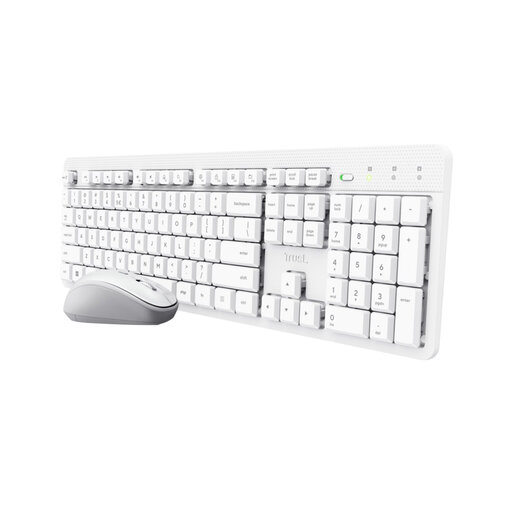
Why this fits the profile: A complete set for home working, study and basic use, with keyboard and mouse in one package.
The USB receiver can be stored magnetically, and the specifications mention quiet keys, an adjustable angle and spill resistance.
US QWERTY, 2.4GHz connection, numeric keypad and mouse with adjustable 800–1600 DPI.

Why this fits the profile: For those who share a desk with multiple devices and value a low profile.
The connection isn’t limited to just Bluetooth: 2.4GHz, Bluetooth 4.0 and Bluetooth 5.0 are all available.
Switch between up to four devices, quiet scissor keys and compatibility with Windows, Mac, Linux and Chrome OS.
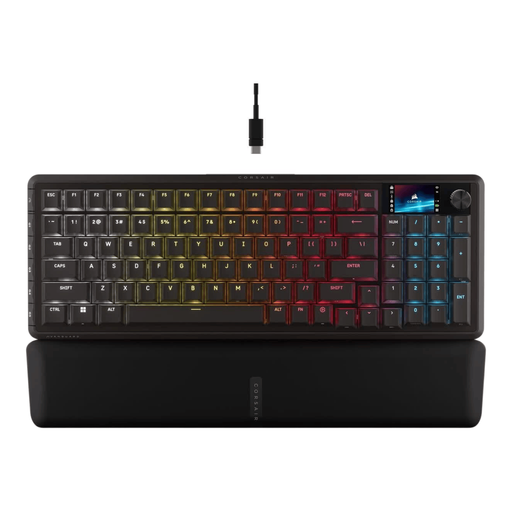
Why this fits the profile: For gamers and intensive users who want mechanical keys, programmable features and multiple connection options.
This is clearly a gaming keyboard with mechanical switches, USB-C, 2.4GHz, Bluetooth and wired mode; it’s not disguised as a simple office accessory.
96% layout with numeric keypad, hot-swappable switches, programmable keys and a built-in display according to the product specifications.
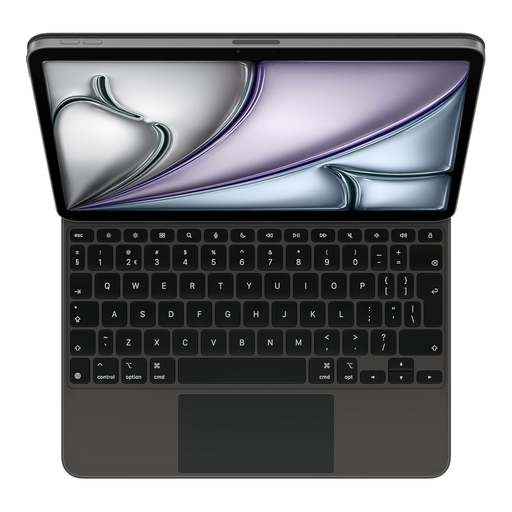
Why this fits the profile: For iPad users who want an integrated trackpad, protective cover and UK QWERTY layout.
The connection is via the Smart Connector, so you don’t need to set up a Bluetooth pairing for the keyboard. Just check that your iPad model is compatible.
Integrated trackpad, 14 function keys, adjustable viewing angle and USB-C pass-through for charging the iPad.
We’ve put together a full, up-to-date list of products that fully meet these strict selection criteria and comply with current European safety regulations.
Not always. A model with a USB receiver needs a suitable USB port. A Bluetooth keyboard requires Bluetooth support on the laptop or a separate adapter. Also check the supported operating system and the keyboard layout.
That depends on the battery type, usage and settings. A mouse on disposable batteries can last for months, but the stated duration varies from product to product. A rechargeable mouse avoids battery changes, but needs to be plugged in regularly. Check whether a charging cable is included and whether you can use the mouse while it’s charging.
A standard 2.4GHz set will only work if the iPad supports a suitable USB adapter and compatible receiver. For ease of use, a Bluetooth set or a specific iPad keyboard is usually more practical. With an Apple Magic Keyboard, you especially need to check the exact iPad model, screen size and language layout.
