
Vandaag of morgen in huis

Kwaliteit gegarandeerd

Welkomstaanbiedingen ontgrendelen: GRATIS bezorging | Tot 80% korting | Gratis 30 dagen JoyPlus-proefperiode
Download de app
A wireless keyboard US QWERTY might seem straightforward to choose at first glance. Yet many buyers fall for features that, in practice, matter less than the layout, connection method and key type. Home workers, students and office professionals in particular quickly notice when a keyboard doesn't suit their daily use.
So watch out for these common pitfalls:
A QWERTY US keyboard uses the American ANSI layout. If you work a lot in English, do programming or are used to an American keyboard layout, you may find this comfortable. Do check the language settings of Windows, macOS or ChromeOS though. The physical key markings and the software layout must match so that you can type special characters in the right place.
For financial administration, spreadsheets and stock management, a wireless keyboard with numeric keypad is often more convenient than a compact model. In that case, choose a full-size keyboard with around one hundred keys. Compact 60% and TKL models save space, but usually lack the separate number pad.
A keyboard with quiet keys often uses low-profile membrane keys or scissor mechanisms. These usually feel softer and quieter than mechanical switches. That suits shared workspaces, meeting rooms and video calls.
Mechanical keyboards can offer more feedback and customisation options, but they are not automatically quiet. Even models with sound dampening can produce a more noticeable keystroke sound. So don't just look at terms like "silent" or "mechanical feeling", but also at the specific switch type and the product description.
A keyboard with USB receiver usually works on a plug-and-play basis: insert the receiver into an available USB port and turn the keyboard on. Check beforehand whether your laptop or docking station has a suitable port. A USB hub may be necessary if only USB-C is available.
Also pay attention to the power source:
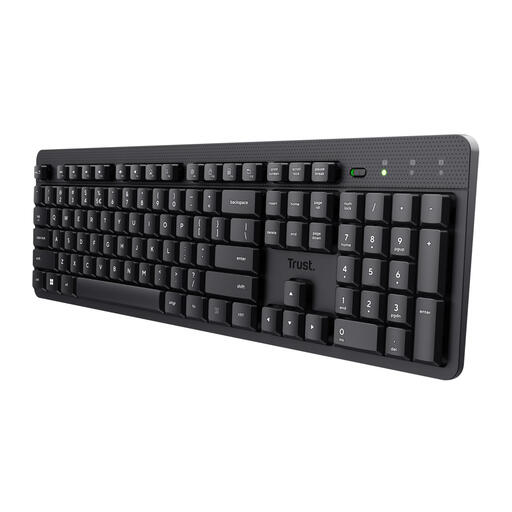
Why this fits the profile: This is a straightforward wireless keyboard for home working, study and general office use, with a US QWERTY layout and numeric keypad.
The product information specifies low-profile membrane keys, a USB receiver and a spill-resistant design. This makes the features more concrete than just the term "quiet".
Full-size ANSI layout, numeric keypad, media keys, on/off switch and a stated wireless range of up to 8 metres.
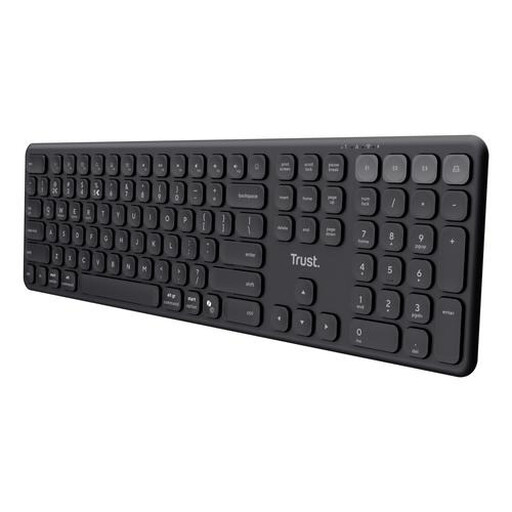
Why this fits the profile: Handy for flexible workers who want to control a laptop, tablet and smartphone from one full-size keyboard.
The connection options are clearly specified: one USB receiver and three Bluetooth channels. This makes the model suitable for multiple devices, unlike a basic receiver without a switching function.
Quiet scissor keys, full-size US QWERTY layout, USB-C rechargeable battery and support for Windows, macOS, iOS, Android and ChromeOS according to the product specifications.
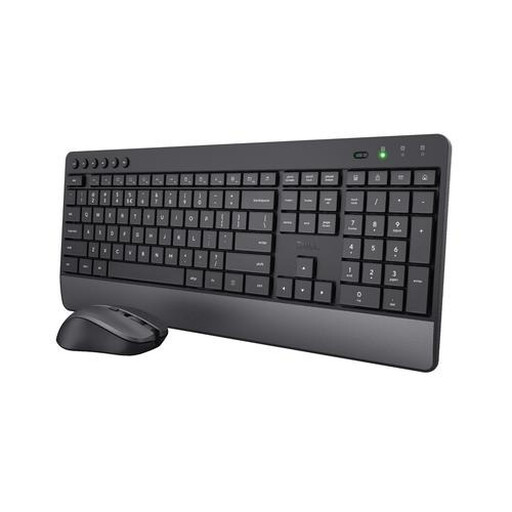
Why this fits the profile: A logical choice for a wireless office keyboard when you also need a mouse, wrist rest and a quiet workspace.
The set explicitly states a membrane keyboard, quiet keys and a USB-A nano receiver. So you know in advance that it is not a mechanical gaming model or a Bluetooth set.
Full-size US QWERTY keyboard with number pad, integrated wrist rest, mouse included and a stated range of up to 10 metres.
Insert the USB receiver directly into your computer or into a suitable hub. Install the batteries following the indicated polarity, or fully charge the built-in battery. Then test the keyboard language in a text field. For example, type the characters @, /, ? and : to check that the software setting matches the physical US layout.
Even with a spill-resistant keyboard, keep it away from liquid. If an accident happens, switch the device off, remove the batteries or cable and let it dry completely according to the manual. For cleaning, use a dry or slightly damp cloth; do not apply liquid directly to the keys.
We have compiled a full, up-to-date list of products that fully meet these strict selection criteria and comply with current European safety regulations.
Yes. Most computers support multiple keyboard layouts. You do need to select the correct language setting in Windows, macOS or ChromeOS. Otherwise, some symbols won't match the markings on the keys.
This varies per model, battery type, usage time and power-saving features. An on/off switch can help to limit consumption during breaks. For a battery-powered product, check whether batteries are included and whether the model is non-rechargeable.
A model with low-profile membrane or scissor keys is generally designed for quieter typing than a mechanical keyboard. The noise level also depends on the surface you use and your typing style. For a shared workspace, it is wise to read claims like "virtually silent" as a product description from the brand, not as an absolute guarantee.
