
Vandaag of morgen in huis

Kwaliteit gegarandeerd

Welkomstaanbiedingen ontgrendelen: GRATIS bezorging | Tot 80% korting | Gratis 30 dagen JoyPlus-proefperiode
Download de app
A wireless keyboard keeps your desk tidy and gives you more freedom when using your computer, laptop, tablet or smartphone. But it’s not wise to choose based only on price, appearance or promises such as “silent keys”. Differences in connectivity, layout, battery and size all affect how comfortable it is to use every day.
If you buy a wireless keyboard without checking the specifications, you may run into three common problems:
@, € and ?.A wireless keyboard usually connects via 2.4GHz radio frequency with a USB receiver, via Bluetooth, or using either option. A USB receiver is often straightforward: plug it in and start typing. Bluetooth is more convenient for tablets, smartphones and laptops with few spare ports.
A multi-device keyboard can be paired with several devices. Check how many devices it actually supports and how to switch between them. According to the product information, the Trust Lyra supports up to three devices via USB or Bluetooth. The Rapoo 9010M is listed as supporting up to four devices and combines 2.4GHz with Bluetooth 4.0 and 5.0.
Also check the operating system. The range includes models for Windows, macOS, Linux, Chrome OS, Android, iOS and iPadOS. Compatibility doesn’t always mean that every shortcut works in the same way on every system.
A QWERTY keyboard with a US layout is not the same as a Dutch ISO layout. So don’t just look at the letters: check the shape and position of the Enter and Shift keys, as well as the special characters.
The size determines how much desk space you’ll have left:
A compact keyboard saves space, but that doesn’t automatically make it suitable for everyone. If you enter numbers every day, you may miss having a numeric keypad.
A quiet keyboard often uses flat membrane or scissor keys. These are usually suitable for a shared workspace, home office or library. Mechanical switches offer a different typing feel and can respond faster, but noise levels vary depending on the switch and casing.
A wireless mechanical keyboard is worth considering if you’re a gamer or keyboard enthusiast who wants to replace switches or customise lighting and macros. Look out for terms such as hot-swap, N-key rollover, tri-mode connectivity and RGB lighting. These features are mainly useful if you’ll actually use them.
Finally, check the power source. Some models use AA or AAA batteries, while others have a built-in rechargeable battery. The stated battery life depends on factors such as lighting, connection type and how often you use the keyboard. With a rechargeable battery, it’s handy if you can keep typing while it charges.
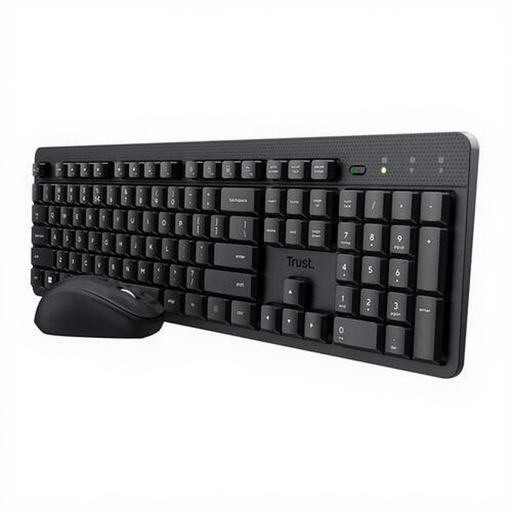
Why it suits this user: This wireless keyboard and mouse set is designed for everyday use at home, for study and in the office. Both devices use a single USB receiver.
The product information mentions quiet keys, an adjustable typing angle and a US QWERTY layout. This makes the key features clear before you buy.
One receiver for the keyboard and mouse, media keys and adjustable mouse sensitivity from 800 to 1600 dpi.
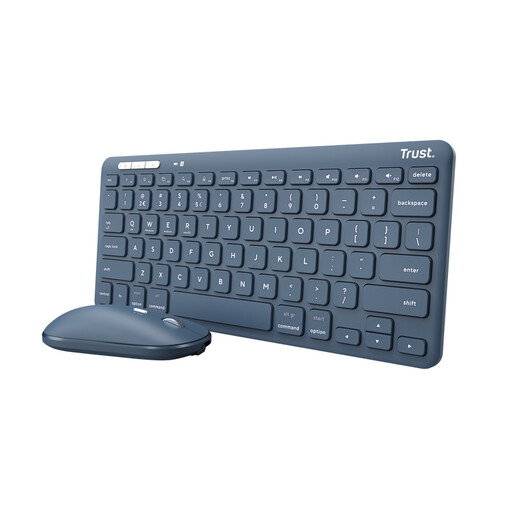
Why it suits this user: This compact set is a good fit for hybrid workers who switch between a computer, tablet and phone.
As well as USB radio, this model supports Bluetooth 5.0 and up to three paired devices. You’re therefore less dependent on a single connection type.
TKL size, scissor keys, rechargeable battery and support for Windows, macOS, Android, iOS, iPadOS and Chrome OS.
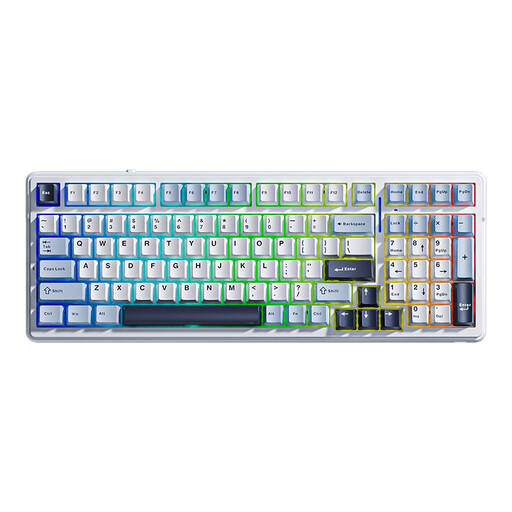
Why it suits this user: This model is designed for users who type, game and want to customise their keyboard.
Connectivity isn’t limited to Bluetooth: the keyboard also supports 2.4GHz and wired USB-C. The 96% layout retains a numeric keypad in a more compact design.
Hot-swappable PCB, RGB lighting, 99 keys, a stated 8000 mAh battery and N-key rollover.
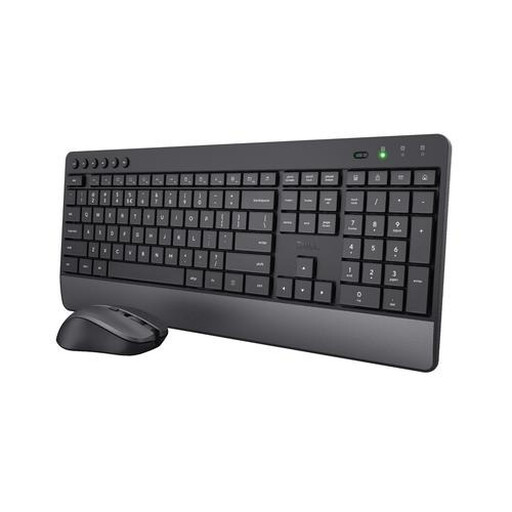
Why it suits this user: The full-size layout, integrated wrist rest and quiet keys are well suited to long working days with lots of text and number entry.
The product description specifically mentions a numeric keypad, US QWERTY layout and USB receiver. So you know exactly what you’re getting for your desk.
Quiet keys and mouse buttons, a wrist rest, adjustable mouse sensitivity from 1000 to 1800 dpi, and batteries according to the product information.
We’ve put together a complete, up-to-date list of products that meet these strict selection criteria and the applicable European safety regulations.
It depends on the connection. A Bluetooth keyboard can pair directly with a device that supports Bluetooth. A model with only a USB receiver usually needs a compatible USB port. If your laptop only has USB-C ports, check whether you’ll need an adapter.
Battery life varies by model, battery type and usage. According to product specifications, models that use replaceable batteries can last from several months to several years. A built-in battery needs to be recharged periodically. Lighting, frequent use and Bluetooth or radio connectivity can all affect battery life.
It can be, but check the noise level and type of switches. Mechanical keyboards often provide more tactile feedback and offer features such as hot-swap and RGB lighting. For a shared workspace, a quiet low-profile keyboard or scissor model is usually more practical. Before ordering, check the layout, connection and dimensions listed for each product.
