
Vandaag of morgen in huis

Kwaliteit gegarandeerd

Welkomstaanbiedingen ontgrendelen: GRATIS bezorging | Tot 80% korting | Gratis 30 dagen JoyPlus-proefperiode
Download de app
A wireless keyboard and mouse set with a US QWERTY layout might seem like a straightforward purchase at first. But many problems only become apparent after a few weeks: the layout turns out to be inconvenient, the mouse clicks are louder than expected, or the USB receiver isn’t compatible with your laptop. A few checks before you buy can help you avoid a costly mistake, whether you’re shopping for working from home, the office or studying.
A US QWERTY keyboard has an ANSI layout. The shape and position of keys such as Enter, Shift and the special character keys may differ from those on a Dutch or Belgian keyboard. So don’t just check whether “QWERTY” appears in the product name; look for an explicit mention of US layout, US English or ANSI too.
This is especially important if you work a lot with punctuation, keyboard shortcuts or programming code. Your computer’s software settings may also be set to Dutch, even though the physical characters are in different positions on the keyboard.
Manufacturers use terms such as quiet keys and quiet mouse clicks to describe different technologies. A membrane or scissor-switch keyboard generally makes a different sound from a mechanical model, but no physical keyboard is completely silent.
Check the specific details:
A wireless keyboard and mouse often work through a single USB receiver. This keeps your desk tidy, but a laptop with only USB-C ports may need an adapter. Check whether the receiver is USB-A or USB-C, and whether both devices connect through the same dongle.
Bluetooth is more flexible for tablets and smartphones, but it requires pairing and device support. A USB receiver is often simpler to use with a desktop PC or office computer.
A full-size keyboard with a numeric keypad is useful for spreadsheets, admin and entering financial data. A compact wireless keyboard without a number pad takes up less room and is more convenient for a shared workspace or when you’re on the go.
Check the dimensions too. A model with a wrist rest needs more desk depth. An adjustable stand can change the typing angle, but it’s no substitute for good posture or the right chair height.
Consider the connection type alongside the operating system. Some sets use radio frequency with a USB receiver, while others combine this with Bluetooth. Windows, macOS, ChromeOS, Android and iOS aren’t necessarily all supported by every Bluetooth keyboard and mouse set, so check the product specifications.
A multi-device keyboard and mouse is useful if you switch between a laptop, tablet and phone. Check how many devices it supports and how you switch between them. Dedicated buttons are easier than pairing again each time.
For a battery-powered set, the type and number of batteries matter. The stated battery life depends on usage, settings and battery type. A rechargeable set means you won’t need loose AA or AAA batteries, but you will need to charge it regularly.
“Spill-resistant” doesn’t mean waterproof. Don’t deliberately expose a keyboard to moisture, and disconnect the power supply straight away if you spill something on it. Clean it with a soft, dry cloth and keep the USB receiver in a safe place.
The recommendations below are based on verifiable features such as layout, connection, size, key type and included functions.
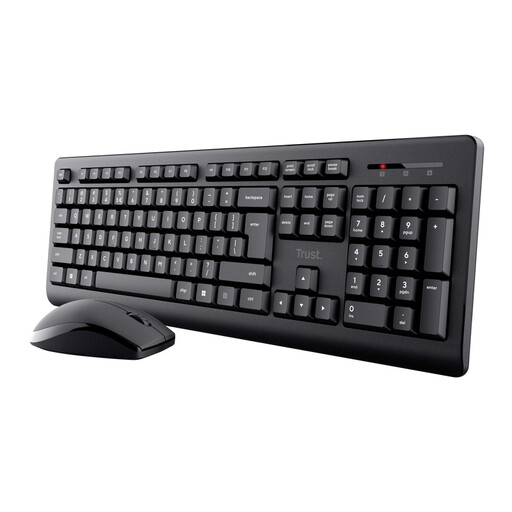
Why it suits this user: This full-size set combines a US QWERTY layout with a numeric keypad, quiet low-profile keys and a single USB receiver. It’s a good fit for people working from home and students who want to get started without a complicated set-up.
The US layout is clearly specified, and the keyboard and mouse use a single receiver. The spill-resistant design offers practical protection against minor spills, but it isn’t waterproof.
Membrane keys, numeric keypad, ambidextrous mouse, USB-C micro receiver with USB-A adapter and two AA batteries included.

Why it suits this user: The integrated wrist rest, full-size layout and cushioned keys are designed for long working days at home or in the office. The mouse is suitable for both left- and right-handed use.
The US QWERTY layout and membrane keys are specified. The mouse sensitivity can be adjusted to 1000, 1400 or 1800 dpi, so you’re not limited to a single speed.
Integrated wrist rest, numeric keypad, 2.4GHz nano receiver and stated battery life of up to 48 months for the keyboard and 12 months for the mouse.

Why it suits this user: This compact model is suitable for small desks, hot-desking and anyone who switches between a computer, tablet and phone. The set supports up to three devices.
It connects via one USB receiver and two Bluetooth channels. Do check beforehand whether you need a numeric keypad: this TKL model doesn’t have one.
Scissor switches, quiet mouse clicks, rechargeable battery, compatibility with Windows, macOS, iOS, iPadOS, Android and ChromeOS.

Why it suits this user: This set is designed for anyone who wants a simple wireless workspace with quiet keys and mouse buttons. The US QWERTY layout and compatibility with several computer systems make it versatile.
The USB receiver can be stored magnetically inside the keyboard. The mouse speed is adjustable from 800 to 1600 dpi, and the set has a spill-resistant design.
One RF receiver, adjustable typing angle, media and shortcut keys, US QWERTY layout, and support for Windows, macOS, Linux and ChromeOS.
We’ve put together a complete, up-to-date list of products that meet these strict selection criteria and the applicable European safety regulations.
For an RF set, plug the USB receiver into a free USB port and switch on the keyboard and mouse. Many models then work straight away, without any extra software. For Bluetooth, open your device’s Bluetooth settings and follow the pairing steps. Check whether you need an adapter if you have a USB-C laptop.
It varies by model, frequency of use and battery type. Some sets use standard AA or AAA batteries, while others have a built-in rechargeable battery. Stated battery life is a guide; heavy use, frequent Bluetooth switching or lots of mouse activity can affect how long the batteries actually last.
Yes, as long as your computer supports the keyboard layout you want to use. However, the physical keys will still have the US layout. Before buying, check the ANSI layout and, once it’s set up, make sure the software layout suits the way you work.
