
Vandaag of morgen in huis

Kwaliteit gegarandeerd

Welkomstaanbiedingen ontgrendelen: GRATIS bezorging | Tot 80% korting | Gratis 30 dagen JoyPlus-proefperiode
Download de app
A wireless keyboard and mouse set can make your desk tidier, but not every combination is suited to daily use. Home workers, students and people who switch between a laptop, tablet and desktop often run into the same issues: a connection that doesn’t work with every device, keys that are noisier than expected, or a mouse that feels uncomfortable after a short time.
So don’t just focus on a low price or terms like “multi-device”. Check the connections, layout and power source before you order.
Some sets work exclusively with a 2.4GHz USB receiver. That’s practical for a PC or laptop with a free USB port, but less suitable for a tablet or smartphone without a compatible adapter. A Bluetooth keyboard and mouse can be paired directly, whereas a USB receiver needs a physical port.
Also check whether both devices support the same connection method. On some combos, only the keyboard is multi-device, while the mouse can’t switch between devices independently.
“Silent” or “quiet” usually refers to a design that reduces typing or clicking noise. It doesn’t mean there’s no sound at all. A low-profile keyboard with scissor switches generally feels different from a mechanical model: the keys are flatter and the travel is shorter.
For a shared workspace, library or home office, a quiet version is often practical. If you prefer a deep, tactile keystroke, you might find a flat keyboard less comfortable.
A product may be listed as working with Windows, Mac, Linux and Chrome OS, but shortcut keys can differ between systems. Also check the keyboard layout. A US-QWERTY layout is not the same as a Dutch QWERTY or Belgian AZERTY layout. Pay particular attention to the position of punctuation marks, the Enter key and special characters.
For a keyboard and mouse for 4 devices, a combination of 2.4GHz and Bluetooth is handy. You can use the USB receiver for a desktop, for example, and Bluetooth for a laptop, tablet or phone. Look at:
A full-size keyboard usually includes a numeric keypad and takes up more space. A compact TKL or tenkeyless model leaves out the numeric block. For administrative work with lots of numbers, full-size can be more practical; for a small desk, a compact model is easier to position.
A scissor-switch keyboard with low-profile keys typically has a flat design. Check whether the model has an adjustable typing angle, indicator lights and shortcut keys for volume or media. These are concrete features you’ll notice every day, unlike general marketing terms like “premium feel”.
DPI indicates how sensitively the cursor responds to movement. An adjustable range, for example 800 to 1600 DPI or 800 to 2400 DPI, gives you room to adjust the speed. A higher DPI isn’t automatically better; it depends on screen size and personal preference.
Also consider:
With battery models, the battery life depends on settings and usage. A stated lifespan, such as “up to approximately 12 months”, should therefore be read as a product estimate under certain conditions, not as a fixed guarantee.
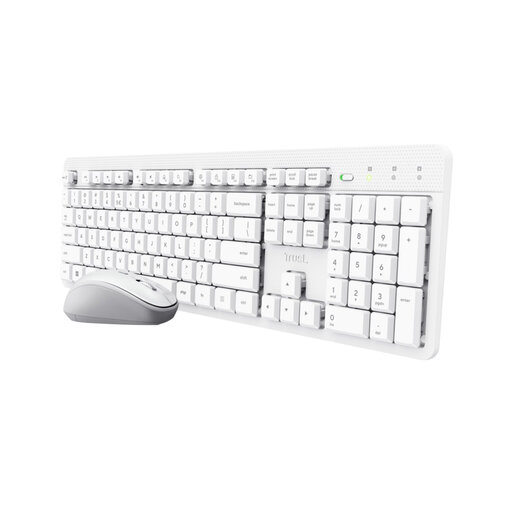
Why this fits the profile: This set is designed for simple use with a USB receiver. It suits students and home users who mainly operate one PC or laptop.
The set uses one magnetic USB receiver and has flat keys and quiet buttons. Note: the connection is RF via USB according to the description, not Bluetooth.
Adjustable typing angle, media and shortcut keys, 800–1600 DPI and compatibility with Windows, macOS, Linux and Chrome OS.

Why this fits the profile: Suitable for professionals who switch between a desktop, laptop, tablet and smartphone and want to use one set across multiple workstations.
The product specification mentions 2.4GHz, Bluetooth 4.0 and Bluetooth 5.0, plus switching between up to four devices. This means the connection isn’t limited to one USB port.
Low-profile scissor keys, quiet mouse clicks, adjustable 800–2400 DPI and support for Windows, Mac, Linux and Chrome OS.
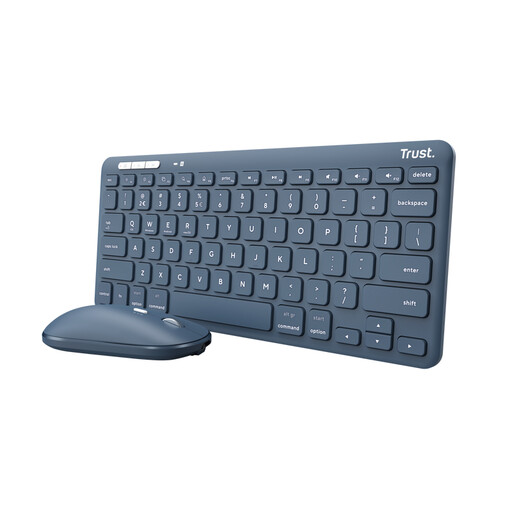
Why this fits the profile: A practical choice for anyone who needs a compact set for the office, home and mobile use with up to three devices.
The product specification lists both Bluetooth 5.0 and a USB connection, plus support for three devices. The TKL shape also prevents the desk from becoming unnecessarily cluttered.
Scissor keys, adjustable 800–1600 DPI, suitable for left- and right-handed use and a rechargeable battery according to the product information.
We’ve put together a full, up-to-date list of products that fully meet these strict selection criteria and comply with current European safety regulations.
Insert the batteries or charge the set. For a USB model, plug the receiver into a free port and turn on the keyboard and mouse. For Bluetooth, activate Bluetooth on your computer, tablet or smartphone and follow the pairing steps. Then check that both devices respond.
This varies by model, battery type, usage time and power-saving settings. Manufacturers sometimes state a lifespan of a few months up to around twelve months. This is an indication according to the product specifications. Switch off the set when you’re not using it for an extended period and remove batteries during long-term storage to help prevent leakage.
Not automatically. Check whether both systems are explicitly mentioned and look at the keyboard layout. A set may technically connect to Windows and Mac, but certain shortcut keys may function differently. For use with a tablet or smartphone, you also need to check whether Bluetooth is supported or whether a USB adapter is required.
