
Vandaag of morgen in huis

Kwaliteit gegarandeerd

Welkomstaanbiedingen ontgrendelen: GRATIS bezorging | Tot 80% korting | Gratis 30 dagen JoyPlus-proefperiode
Download de app
A wireless keyboard and mouse set keeps your desk tidier and is useful when switching between a laptop, PC, tablet or smartphone. However, not every wireless keyboard and mouse combination is automatically suitable for your workspace. The wrong layout, limited connection options or unclear battery information can cause frustration after purchase.
This buying guide helps you compare a wireless keyboard with mouse based on verifiable specifications. That way, you can choose a set suited to your working routine, desk size and devices.
Several layouts are available in the Netherlands. A QWERTY keyboard and mouse set with a US layout is not the same as a Dutch or Belgian AZERTY layout. Pay particular attention to the position of punctuation marks, the Enter key and symbols such as the euro sign.
If you touch-type, you may quickly get used to a different layout. For everyday office work, however, an unfamiliar layout can be inconvenient. Always check the product title and specifications before ordering.
Some sets work via a single 2.4 GHz USB-A receiver. Others use Bluetooth, or combine both technologies. A USB receiver is practical for a desktop or laptop with a free port. For a tablet or smartphone, Bluetooth is often more convenient.
Also check whether the keyboard and mouse share one receiver. This prevents you from occupying two USB ports. With a multi-device keyboard and mouse, it is also important to check how many devices can actually be paired at the same time.
Terms such as “quiet” and “ergonomic” can mean different things from one brand to another. Look at the specific features instead:
According to the manufacturer’s product information, these features may make the set more comfortable or quieter to use. This does not guarantee that every user will have the same experience.
A compact wireless keyboard is suitable for small desks, hot-desking areas and transport. A TKL model usually lacks a separate numeric keypad, but still offers the main keys needed for word processing. A full-size keyboard is wider, but more practical for figures, spreadsheets and administrative work.
Also check:
A wireless set for laptop and PC usually works via a USB receiver. Check whether your device has a USB-A port. Modern laptops with USB-C ports only may require an adapter.
Bluetooth is useful for tablets, phones and devices without a free USB port. Check that the set works with your operating system. Many models support Windows and macOS, while some also support Linux, Android, iPadOS or Chrome OS.
For battery-powered models, check the battery type and expected battery life. A long stated battery life generally depends on usage, settings and battery type. With a rechargeable set, charging time is more important: can you continue working while it charges, and is a cable included?
You must not open or replace a built-in lithium-ion battery yourself. Follow the manufacturer’s instructions and dispose of used batteries or electronic equipment in accordance with local recycling regulations.
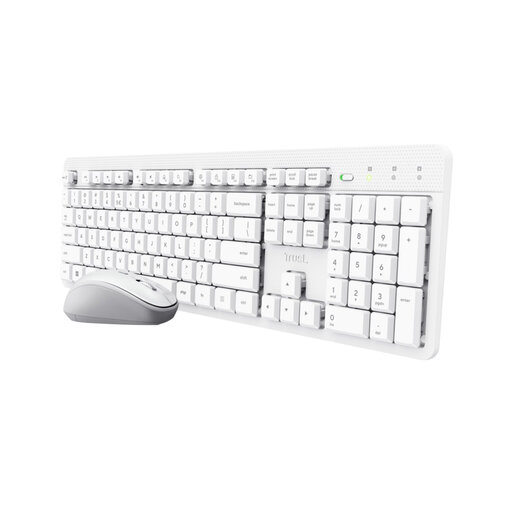
Why it suits this profile: According to the product information, this quiet keyboard and mouse set uses one USB receiver and works with Windows, macOS, Linux and Chrome OS. This makes installation simple for homeworkers, students and beginners.
The US QWERTY layout, RF connection and included batteries are clearly stated. The receiver can be stored magnetically, helping to prevent it from being lost while travelling.
Quiet keys and mouse buttons, adjustable DPI from 800 to 1600, and an adjustable typing angle.

Why it suits this profile: The Lyra is aimed at users looking for a compact set for several devices. According to the product information, up to three devices can be connected via a USB receiver and two Bluetooth connections.
The connection method and compatible systems are clearly described. You therefore do not have to rely solely on the general term “multi-device”.
Rechargeable keyboard and mouse, compact TKL format, quiet mouse click and stated battery life of up to six months per charge.

Why it suits this profile: This full-size set is designed for users who value a numeric keypad, wrist rest and quiet operation during longer working days.
The size, US QWERTY layout and presence of a numeric keypad are clearly stated in advance. This makes the set less suitable for small desks, but well suited to administrative work.
Integrated wrist rest, quiet keys, 2.4GHz receiver and stated battery life of up to 48 months for the keyboard.
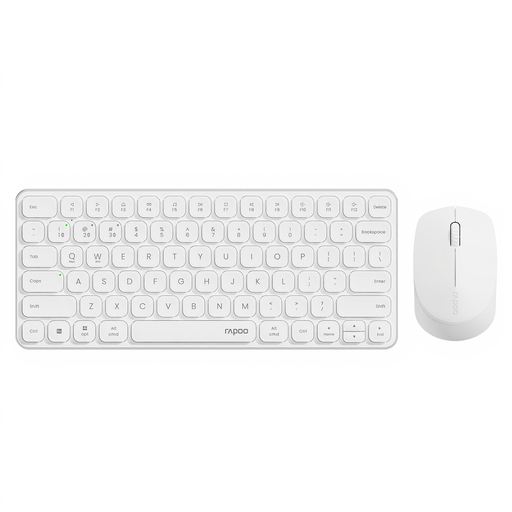
Why it suits this profile: According to the product information, the Rapoo 9010M supports up to four paired devices via 2.4GHz and Bluetooth. This suits a workspace with, for example, a PC, laptop, tablet and smartphone.
The number of connections and protocols used are specified. This gives you a better idea of whether the set suits your devices than a general claim about flexibility.
Low-profile scissor keys, quiet mouse click, four device profiles and adjustable mouse resolution from 800 to 2400 dpi.
We have put together a complete, up-to-date list of products that fully meet these strict selection criteria and the applicable European safety regulations.
Not always. Check whether the set works via Bluetooth, a USB-A receiver or both. Also check the supported operating systems. A laptop with USB-C ports only may require an adapter when using an RF receiver.
This varies by model, battery type and usage. Manufacturers often state a maximum battery life. According to the product information, the Trust Lyra offers up to six months per charge. The Trust Trezo Comfort is stated to offer up to 48 months for the keyboard and up to 12 months for the mouse when using batteries. Treat such figures as product specifications under certain usage conditions, not as a fixed guarantee.
A model with quiet or dampened keys and mouse buttons can help reduce noise in a shared space. Also check the mechanism, such as scissor, membrane or plunger. If comfortable typing is your main priority, you may also want to consider an adjustable typing angle, wrist rest and the spacing between the keys.
