
Vandaag of morgen in huis

Kwaliteit gegarandeerd

Welkomstaanbiedingen ontgrendelen: GRATIS bezorging | Tot 80% korting | Gratis 30 dagen JoyPlus-proefperiode
Download de app
A wireless keyboard and mouse set may seem like a straightforward purchase. Yet problems often only emerge after a few weeks: the connection drops, the keys are noisier than expected or the layout turns out not to suit your laptop. Home workers, students and office professionals who switch between multiple devices in particular should look beyond just the price and appearance.
Here are the main pitfalls and specifications to consider when choosing a wireless keyboard and mouse combination.
A set may work via a 2.4GHz USB receiver, Bluetooth or both. A USB receiver is practical for a PC with a spare USB port. Bluetooth is more convenient for tablets, smartphones and laptops with limited connectivity.
Also check how many devices you can actually pair. An inexpensive wireless keyboard and mouse set for laptop and PC may only support one connection. If you regularly switch between a work laptop, personal computer and tablet, a multi-device keyboard and mouse is a better choice.
Terms such as “silent” and “quiet click” do not automatically mean that every sound disappears. The type of switch, the shape of the keys and the surface you use all affect the experience. Low-profile keys with a scissor mechanism are often chosen for a laptop-style feel. With the mouse, the click mechanism is the main factor.
According to product information from Rapoo and Trust, certain models are designed for quieter typing and clicking. This is a manufacturer’s product claim; the actual noise level may vary from one user and desk to another.
In the Netherlands, a QWERTY layout is usually the safe choice, but there are several variants. A Belgian AZERTY keyboard feels different from a Dutch or US QWERTY model. So do not just check the language settings in Windows or macOS; also look at the physical markings on the keys.
For example, the HP 650 Wireless Keyboard and Mouse Combo has a Belgian AZERTY layout. This may be suitable for users who work with that layout, but it is less logical if you normally use QWERTY.
For flexible use, a combination of 2.4GHz and Bluetooth 4.0/5.0 is practical. The Rapoo 9010M uses both connection types and, according to the product information, is suitable for Windows, Mac, Linux and Chrome OS. For smartphones and tablets, however, check whether the operating system supports the shortcuts you need.
Pay attention to these points:
A keyboard and mouse for 4 devices is particularly useful if you work across several locations or use multiple devices. Rapoo states that the 9010M supports up to four paired devices. According to its product specifications, the Trust Lyra supports up to three devices.
A low-profile keyboard takes up little space and offers a typing feel similar to many laptop keyboards. A full-size model, on the other hand, includes a numeric keypad, which can be useful for spreadsheets and administrative work.
Also check:
A low profile is not automatically more comfortable. The right choice depends on your posture, desk space and preference for short or deep key presses.
Battery-powered sets are easy to use, but you need to keep AA or AAA batteries in stock. With a built-in rechargeable battery, you need to replace batteries less often, but charging is essential.
Check whether the manufacturer states a battery life and under which conditions. A claim such as “up to twelve months” is a manufacturer’s indication, not a guaranteed lifespan for every user. Switch devices off when you are not going to use them for an extended period, and remove batteries during long-term storage to help prevent leaks and corrosion.
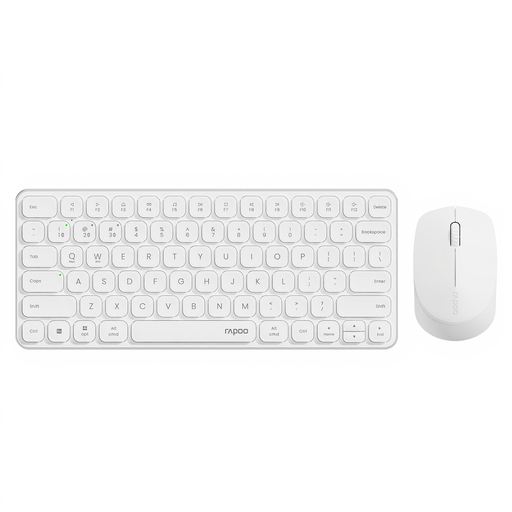
Why it suits this profile: A practical wireless office accessory for anyone who wants to use one set with a PC, laptop, tablet or smartphone.
The set combines 2.4GHz with Bluetooth 4.0/5.0 and states support for up to four paired devices. The keyboard and device indicators make the active connection easier to identify.
Low-profile scissor mechanism, quiet clicking according to Rapoo and adjustable mouse sensitivity from 800 to 2400 dpi.
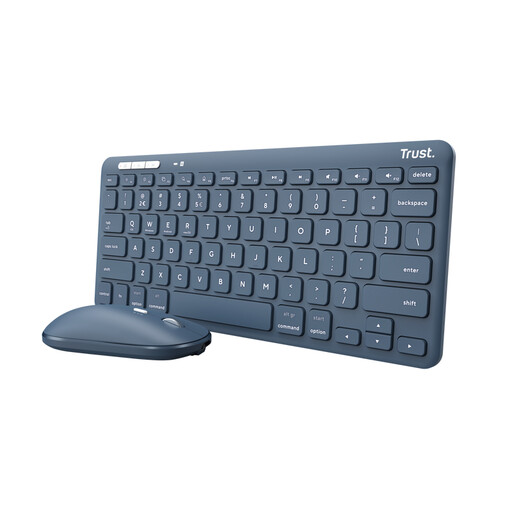
Why it suits this profile: Suitable for the office, home and on the go thanks to its compact size and ability to switch between multiple devices.
The product information specifies quiet flat keys, Bluetooth 5.0 and a radio connection. The layout is QWERTY, making the physical arrangement easy to check in advance.
Supports up to three devices, has a 1200 dpi optical mouse and a rechargeable battery according to the product specifications.
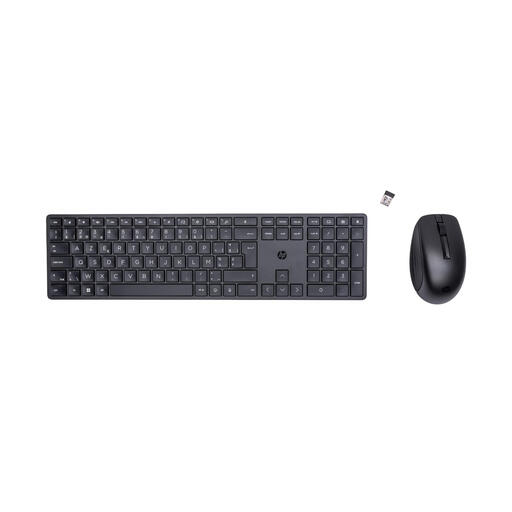
Why it suits this profile: A full-size set with a numeric keypad for users who enter lots of figures or have a permanent home workstation.
The connection is clearly specified as 2.4GHz RF with a USB receiver. The Belgian AZERTY layout is stated explicitly, so you can match it to your own typing habits.
Full-size design, membrane keys and a mouse with a stated resolution of 4000 dpi.
We have put together a complete, up-to-date list of products that fully meet these strict selection criteria and the applicable European safety regulations.
Setting up a wireless keyboard and mouse combination is usually straightforward:
If the connection is unstable, avoid using a USB hub where possible. If you experience Bluetooth problems, it can sometimes help to remove unused paired devices and reconnect the set.
They can, provided both devices are supported by the set. Check the product specifications for Windows, macOS, Linux, Chrome OS, iOS or Android. Shortcut keys may vary between operating systems. The Rapoo 9010M states support for Windows, Mac, Linux and Chrome OS.
Battery life depends on the battery type, connection method and how often you type or click. Manufacturers sometimes provide an estimated maximum duration. Treat this information as a guideline. Switch the set off when you have finished using it, and remove the batteries if you are storing the device for an extended period.
A model with low-profile keys and a quiet mouse click can help reduce background noise. According to product information from Rapoo, Trust and some other brands, their models are designed for this purpose. No wireless set is completely silent; the surface you use and the way you type still make a difference.
