
Vandaag of morgen in huis

Kwaliteit gegarandeerd

Welkomstaanbiedingen ontgrendelen: GRATIS bezorging | Tot 80% korting | Gratis 30 dagen JoyPlus-proefperiode
Download de app
A wireless keyboard and mouse set keeps your desk tidier and is useful for working from home, studying or setting up a dedicated PC. However, sets vary considerably in layout, noise level, comfort and connectivity. A low price does not necessarily mean a set is suitable for your workspace.
As a Joybuy Product Recommendation Officer, I focus mainly on verifiable specifications. Marketing terms such as “quiet”, “ergonomic” or “multi-device” only matter when it is clear exactly what you are getting.
A QWERTY keyboard and mouse set is not automatically suited to Dutch users. Some models have a US layout, while others have a UK layout. The position of the Enter key, Shift key and punctuation marks, among other things, may differ.
So always check:
If you regularly enter numbers, a full-size keyboard with a numeric keypad will usually be more useful than a compact model.
A quiet wireless keyboard and mouse often uses membrane, chiclet or low-profile keys. This can reduce typing noise, but the noise level also depends on how you type and on the surface of your desk. The same applies to the mouse buttons.
Brands can make their own noise claims, but these are not a universal guarantee. According to Trust’s product information, the keys and mouse buttons on the Ody II and Trezo Comfort are designed to provide a softer, quieter click. For the HP 285 Silent Wireless Mouse, HP states in its own product information that noise can be reduced by up to 90 per cent for the left and right buttons. Treat this as a product specification, not a promise that no sound at all will be audible.
Many sets work via a 2.4GHz USB receiver. This is straightforward on a PC or laptop with a spare USB-A port, but less convenient if you only have USB-C connections. A Bluetooth set can connect directly to certain laptops, tablets and phones, although the set-up process varies from one device to another.
Also pay attention to the receiver. With some sets, the keyboard and mouse share a single nano receiver. This saves a USB port, but you need to keep the receiver safe when taking the set with you.
For a wireless set for laptop and PC, first check the connection:
Also check the operating system listed. Windows, macOS, Linux and ChromeOS are not supported in exactly the same way by every set. Media keys and shortcuts may work differently depending on the system.
A full-size model takes up more space, but often provides a numeric keypad and a familiar layout. A slim model is easier to take with you. For everyday office work, the following points are relevant:
An ergonomic keyboard and mouse may complement your posture comfortably, but the shape alone does not determine whether a set will be comfortable for you. Position the keyboard and mouse directly in front of you, keep your shoulders relaxed and take regular short breaks.
Battery life is usually stated as “up to” a certain number of months. Actual battery life depends on usage, the connection and the battery type. Check whether batteries are included and whether the keyboard and mouse use separate batteries.
A rechargeable mouse avoids the recurring cost of replacement batteries, while a set powered by AA or AAA batteries is easy to use straight away. So do not look only at the purchase price; consider the long-term upkeep as well.
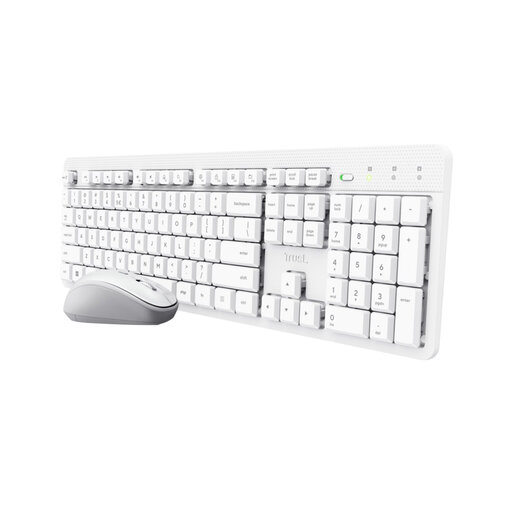
Why it suits this profile: This set is aimed at home workers, students and office users looking for a simple USB receiver and a tidy desk. The product information lists a US QWERTY layout, compatibility with Windows, macOS, Linux and ChromeOS, and adjustable DPI from 800 to 1600.
The layout and connection are clearly specified. The magnetic receiver can be stored in the keyboard, making it less likely that you will lose it.
Quiet keys according to Trust, one USB receiver, adjustable typing angle and media controls.
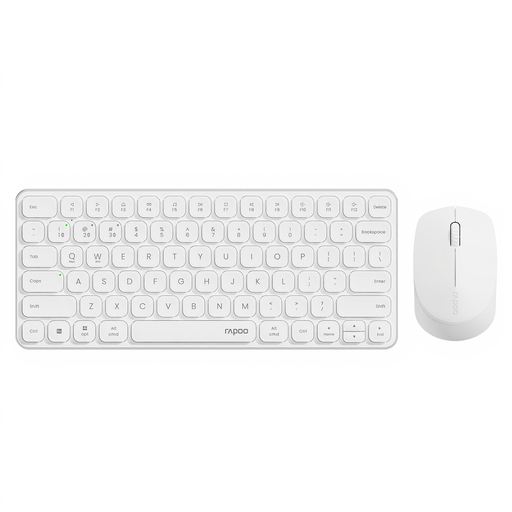
Why it suits this profile: This multi-device keyboard and mouse set is designed for users who switch between up to four devices, such as a laptop, desktop, tablet or phone.
You are not restricted to a single USB-A port: the set supports 2.4GHz and Bluetooth 4.0/5.0. However, check beforehand that your devices support these connections.
Connection to up to four devices, low-profile scissor keys, quiet clicking and adjustable mouse resolution from 800 to 2400 DPI.

Why it suits this profile: The full-size layout with numeric keypad and integrated wrist rest is well suited to intensive office work and frequent text or number entry. According to Trust, the set is made from 85 per cent recycled material.
The US QWERTY layout, size and battery information are clearly stated. This means you know in advance that it is not a compact Dutch ISO model.
Quiet keys according to Trust, wrist rest, numeric keypad, 2.4GHz receiver and adjustable DPI of 1000, 1400 or 1800.
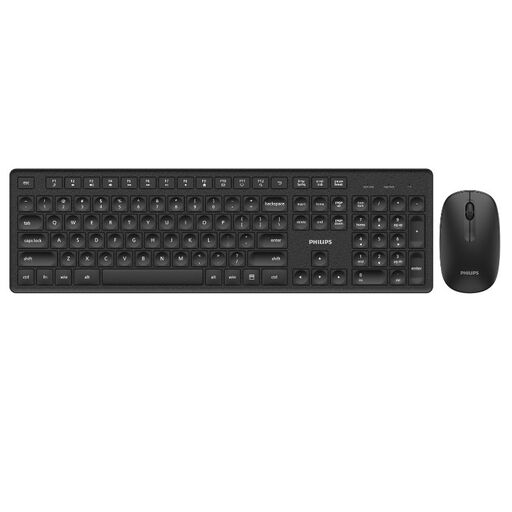
Why it suits this profile: This full-size wireless keyboard and mouse set is suitable for a straightforward PC or laptop workspace where a UK QWERTY layout is preferred. The mouse is described as having a quiet click in the product name.
The UK layout and full-size design are explicitly stated. Check the product images and layout before ordering, especially if you are used to a Dutch keyboard.
Full-size design, 2.4GHz USB receiver and a mouse designed for quieter clicking according to the product description.
We have compiled a complete, up-to-date list of products that fully meet these strict selection criteria and the applicable European safety regulations.
With a 2.4GHz set, connect the receiver to a spare USB port, insert the batteries and switch on the keyboard and mouse. If the set does not work straight away, first check the on/off switch, battery orientation and USB connection. Keep the receiver as far as possible from metal obstructions.
Use a mouse mat on a non-reflective surface. Store a separate receiver with the keyboard or in the mouse’s battery compartment when transporting the set. This reduces the risk of loss or damage.
Yes, provided the laptop has a spare USB-A port or supports Bluetooth. If your laptop only has USB-C, you may need a suitable adapter for a set with a USB-A receiver.
This varies by model and usage. Manufacturers often state a maximum operating time. According to Trust, the Trust Trezo Comfort offers up to 48 months for the keyboard and up to 12 months for the mouse. Treat such figures as an indication and check which battery type is required.
A quiet set can reduce typing and clicking noise, but it will not make your work completely silent. Check that both the keyboard and mouse offer quiet operation. A model with low-profile keys and dampened mouse buttons is generally better suited to a shared workspace than a mechanical keyboard with loud switches.
