
Vandaag of morgen in huis

Kwaliteit gegarandeerd

Welkomstaanbiedingen ontgrendelen: GRATIS bezorging | Tot 80% korting | Gratis 30 dagen JoyPlus-proefperiode
Download de app
A wireless keyboard and mouse set helps keep your desk tidy and is useful for working from home, studying or everyday computer use. Yet choosing one can be trickier than it first seems. A low price, the word “quiet” or a Bluetooth logo doesn’t tell you everything about how practical a set will be.
Look out for these three common pitfalls:
For many Dutch users, a QWERTY keyboard and mouse is a natural choice. Still, check whether it’s US QWERTY or another QWERTY variant. With a US layout, the position of punctuation marks and special characters may differ.
A Belgian AZERTY model, such as certain Dell and HP sets, is best suited to anyone who is already used to that layout. Also consider the size:
A USB keyboard and mouse set usually uses a single nano or micro receiver for both devices. This saves a USB port and is often plug and play. Check in advance that your computer has a suitable USB port. If it only has USB-C, you may need an adapter.
A Bluetooth keyboard and mouse works without a separate receiver, but your computer, tablet or phone needs to support Bluetooth. Sets with both options offer flexibility when switching between devices. The Trust Lyra and Rapoo 9010M, for example, specify support for multiple paired devices.
Check the stated range too. Manufacturers often quote around 8 to 10 metres under ideal conditions. Walls, metal surfaces and other 2.4GHz devices can affect the actual range.
A quiet keyboard and mouse set is useful in a shared study, library or office. Membrane keys and scissor switches generally feel different from mechanical switches. If you expect a distinct click or a deep keystroke, a quiet office set may not be the best fit.
These specifications can help you assess comfort:
A splash-resistant keyboard is not waterproof. If you spill a drink, it’s still important to clean it carefully and switch it off straight away.
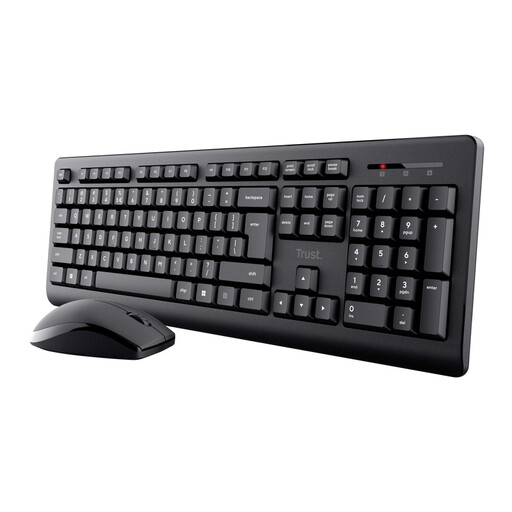
Why it suits this profile: This full-size set combines a US QWERTY layout, numeric keypad and a single USB receiver. That makes it practical for everyday use with a PC or laptop.
The product details specify quiet, low-profile membrane keys, a splash-resistant design and an ambidextrous mouse. This makes it easy to check the key features before you buy.
One receiver for both devices, a numeric keypad, US QWERTY layout and a USB-C to USB-A adapter included.

Why it suits this profile: This compact set is designed for users who switch between a laptop, tablet and computer and want to keep their desk tidy.
The product description specifies USB and Bluetooth connectivity, pairing with up to three devices and dedicated switching buttons. This makes the connection options clear.
Scissor switches, rechargeable batteries, support for multiple operating systems and an ambidextrous mouse with adjustable speed.

Why it suits this profile: This full-size set is designed for long working days, with quiet keys, an integrated wrist rest and a numeric keypad.
The specifications explicitly list an integrated wrist rest, quiet low-profile keys and a USB receiver. Do check that the US QWERTY layout suits what you’re used to.
Adjustable mouse sensitivity of 1000, 1400 or 1800 dpi, splash-resistant features and a stated long battery life.
We’ve put together a complete, up-to-date list of products that meet these strict selection criteria and the applicable European safety regulations.
Not necessarily. A USB set needs a spare USB port. If your laptop only has USB-C, check whether an adapter is included or choose a Bluetooth model. Also check which operating systems are supported, such as Windows, macOS, Chrome OS, Linux, Android or iPadOS.
It varies by model, battery type, usage and power-saving features. Some sets use AA or AAA batteries; others have a rechargeable battery. Manufacturer estimates depend on how the set is used. Switch the devices off when you can, and don’t leave loose batteries in an unused device for long periods.
Yes, as long as the layout, connection and ergonomics suit your work. Quiet keys and mouse clicks are useful in a shared space. A numeric keypad comes in handy if you work with lots of figures. If you switch between a PC, laptop and tablet, Bluetooth or a multi-device model is more useful than a basic USB set.
