
Vandaag of morgen in huis

Kwaliteit gegarandeerd

Welkomstaanbiedingen ontgrendelen: GRATIS bezorging | Tot 80% korting | Gratis 30 dagen JoyPlus-proefperiode
Download de app
A wireless keyboard and mouse set keeps your desk tidier and is practical for working from home, studying and office work. However, there are a few potential pitfalls. For example, a quiet set may still have a loud mouse click. “Wireless” is also sometimes used to describe Bluetooth models, while your desktop computer may only have a spare USB port.
So don’t focus solely on the price or appearance. Above all, check the layout, connection, dimensions and the type of use the combination is designed for.
In the Netherlands, both QWERTY US and AZERTY and UK layouts are available. The keys may look similar, but symbols such as @, " and ? are in different places. If you order a set without checking because it only says “QWERTY”, you may therefore receive an inconvenient layout.
So check whether QWERTY US or US English is explicitly stated. This is particularly important for students, programmers and people working from home who are used to an American layout.
Quiet keys are usually membrane, low-profile or scissor keys that make less noise than mechanical switches. The noise level also depends on how you type and the surface underneath. Also check whether the mouse has quiet buttons. With some sets, only the keys are dampened.
A spill-resistant keyboard can, according to the product description, cope better with a limited amount of spilt liquid. This does not mean that you can rinse the keyboard or continue using it if moisture has entered the casing. If an accident happens, switch off the equipment, disconnect the USB receiver and allow everything to dry completely in accordance with the safety instructions.
A keyboard with a numeric keypad is useful for figures, spreadsheets, administration and bookkeeping. However, a full-size model takes up more space. Measure your desk before ordering.
Compact models, such as a tenkeyless keyboard, generally do not have a separate numeric keypad. They are easier to carry around and fit better on a small desk, but are less practical for entering lots of figures.
A set with one USB receiver is often easy to install: connect the receiver, insert the batteries and switch on the devices. Do check that your computer has a suitable USB-A or USB-C port. Some products include a micro receiver with a converter.
Bluetooth is useful if you switch between, for example, a laptop, tablet and smartphone. Check how many devices can be paired at the same time and whether your operating system is supported. A USB radio connection and Bluetooth are not the same, even though both are wireless.
A left- and right-handed mouse generally has a symmetrical shape. This is practical in a shared working environment or when several people use the same computer. Also look at the DPI value. An adjustable setting, such as 800 to 1600 dpi, allows you to adjust the cursor speed. An extremely high DPI value is not necessary for normal office work.
An ergonomic keyboard or ergonomic mouse may feel comfortable, but “ergonomic” does not guarantee that the product will suit everyone. Consider the shape, key height, adjustable feet and any wrist rest. When using the equipment for long periods, take regular breaks and adjust your workstation properly.
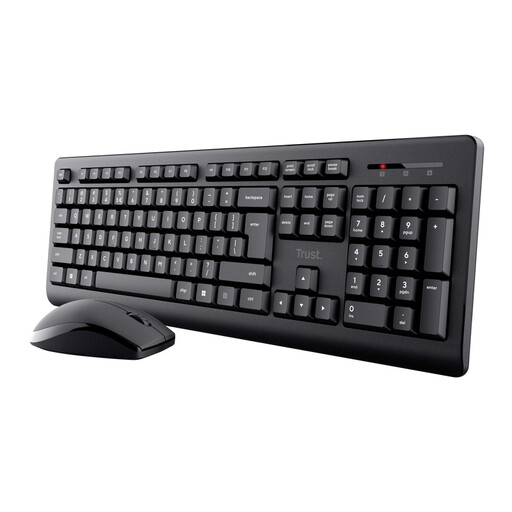
Why it suits this profile: This Trust Primo wireless set combines a full-size QWERTY US keyboard with a mouse for everyday work, study and home use. According to the product information, both devices work via a single USB receiver.
The layout is listed as QWERTY US and the description mentions quiet low-profile keys and a spill-resistant design. Spill-resistant does not mean waterproof.
Numeric keypad, symmetrical mouse, adjustable feet and, according to the product details, 70% pre-consumer recycled plastic.

Why it suits this profile: This combination is designed for long working days where an integrated wrist rest, full-size layout and quiet operation are important.
The product details mention quiet keys and mouse buttons, so “quiet” does not refer only to the keyboard. The US/QWERTY layout is listed separately.
Numeric keypad, wrist rest, adjustable mouse sensitivity of 1000/1400/1800 dpi and RF connection via a nano receiver.

Why it suits this profile: This compact set is suitable for users with a small desk or several devices. According to the product information, you can connect up to three devices via a USB receiver and Bluetooth.
The connection options and the lack of a numeric keypad are clearly described. This means you know in advance that this is not a full-size office layout.
Rechargeable design, scissor keys, connections for three devices and a symmetrical mouse with adjustable DPI.
We have put together a complete, up-to-date list of products that fully meet these strict selection criteria and the applicable European safety regulations.
With an RF set, insert the supplied USB receiver into a spare USB port. Then insert the batteries, switch on the keyboard and mouse, and wait for the computer to recognise the devices. With Bluetooth models, you need to pair the devices via the Bluetooth settings.
Battery life depends on the model, the batteries and how often you use the set. A wireless set powered by AA or AAA batteries can operate for months or several years, according to the stated product specifications. Rechargeable models need to be charged periodically. Switch off the keyboard and mouse when you are not going to use them for an extended period.
Yes, a keyboard for office work and working from home is particularly practical when you choose quiet keys, a stable USB connection and a suitable layout. For entering lots of figures, a full-size model with a numeric keypad is the logical choice. For a small desk or several devices, a compact Bluetooth set may be a better fit.
