
Vandaag of morgen in huis

Kwaliteit gegarandeerd

Welkomstaanbiedingen ontgrendelen: GRATIS bezorging | Tot 80% korting | Gratis 30 dagen JoyPlus-proefperiode
Download de app
A wireless keyboard and mouse set keeps your desk tidier and is ideal for working from home, studying and office use. Yet many sets look very similar. A low price, the word “quiet” or a long range does not automatically mean the combination is right for your computer and workspace.
The most common buying mistakes usually come down to three things:
For Dutch users, a QWERTY keyboard and mouse is often the practical choice, but check whether it is a US QWERTY layout or another variant. For example, the Trust Ody II and Trust Trezo Comfort use a US/QWERTY layout. Philips offers a UK/QWERTY layout for the model mentioned.
If you are used to a Belgian layout, it is better to look for an AZERTY keyboard and mouse. The Dell KM5221W and HP 650 have a Belgian AZERTY layout. Do not just look at the letters, but also check:
A different layout is not a defect, but it can be inconvenient if you type a lot every day.
A set with a USB receiver keyboard and mouse generally works on a simple plug-and-play basis. You plug the receiver into a USB port and both devices usually connect through the same receiver. This is convenient for a desktop PC or laptop with USB-A.
A Bluetooth keyboard and mouse does not need a separate receiver. This is practical for laptops, tablets and smartphones, as long as the device supports Bluetooth. Some models combine both options:
Check how many USB ports your laptop has beforehand and whether you want to switch between devices. A USB receiver may be simpler, while Bluetooth often offers greater flexibility.
A full-size keyboard usually includes a numeric keypad. This is useful for administration, spreadsheets and entering figures, but it takes up more space. A compact TKL model leaves out the numeric section and is better suited to a small desk or laptop bag.
When it comes to a quiet keyboard and mouse, this often means membrane or scissor keys and dampened mouse buttons. According to Trust’s product description, the keys and buttons on the Trezo Comfort are designed for softer, quieter operation. This is useful in a shared study, but “quiet” does not mean completely silent.
Also consider the power supply:

Why it suits this profile: This set offers a simple wireless starting point for working from home, studying and everyday computer use. The US/QWERTY layout and single USB receiver are clearly specified.
The product information clearly states the layout, connection and DPI setting, so you are less reliant on general comfort claims.
Quiet keys and mouse buttons, adjustable mouse speed from 800–1600 DPI and compatibility with Windows, macOS, Linux and Chrome OS.
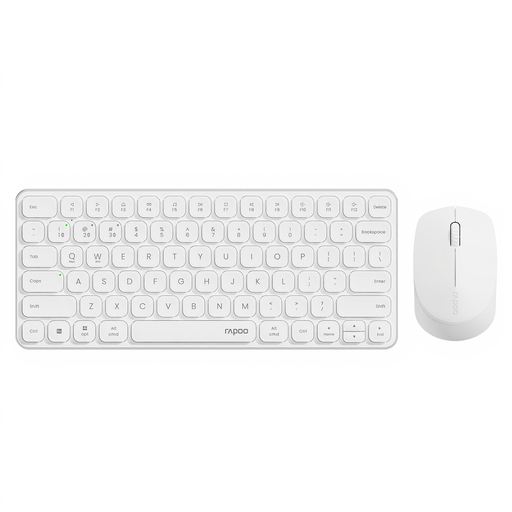
Why it suits this profile: For users working with a PC, laptop, tablet and phone, the combination of 2.4 GHz and Bluetooth is practical. The keyboard supports up to four paired devices.
The connection options and number of devices are stated specifically. This allows you to match the set to your own workstation.
Low-profile scissor keys, quiet clicks, adjustable mouse resolution from 800–2400 DPI and support for Windows, macOS, Linux and Chrome OS.
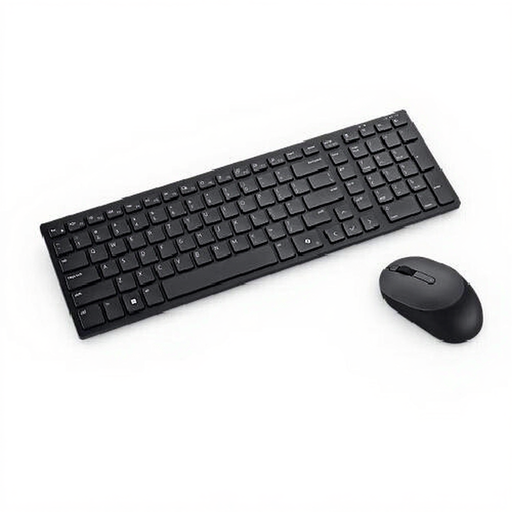
Why it suits this profile: This set is designed for users who need a Belgian AZERTY layout, numeric keypad and multiple connection options for everyday office work.
The Belgian AZERTY layout and compatible connections are clearly specified. This reduces the risk of choosing the wrong layout or missing out on Bluetooth functionality.
Bluetooth 5.1 and RF connection, full-size design, numeric keypad and an optical mouse with 4020 DPI according to the product specifications.

Why it suits this profile: The full-size design with wrist rest is ideal for home workers and office professionals who type frequently and have a dedicated workspace.
The product description explicitly mentions quiet keys, a wrist rest, a USB nano receiver and the full-size design.
US/QWERTY layout, adjustable DPI of 1000/1400/1800 and, according to Trust, up to 48 months of battery life for the keyboard.
We have put together a complete, up-to-date list of products that fully meet these strict selection criteria and the applicable European safety regulations.
Sets with a USB receiver generally do not require separate software. Connect the receiver, insert the batteries and switch on the devices. With Bluetooth, you need to pair the set once via your laptop’s Bluetooth settings. Make sure your laptop has a suitable USB port.
This varies depending on the model, frequency of use and battery type. Product specifications sometimes quote a lifespan ranging from several months to several years. These figures are indicative. A set with a rechargeable battery avoids the need for loose batteries, but does require regular charging.
It can be, but pay attention to the size and key layout. A full-size model with a numeric keypad is practical for figures and administrative tasks. A compact keyboard saves space, but often lacks the numeric section. Also check that the mouse shape and DPI setting suit the way you work.
