
Vandaag of morgen in huis

Kwaliteit gegarandeerd

Welkomstaanbiedingen ontgrendelen: GRATIS bezorging | Tot 80% korting | Gratis 30 dagen JoyPlus-proefperiode
Download de app
A wireless keyboard and mouse set keeps your desk tidier and is useful when you switch between a laptop, PC or tablet. However, not every combination is suitable for everyday use. The wrong keyboard layout, limited connectivity or unclear battery information can quickly become frustrating.
In this buying guide, you’ll find out what to look for in a quiet wireless keyboard and mouse combination, which features are practical for the office and working from home, and which popular choices suit different types of user.
Manufacturers often use terms such as “silent” or “quiet” only for the mouse buttons. Meanwhile, the keyboard may still be clearly audible. Therefore, check each of the following separately:
A quiet mouse reduces clicking noise according to the product information, but the actual experience may vary depending on the user and the surface.
A set with a 2.4GHz USB receiver usually works easily with a PC or laptop that has a free USB-A port. Bluetooth is more practical for tablets and modern laptops without traditional USB ports. Some combinations support both options, but that does not automatically mean you can use four devices at the same time.
Therefore, check whether it offers:
A keyboard with a UK QWERTY layout is not the same as a Dutch keyboard layout. Pay attention to the position of the Enter key, @, quotation marks and special characters, among other things. If you type a lot every day, this is more important than a slim design or extra multimedia keys.
For a wireless mouse for laptop and PC, a USB receiver is convenient if you want to get started quickly. Bluetooth avoids the need for an extra dongle, but the pairing process may vary from one device to another. A Bluetooth keyboard and mouse is particularly practical for tablets and laptops with few available ports.
If you work with several devices, look for a multi-device keyboard and mouse. Check the maximum number of paired devices and how you switch between them. In practice, a button or function key is easier than pairing again every time.
A low-profile keyboard takes up less space and works well on a compact desk. Scissor-switch keys generally have a short travel distance. According to the product descriptions of some models, these keys are designed for quieter typing, but the noise level also depends on how heavily you type and on the surface.
A full-size keyboard includes a numeric keypad. This is useful for administration, spreadsheets and financial data entry. For students or people working from home with a small table, a compact model may provide more room to move.
Many sets run on AA or AAA batteries. This means there is no charging cable on your desk, but you will need to keep spare batteries available. Manufacturers sometimes quote a battery life of up to twelve months, for example. This is a statement from the brand and depends on how frequently you use the set, the connection mode and the power-saving settings.
Also look out for:
An ergonomic wireless mouse may have a shape that provides more support for your hand, but “ergonomic” does not guarantee that every hand will find the shape comfortable. Consider the width, height, weight and whether it is suitable for left- or right-handed use.
For general office work, an adjustable resolution of around 800 to 2400 dpi is often sufficient. A compact wireless mouse is easy to carry around, but usually provides less hand support than a larger model.
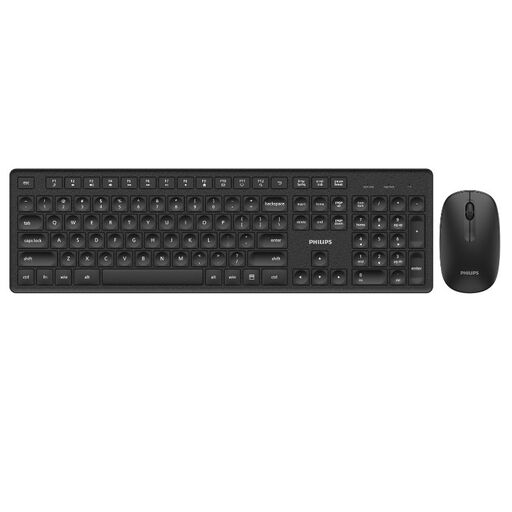
Why it suits this profile: This keyboard and mouse set for the office or home offers a straightforward 2.4GHz connection via a single USB receiver. However, check beforehand that the UK QWERTY layout suits your typing habits.
The connection method is clearly stated. The main thing to check is the UK layout, so you do not encounter different key positions only after buying.
Full-size keyboard, wireless 2.4GHz connection and a quiet mouse click according to the product listing.

Why it suits this profile: The combination supports 2.4GHz and Bluetooth 4.0/5.0 and, according to the product specifications, can be used with up to four devices. This is ideal for a workspace with a laptop, PC and tablet.
You are not limited to Bluetooth or a USB port alone. The connection options and device switching can be checked in advance.
Low-profile scissor-switch keys, adjustable mouse resolution from 800 to 2400 dpi, and compatibility with Windows, Mac, Linux and Chrome OS.

Why it suits this profile: This set is designed for everyday office and home use, with a full-size keyboard, a wrist rest according to the product description, and a single wireless receiver for the keyboard and mouse.
The US QWERTY layout is stated clearly, allowing you to compare it with your current keyboard beforehand. The receiver uses a single USB connection.
104 keys, a stated wireless range of up to 10 metres, and an energy-saving design with a battery life of up to twelve months quoted by the manufacturer.
We have put together a complete, up-to-date list of products that fully meet these strict selection criteria and the applicable European safety regulations.
That varies by model. Check the stated operating systems and keyboard shortcuts. The Rapoo 9010M lists compatibility with Windows, Mac, Linux and Chrome OS. With other sets, the hardware may work, while certain function keys respond differently.
Battery life depends on the type of battery, the connection mode and how intensively you type and click. Manufacturers sometimes quote a period of up to twelve months, but this is an estimated product life under certain usage conditions. An on/off switch and sleep mode can help reduce power consumption.
For a desktop PC with USB-A, a receiver is often quick to install. Bluetooth is useful for laptops and tablets without a free USB port. If you work with several devices, choose a multi-device keyboard and mouse with a clear switching button and check how many devices can remain paired at the same time.
