
Vandaag of morgen in huis

Kwaliteit gegarandeerd

Welkomstaanbiedingen ontgrendelen: GRATIS bezorging | Tot 80% korting | Gratis 30 dagen JoyPlus-proefperiode
Download de app
A wireless keyboard and mouse set keeps your desk tidier and is handy for working from home, studying or using on the go. But choosing the wrong one can quickly lead to frustration. The keyboard layout may be awkward, the mouse may start to feel too small after a few weeks, and the wireless connection may not work with every device.
The main pitfalls are usually not obvious features, but details you only notice after buying. So pay particular attention to the following.
A product may be described as QWERTY even though it has a US International or ANSI layout. This differs from a Dutch ISO QWERTY layout. The Enter key, left Shift key and some punctuation marks may be in different positions.
Before buying, check:
For everyday typing in Dutch, a QWERTY keyboard is often practical, but always check the physical layout on the product page. A Belgian AZERTY set, such as the DELL KM7120W in its AZERTY version, is not the same as a Dutch office layout.
An RF wireless keyboard usually uses a 2.4 GHz USB receiver. This is handy for a desktop PC or laptop with a spare USB-A port. A Bluetooth keyboard and mouse connects directly to Bluetooth-enabled devices, such as tablets and smartphones.
A USB receiver may require an adapter if you have a slim laptop without a USB-A port. Also check whether one receiver connects both devices. Some sets do; separate products may not.
Sets with more than one connection type are more flexible. For example, the Trust Lyra and Rapoo 9010M combine a USB receiver with Bluetooth. According to the product information, the Trust Lyra can connect to up to three devices, while the Rapoo 9010M supports up to four paired devices.
A small mouse fits easily in a laptop bag, but gives your palm less room. If you use long documents, spreadsheets or administrative systems every day, you may be more comfortable with a larger shape or an ergonomic mouse.
Check the:
A higher DPI doesn’t automatically mean a better mouse. It mainly determines how quickly the cursor moves. For office work, adjustable settings of around 800 to 1600 DPI are often enough. A wider range can be useful for large screens or creative software.
Choose a wireless keyboard and mouse to suit your devices, rather than relying solely on the words “wireless keyboard mouse set”. Check whether it works with Windows, macOS, ChromeOS, Android or iPadOS. Manufacturers list compatibility, but some keyboard shortcuts may vary between operating systems.
Bluetooth is handy for tablets and phones. RF via a USB receiver is often practical for a desktop PC. A set that combines both gives you more options, but check whether all your devices can stay connected at the same time.
A quiet keyboard and mouse set is useful in a shared office, library or home with several people working remotely. Low-profile scissor-switch keys are similar to laptop keys and take up little space. However, check whether a compact TKL keyboard has no numeric keypad; this can be inconvenient for bookkeeping or working with lots of figures.
Also consider:
A set that uses AA or AAA batteries can last a long time, but you’ll need to keep spare batteries handy. A rechargeable set means you won’t need to buy replacement batteries regularly, but you’ll need to charge it in good time.
Bear in mind the difference between the stated maximum battery life and your own usage. Actual battery life depends on the connection, how intensively you use the set and its power-saving features. Also check whether you can keep working while it charges.
The recommendations below are based on verifiable specifications, including connectivity, layout, size, battery type and the number of devices supported. The stated functionality is taken from the product information provided by the relevant manufacturer or seller.

Why it suits this user: This compact keyboard and mouse combo is easy to use for working from home, studying and using on the go. According to the product information, it works with Windows, macOS, iOS, iPadOS, Android and Chrome OS.
The product information specifies a US QWERTY layout, Bluetooth and a USB receiver. Check the layout in advance if you expect Dutch key positions.
78 keys, TKL size, scissor-switch keys, three paired devices and rechargeable batteries with a stated battery life of up to six months.
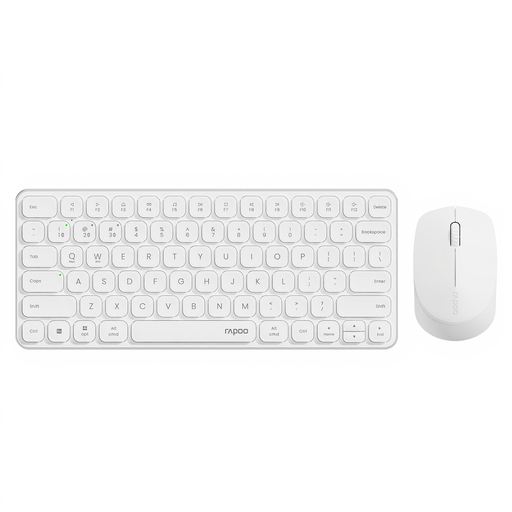
Why it suits this user: A good choice if you regularly switch between a laptop, tablet, phone and desktop PC. According to the product information, the set supports 2.4GHz and Bluetooth 4.0/5.0.
Three connection types mean you’re less reliant on a single connection. The indicators help you identify the active device and whether Caps Lock is on.
Supports up to four devices, with low-profile scissor-switch keys, quiet mouse clicks and adjustable mouse sensitivity from 800 to 2400 DPI.
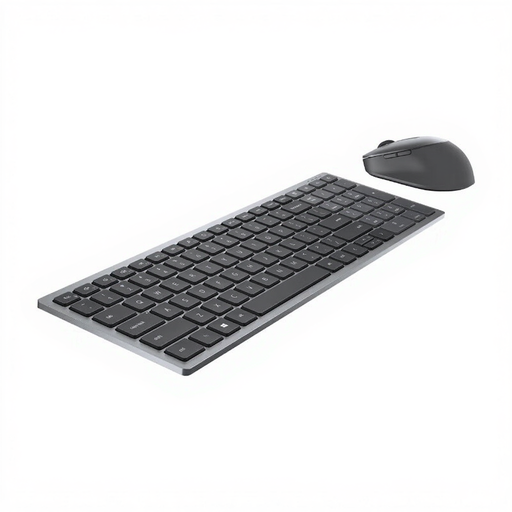
Why it suits this user: This office keyboard and mouse set is designed for a fixed workstation, with a numeric keypad, multimedia keys and dual-mode connectivity.
The product information explicitly states US International QWERTY. This makes the layout easy to check, but it isn’t automatically the same as a Dutch ISO layout.
RF and Bluetooth 5.0, numeric keypad, seven mouse buttons, 1600 DPI and a manufacturer-stated battery life of up to 36 months.
We’ve put together a complete, up-to-date list of products that meet these strict selection criteria and current European safety regulations.
It depends on the connection. A Bluetooth keyboard and mouse will work with a tablet that supports Bluetooth input. An RF set usually needs a USB receiver. If your tablet only has USB-C, you may need a suitable adapter.
This varies by model, battery type and usage. Manufacturers sometimes state a maximum life of several months to several years. Treat this as a product specification based on particular usage conditions. Rechargeable sets need charging regularly; models that use AA or AAA batteries will need replacements.
Not necessarily. Noise levels depend mainly on the keyboard mechanism and mouse buttons. Scissor-switch keys and models with a quiet-click feature can help reduce noise. Check whether “quiet” refers to the keyboard, the mouse or both.
