
Vandaag of morgen in huis

Kwaliteit gegarandeerd

Welkomstaanbiedingen ontgrendelen: GRATIS bezorging | Tot 80% korting | Gratis 30 dagen JoyPlus-proefperiode
Download de app
A wireless keyboard and mouse set keeps your desk more organised and is useful for working from home, studying and office work. However, not every wireless keyboard and mouse combination is right for your situation. The wrong layout, limited connectivity or an uncomfortable mouse can cause daily frustration.
As a Joybuy Product Recommendation Officer, I therefore start by checking verifiable specifications. Marketing terms such as “quiet”, “ergonomic” or “long battery life” only mean something when you know which technology and connections are actually used.
A QWERTY US keyboard is not the same as a Belgian AZERTY layout. The positions of the Z, Y, punctuation marks and special characters differ, among other things. So do not just check whether “QWERTY” appears in the product title; also check whether it is a US layout, UK English or another variant.
If you work frequently with Dutch text and special characters, also check the keyboard settings in Windows or macOS. The physical layout and software layout need to match.
Many sets work via a 2.4GHz USB receiver. This is usually straightforward: plug in the receiver, insert the batteries and get started. However, a laptop with USB-C ports only may require an adapter.
Other models use Bluetooth, making them suitable for tablets, phones and computers without a spare USB port. So check the connection type before buying. A set with one USB receiver is practical for a fixed workstation; a multi-device set makes more sense if you switch between several devices.
A membrane or scissor keyboard can make less noise than a mechanical model, but “quiet” does not mean completely silent. A spill-resistant keyboard is not waterproof either. A knocked-over cup of coffee can cause damage, even when the manufacturer states that the product is protected against minor spills.
According to Trust’s own information, certain Primo, Ody II and Trezo models are designed with quiet keys or a spill-resistant construction. These are product features stated in the manufacturer’s description, not a guarantee that all noise or liquid damage will be prevented.
A full-size keyboard usually includes a separate numeric keypad. This is useful for administration, spreadsheets and entering financial data. Compact models save space, but often omit the numeric section.
The Trust Lyra, for example, has a compact TKL format without a separate numeric keypad. The Trust Primo, Trust Trezo Comfort, HP 650 and Dell KM555 are full-size or almost full-size models with a numeric section. Choose based on your work rather than desk size alone.
A quiet keyboard and mouse set is particularly practical in a shared workspace, during online meetings or when housemates are working in the same room. Also consider the sound made by the mouse buttons; some models mention quiet keys but not quiet clicks.
Check whether the set uses AA or AAA batteries or has a built-in rechargeable battery. A rechargeable set means you do not need to replace batteries regularly, but you do need to charge the keyboard and mouse in good time.
The Trust Lyra states a battery life of up to six months per charge, according to Trust’s product description. With battery-powered models, actual battery life depends on usage and battery type. Also check the supported operating systems. Some sets work with Windows, macOS and Chrome OS; others also support Linux, Android or iPadOS.
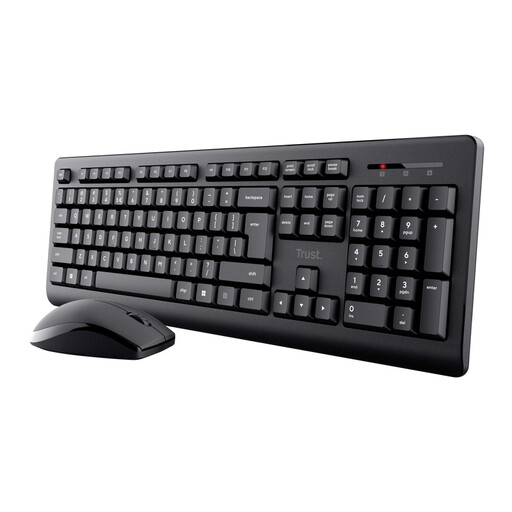
Why it suits this profile: This set offers a simple RF connection via one USB receiver, a full-size QWERTY US keyboard and a symmetrical mouse suitable for both left- and right-handed use.
The US layout is clearly stated and the description mentions spill resistance. This does not mean that the keyboard is waterproof.
Quiet low-profile keys, a numeric keypad, one USB receiver and a stated range of up to 8 metres.
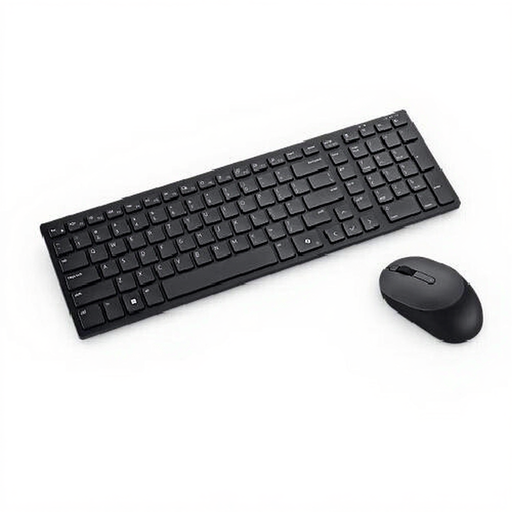
Why it suits this profile: This combination is aimed at office work, with a Belgian AZERTY layout, numeric keypad, multimedia functions and both RF and Bluetooth 5.1.
The product details explicitly state AZERTY, Bluetooth and RF. This allows you to check the layout and connection options against your workstation in advance.
Belgian AZERTY layout, 105 keys, switchable Bluetooth or RF connection and a mouse with 4020 dpi according to the product specifications.
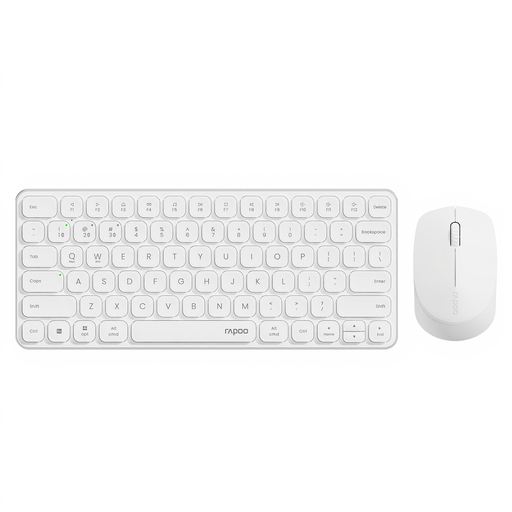
Why it suits this profile: This wireless keyboard and mouse combination is designed for users who work with a computer, laptop, tablet or phone and want to switch between devices.
The connection is not limited to one USB port: the set supports 2.4GHz and Bluetooth. However, check beforehand that your devices support Bluetooth.
Pairing with up to four devices, low-profile scissor keys and a mouse with adjustable dpi from 800 to 2400.
With an RF set, plug the receiver into a spare USB port and insert the batteries according to the plus and minus markings. Then switch on the keyboard and mouse. With Bluetooth models, activate Bluetooth on the device and follow the pairing steps on screen.
Keep the receiver as far as possible from metal objects and sources of interference. Use a soft, dry cloth for maintenance and dispose of flat batteries in accordance with local collection regulations. When buying, also check the statutory warranty and any additional manufacturer’s terms; these may vary by seller and brand.
We have put together a complete, up-to-date list of products that fully meet these strict selection criteria and the applicable European safety regulations.
Not automatically. Check the operating system and available connection. An RF set usually requires USB; a USB-C laptop may need an adapter. Bluetooth models require Bluetooth support and may need to be paired manually.
This depends on the model, usage and battery type. Product descriptions may state a maximum operating time, but this is not a fixed guarantee for every user. A built-in rechargeable battery needs to be charged periodically; a battery-powered model will continue working as long as you have spare batteries available.
Yes, provided the layout, size and connection suit your work. Choose a full-size model with a numeric keypad for spreadsheets and administration. For a small table or several devices, a compact Bluetooth set may be more practical. For extended use, also check the shape of the mouse, adjustable keyboard angle and whether a wrist rest is included.
