
Vandaag of morgen in huis

Kwaliteit gegarandeerd

Welkomstaanbiedingen ontgrendelen: GRATIS bezorging | Tot 80% korting | Gratis 30 dagen JoyPlus-proefperiode
Download de app
A wireless keyboard and mouse set may seem like a straightforward purchase, until you have to deal with the wrong layout, an unstable connection or batteries that run out quickly every day. For home workers, students and office staff, quiet keys, a comfortable working position and easy connection are particularly important.
However, the product name does not always tell the whole story. Terms such as “ergonomic”, “silent” and “long battery life” should be checked against specific specifications. Below, you can find out what to look for in a wireless keyboard and mouse, keyboard and mouse combo or wireless keyboard and mouse set.
A QWERTY keyboard and an AZERTY keyboard differ in the positioning of letters such as A and Q, as well as various punctuation marks. Dutch users are often accustomed to QWERTY, while a Belgian AZERTY layout is mainly suitable if you already use it every day.
So do not just check the product title. Also look at:
Getting the wrong layout can make the adjustment difficult, and it is not an issue that software can always solve completely.
Many sets use a 2.4GHz USB receiver. This usually works easily with a laptop or PC that has a spare USB port. A Bluetooth keyboard and mouse, on the other hand, does not require a separate receiver, but your device must support Bluetooth and the pairing process must be completed correctly.
Some models combine both options. According to the product specification, the Dell Pro Compact Silent KM555 supports RF wireless and Bluetooth 5.1. According to the product description, the Trust Lyra can be connected to up to three devices: one via USB and two via Bluetooth.
Also consider the number of USB ports. With a set that uses one shared receiver, you keep a port free. Separate receivers for the keyboard and mouse may require two ports.
“Silent”, “quiet click” and “quiet wireless keyboard” are descriptions of use, not universal sound standards. A scissor or plunger mechanism generally sounds different from mechanical switches, but the noise level also depends on how you type, the desk and the mouse being used.
According to the product description, the Dell KM555 uses plunger keys for a quiet typing experience. The Trust Lyra has low-profile scissor keys and a mouse with a silent click. If you are unsure, check the technical description and user reviews rather than relying solely on the marketing term.
A full-size keyboard is approximately 100% size and usually includes a numeric keypad. This is practical for administration, spreadsheets and accounting. A compact TKL or 75% model takes up less space, but may lack certain keys or the numeric keypad.
For a keyboard for laptop and PC use, these options are relevant:
Position the keyboard so that your shoulders remain relaxed and your wrists are not held bent upwards for long periods. An ergonomic keyboard and mouse should suit your desk height and way of working; the shape of the product alone does not determine this.
A range of up to 10 metres is stated for several sets, including the ET Silent Wireless Combo and Dell KM5221W. This is a quoted maximum under certain conditions. Walls, metal objects, other 2.4GHz devices and the position of the receiver can reduce the practical range.
For everyday office work, it is especially important that:
Pay attention to the difference between disposable batteries and a built-in rechargeable battery. The ET set states that it has an energy-saving system with battery life of up to 12 months. The Dell KM5221W states up to 36 months. These are product specifications based on the manufacturer’s usage conditions and are not a guarantee for every user.
The Trust Lyra uses a rechargeable battery and states up to six months of use per charge, with an approximately two-hour charging time. A rechargeable model means you do not have to regularly buy AA or AAA batteries, but you do need to charge it in good time.
It is best not to use an optical mouse on glass or a reflective surface. According to the ET set’s safety information, this may interfere with tracking. Also keep a small USB receiver out of children’s reach.

Why it suits this profile: This full-size QWERTY set is designed for straightforward office and home use, with one USB receiver for both devices.
The layout is listed as QWERTY and the connection uses one receiver. The stated quiet operation and range of up to 10 metres can be clearly checked in the product specifications.
104 keys, an optical mouse with adjustable resolution, wrist rest and stated battery life of up to 12 months.
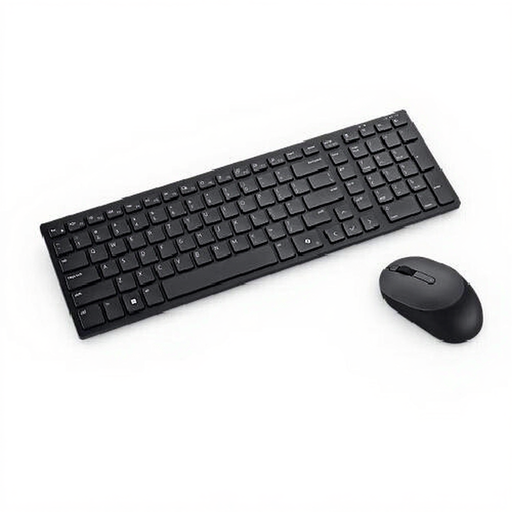
Why it suits this profile: Suitable for a permanent workstation where a Belgian AZERTY layout, quiet keys and multiple connection options are important.
The set explicitly states AZERTY, Bluetooth 5.1 and RF wireless. This allows you to check in advance whether the layout and connection suit your equipment.
Plunger keys, numeric keypad, optical mouse with 4,020 dpi and two connection options.

Why it suits this profile: Handy for home workers and students who switch between a laptop, tablet and smartphone, or who have a compact desk.
The connection is not limited to one type: USB and Bluetooth are both available. The compact design also prevents a large full-size model from taking up too much desk space.
Up to three paired devices, rechargeable battery, 78 keys and support for Windows, macOS, iOS, iPadOS, Android and Chrome OS.
We have put together a complete, up-to-date list of products that fully meet these strict selection criteria and the applicable European safety regulations.
With a 2.4GHz set, plug the USB receiver into a spare port and insert the batteries or charge the devices. Then switch on the keyboard and mouse. For Bluetooth, activate Bluetooth on your laptop, PC, Mac or tablet and select the set from the list of available devices.
This varies by model, frequency of use and energy-saving settings. In the stated product specifications, the quoted battery life ranges from approximately six months for a rechargeable Trust Lyra to up to 36 months for the Dell KM5221W. Treat such figures as the manufacturer’s guidelines.
That depends on the connection and your expectations. For office work and casual gaming, a 2.4GHz or Bluetooth set may be sufficient. If you are looking for very low latency, mechanical switches, RGB lighting or a compact gaming form factor, it may be better to choose a separate gaming keyboard and mouse. Pay particular attention to the layout, compatibility and whether there is no numeric keypad.
