
Vandaag of morgen in huis

Kwaliteit gegarandeerd

Welkomstaanbiedingen ontgrendelen: GRATIS bezorging | Tot 80% korting | Gratis 30 dagen JoyPlus-proefperiode
Download de app
A wireless keyboard and mouse set keeps your desk tidy and is practical for working from home, the office or studying. But a cheap or poorly chosen combination can quickly disappoint. The keys may feel different from what you expected, the layout may not suit you, or the connection may not work with your laptop.
As a Joybuy Product Recommendation Officer, I cut through the marketing copy to pick out the most important product specifications. That way, you can compare a quiet wireless keyboard and mouse on the features that really make a difference in everyday use.
In the Netherlands, you’ll find both QWERTY keyboard and mouse sets and Belgian AZERTY keyboard and mouse sets. The keys aren’t in the same places. If you’re used to AZERTY and accidentally order a US QWERTY model, you may find yourself searching for letters and punctuation marks.
So check not only the product title, but also the “keyboard layout” specification. Be sure to distinguish between US QWERTY, UK QWERTY and Belgian AZERTY.
A quiet keyboard and mouse may refer to a membrane model, scissor-switch keys or simply dampened mouse buttons. Noise levels also depend on the surface you use and how you type. Treat “silent” or “quiet” as a product feature claimed by the manufacturer, not a guarantee that all noise will disappear.
According to Trust’s product information, the Ody II and Trezo Comfort have quiet keys and mouse buttons. This makes them suitable for shared workspaces, but they aren’t designed as mechanical gaming keyboards.
A USB receiver keyboard and mouse set usually uses a 2.4GHz RF connection. You plug the receiver into a USB port and often connect both devices using a single dongle. It’s simple, but a laptop with few USB ports may need an adapter.
A Bluetooth keyboard and mouse doesn’t require a USB receiver. However, check that your computer, tablet or phone supports Bluetooth. Some sets offer both options, which is handy if you switch between a desktop, laptop and tablet.
A full-size keyboard usually has a numeric keypad. This is useful for admin, spreadsheets and working with numbers, but takes up more desk space. A compact model fits better next to a laptop or on a small desk.
Check the language layout too. A wireless keyboard and mouse combination with US QWERTY may suit international software, while a Belgian AZERTY model makes more sense if you’re used to that layout.
Look at the combination of:
A USB receiver may be stored magnetically or tucked away inside the keyboard or mouse. This reduces the chance of losing the small dongle when you take the set with you.
For extended typing, flat keys, an adjustable typing angle and a wrist rest are useful features. An ergonomic keyboard and mouse set won’t automatically prevent discomfort; good posture, screen height and regular breaks are still important.
DPI indicates the mouse’s sensitivity. A range of 800 to 1600 DPI suits general office work. Some models offer more settings, for example up to 2400 or 4020 DPI. A higher DPI isn’t necessarily needed for office work.
Finally, check the battery type and stated battery life. Manufacturers base battery claims on specific usage conditions. According to Trust’s product information, the Trezo Comfort can last up to 48 months for the keyboard and up to 12 months for the mouse. Treat this as a stated maximum, not a guaranteed battery life.

Why it suits this type of user: This set is designed for people working from home, students and office workers looking for a simple US QWERTY solution with a single USB receiver.
The layout is clearly listed as US QWERTY. The keyboard and mouse connect through a single receiver, so you don’t need two USB ports.
Quiet keys and mouse buttons, adjustable typing angle, media keys and adjustable mouse speed from 800 to 1600 DPI.
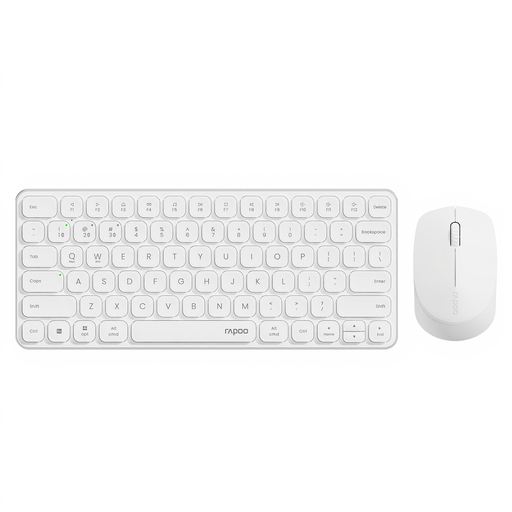
Why it suits this type of user: Ideal for professionals who want to control a PC, laptop, tablet or phone using the same combination.
The set supports both 2.4GHz and Bluetooth 4.0 and 5.0. This makes you less reliant on a single connection type and lets you pair up to four devices.
Low-profile scissor keys, quiet mouse clicks and adjustable mouse resolution from 800 to 2400 DPI.
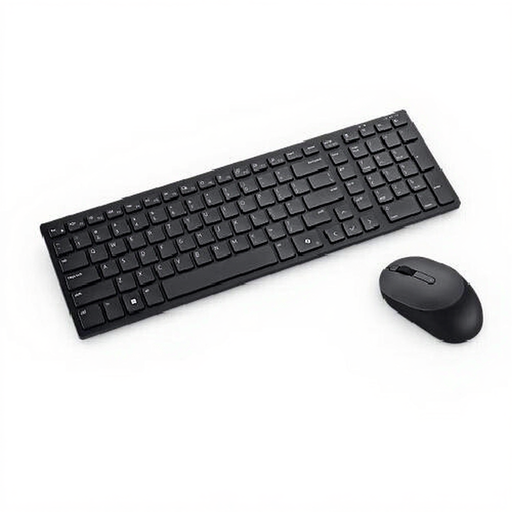
Why it suits this type of user: A practical choice for people in the Netherlands specifically looking for a Belgian AZERTY keyboard with a numeric keypad for office work.
The Belgian AZERTY layout is clearly specified. You can also choose between RF via USB and Bluetooth 5.1.
Plunger keys, numeric keypad, spill-resistant design and an optical mouse with 4020 DPI, according to the product specifications.
We’ve put together a complete, up-to-date list of products that meet these strict selection criteria and the applicable European safety regulations.
Yes, especially if you want to keep your desk free of cables. Choose a set with quiet keys, a layout that suits you and support for your operating system. Bluetooth is handy if your laptop doesn’t have a spare USB port.
For a USB model, plug the receiver into a spare USB port, install the batteries and switch on both devices. For Bluetooth, activate pairing mode and select the set in your Bluetooth settings. If you’re unsure, check the supplied manual.
Batteries are the main ongoing cost, unless the model is rechargeable. Check the battery type and the manufacturer’s stated battery life. With a set that uses a single USB receiver, you also won’t need to replace separate dongles for the keyboard and mouse.
