
Vandaag of morgen in huis

Kwaliteit gegarandeerd

Welkomstaanbiedingen ontgrendelen: GRATIS bezorging | Tot 80% korting | Gratis 30 dagen JoyPlus-proefperiode
Download de app
A wireless keyboard and mouse set keeps your desk tidy and is ideal for working from home, studying or everyday office tasks. However, not every set suits every situation. A compact model might be fine on a small desk, but awkward if you enter lots of numbers. A quiet mouse can work well in a shared space, while a standard wireless connection won't suit a laptop without a USB-A port.
So don't just focus on colour, price or claims like "ergonomic". Instead, check the layout, connection, dimensions and power supply.
In Dutch online shops, you'll often come across a QWERTY keyboard with a US layout. That's not the same as a Dutch QWERTY layout. The position of punctuation marks, the Enter key and some symbols can differ. If you touch-type or use lots of special characters, you'll notice this quickly.
So check whether the product info says "US QWERTY", "UK QWERTY", "Dutch" or "AZERTY". A Belgian AZERTY set, for example, won't be suitable if you're deliberately looking for a wireless keyboard and mouse in QWERTY.
With a quiet keyboard and mouse, it's usually about membrane, scissor or low-profile keys and dampened mouse buttons. That can reduce the tapping and clicking noise, but it doesn't mean the set is completely silent. Mechanical keyboards generally have a more distinct key feel and can be louder, depending on the switches.
For a home office, library or shared space, soft keys and a dampened mouse click are usually more practical than RGB lighting or a mechanical build.
A set with a 2.4GHz USB receiver often works straight after plugging in, but you need a suitable USB port. Modern laptops sometimes have mostly USB-C connections. Bluetooth is more flexible then, but pairing can take a few more steps.
Also check whether the receiver belongs to the set and whether the keyboard and mouse work via a single receiver. That saves an unnecessary USB port and makes a keyboard and mouse combo for a laptop easier to carry around.
A full-size keyboard usually includes a numeric keypad. That's useful for spreadsheets, admin and financial data entry. A compact or TKL model saves space, but often lacks a separate number section.
An integrated wrist rest can offer extra support during long work sessions. However, present this as a design feature, not a medical solution. Also pay attention to dimensions: a full-size keyboard around 44 cm wide takes up noticeably more desk space than a compact model.
Look at the combination of:
A multi-device keyboard and mouse is especially useful if you switch between, say, a work laptop, tablet and desktop. Check whether both parts can actually switch between multiple devices. On some sets, multi-device only applies to the keyboard.
A battery-powered set doesn't need a charging cable on your desk, but you do have to replace AA or AAA batteries. Manufacturers sometimes mention a usage time "up to" a certain number of months. That depends on usage, settings and battery type.
A rechargeable set avoids loose batteries, but needs to be plugged in periodically. Check whether you can keep working while it charges and whether a charging cable is included.

Why it fits this profile: According to Trust's product description, this set is designed for quiet work with a US QWERTY layout, one USB receiver and an adjustable typing angle. That suits basic use in the office, at home or for study.
The product info clearly states the US QWERTY layout, one receiver and compatibility with Windows, macOS, Linux and Chrome OS. Do check these points with your own device.
Low-profile keys, adjustable mouse speed of 800–1600 dpi, media keys and a magnetic storage compartment for the USB receiver.

Why it fits this profile: According to Trust's own product info, this full-size set combines quiet keys, an integrated wrist rest and a numeric keypad. That suits daily office work and long typing sessions.
The specifications explicitly mention US QWERTY, full-size format, USB-A nano receiver and membrane keys. So you know upfront this isn't a mechanical gaming set.
Numeric keypad, integrated wrist rest, mouse for left- and right-handed use and, according to Trust, a battery life of up to 48 months for the keyboard and 12 months for the mouse.
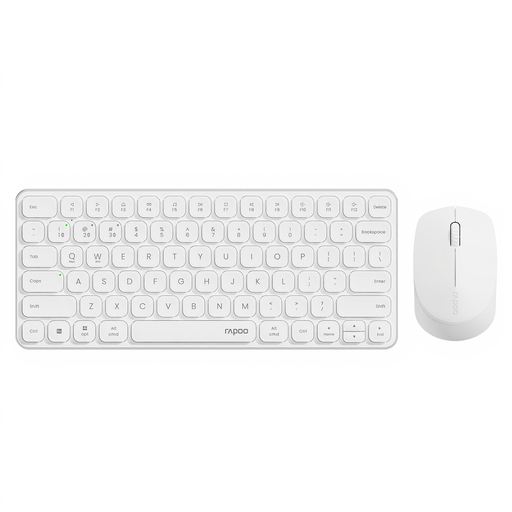
Why it fits this profile: According to Rapoo's product specifications, you can pair this multi-device keyboard and mouse with up to four devices via 2.4GHz and Bluetooth 4.0/5.0. That's practical for a laptop, tablet, phone and desktop.
The connection methods and supported operating systems are listed. That lets you check in advance whether Bluetooth or the USB receiver works with your devices.
Scissor mechanism with low-profile keys, four paired devices, adjustable mouse resolution of 800–2400 dpi and shortcut keys for Windows and Mac.

Why it fits this profile: According to Trust's own information, this is a compact, rechargeable set for up to three devices. The size suits a small desk or use alongside a laptop.
The compact size and separate switches for devices are clearly described. Bear in mind that this model doesn't have a numeric keypad or integrated wrist rest.
USB receiver plus two Bluetooth connections, rechargeable batteries, three pairing buttons and support for Windows, macOS, iOS, iPadOS, Android and Chrome OS.
We've put together a full, up-to-date list of products that fully meet these strict selection criteria and current European safety regulations.
With a set that uses a USB receiver, you plug the receiver into a suitable USB port and switch on the keyboard and mouse. If your laptop only has USB-C, you may need an adapter. Bluetooth models need to be paired first via the Bluetooth settings.
That varies by model and usage. Some battery-powered sets claim a usage time of several months or longer according to their product info. A rechargeable set, based on the stated product specifications, might work for up to a few months per charge. Treat these figures as a guide and check which battery type is included.
It can be, but check the layout before you buy. The letters are mostly in the familiar QWERTY positions, while symbols and some function keys may differ from a Dutch layout. For standard word processing it's often usable; for lots of special characters, a different layout might be more convenient.
