
Vandaag of morgen in huis

Kwaliteit gegarandeerd

Welkomstaanbiedingen ontgrendelen: GRATIS bezorging | Tot 80% korting | Gratis 30 dagen JoyPlus-proefperiode
Download de app
A wireless keyboard and mouse set keeps your desk tidy and is ideal for working from home, the office or studying. Although many sets look similar, the differences in layout, connection type, size and battery life can be significant. A low price doesn't always tell you much about day-to-day use.
So pay particular attention to these three common pitfalls:
For users in the Netherlands, a QWERTY keyboard with mouse is often the standard choice. However, do check whether it's US QWERTY, UK QWERTY or another variant. The position of punctuation marks and certain special keys can differ.
If you work with a Belgian layout, choose a AZERTY keyboard with mouse deliberately. Models such as the HP 650 and various Dell sets are specified with a Belgian AZERTY layout. Getting the wrong layout is no small detail: you'll constantly be searching for characters and shortcut keys.
A keyboard and mouse without cables can work via a 2.4GHz radio connection, Bluetooth or both.
A multi-device keyboard and mouse is practical for, say, a laptop, desktop and tablet. Pay attention to the stated maximum number of devices. The Trust Lyra supports up to three devices according to the product information; the Rapoo 9010M is specified for up to four paired devices.
A full-size keyboard has a numeric keypad. That's useful for administration, spreadsheets and numbers, but it takes up more space. A compact TKL model omits the numeric section and fits better on a small desk or in a laptop bag.
For quiet working, low-profile keys, membrane keys or scissor switches are often a logical choice. Manufacturers use terms like "silent" or "quiet"; treat this as a product feature, not a guarantee that no sound is produced at all. According to Trust's product description, the keys and mouse buttons of the Ody II are designed for quieter typing and clicking.
Also check whether the set runs on batteries or has a built-in rechargeable battery. A rechargeable battery avoids loose batteries but needs to be charged. With battery models, the stated battery life depends on usage and settings. The Rapoo 9010M claims a battery life of up to around twelve months, while the Dell KM7120W is specified for up to 36 months of battery use.
The selection below is based on verifiable specifications such as layout, connectivity, size, key type and power supply.

Why this fits the profile: This set is aimed at everyday home and office work and uses a single USB receiver for both keyboard and mouse. The US QWERTY layout suits users who deliberately want this layout.
The product information mentions silent keys and mouse buttons, an adjustable typing angle and a magnetic storage compartment for the receiver. Do check that your device has a suitable USB port.
Single RF receiver, adjustable mouse speed from 800–1600 dpi and compatibility with Windows, macOS, Linux and Chrome OS.
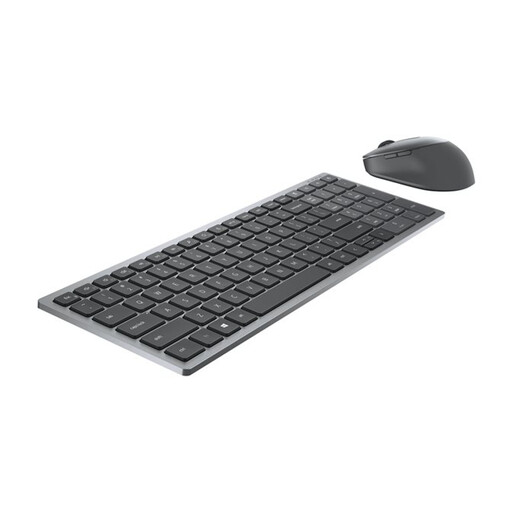
Why this fits the profile: This wireless office keyboard set combines RF and Bluetooth with a Belgian AZERTY layout. That suits professionals who need a fixed workstation and multiple connection options.
The layout is clearly stated as Belgian AZERTY. This reduces the risk of ordering a US QWERTY model when you need a Belgian layout.
Bluetooth 5.0 and RF connectivity, a numeric keypad, programmable shortcut keys and a mouse with seven buttons.

Why this fits the profile: For those who switch between laptop, desktop, tablet or phone daily, this multi-device keyboard and mouse set offers multiple connection options.
You're not tied to a single connection: the set supports 2.4GHz via USB and Bluetooth 4.0/5.0. Do check which devices you want to pair beforehand.
Switch between up to four devices, low-profile scissor keys, silent mouse clicks and adjustable mouse resolution from 800–2400 dpi.

Why this fits the profile: The full-size design with numeric keypad and integrated wrist rest is aimed at prolonged office and home use at a fixed workstation.
The product specifications mention quiet, low-profile keys, a 2.4GHz nano receiver and a clear US QWERTY format. So you know exactly what you're buying.
Integrated wrist rest, numeric keypad, symmetrical mouse and adjustable dpi settings of 1000, 1400 and 1800.
Use this short checklist:
We've put together a full, up-to-date list of products that fully meet these strict selection criteria and current European safety regulations.
Not automatically. A set with a USB receiver needs a suitable USB port. With Bluetooth, your laptop must support Bluetooth and the set must be compatible with the operating system you're using. Also check whether a USB-C adapter is included if your laptop doesn't have a USB-A port.
That varies by model, battery type and usage. Product information sometimes states a maximum battery life, but heavy typing, lots of mouse movement and not switching the set off can shorten it. A rechargeable set doesn't need loose batteries but does need to be charged regularly.
Yes, many office-oriented sets have quiet or low-profile keys, media keys and a simple wireless connection. For quiet workspaces, it's wise to consider both the key sound and the mouse click sound in your choice. Gamers or users looking for mechanical keys and high polling rates typically need different product specifications.
