
Vandaag of morgen in huis

Kwaliteit gegarandeerd

Welkomstaanbiedingen ontgrendelen: GRATIS bezorging | Tot 80% korting | Gratis 30 dagen JoyPlus-proefperiode
Download de app
A wireless keyboard and mouse set keeps your desk tidy and is ideal for working from home, the office or studying. However, not every keyboard and mouse combination suits every user. The wrong layout, a missing USB port or disappointing battery life can make daily use unnecessarily difficult.
With these practical checkpoints, you can compare a wireless keyboard and mouse on the features that really matter in the UK.
QWERTY and AZERTY are not interchangeable. On a QWERTY keyboard with mouse, the letters and punctuation marks are arranged differently compared to a Belgian AZERTY keyboard with mouse. So don't just check the product title – also look at the specification for “keyboard layout” and “language”.
A US QWERTY layout can be suitable for users who are used to working with it, but it differs in a few ways from a UK layout. If you work daily with Belgian keys, it's better to search specifically for AZERTY.
Some sets work exclusively with a USB receiver via 2.4 GHz. That's practical for a desktop or laptop with a free USB-A port, but less convenient with a tablet or slim laptop that lacks a suitable connection. A Bluetooth keyboard and mouse doesn't need a separate receiver, but it does need to be paired correctly.
Sets with both options offer more flexibility. Also check how many devices can be paired at the same time and how you switch between them.
A quiet keyboard and mouse set can be pleasant in a shared workspace, but “quiet” doesn't automatically tell you anything about the key feel or wrist position. A compact wireless keyboard saves space, but often lacks a numeric keypad. An ergonomic keyboard and mouse set may offer extra wrist support or an adjustable typing angle, but takes up more space as a result.
So choose based on your workspace and usage. Marketing terms are no substitute for concrete specifications.
Look at the combination of connection methods:
For example: the Trust Lyra can connect up to three devices via a USB receiver and Bluetooth, according to the product specification. The Rapoo 9010M supports 2.4 GHz and Bluetooth 4.0/5.0 and can be used with up to four devices, according to the product information.
A full-size keyboard usually has a numeric keypad. That's handy for spreadsheets, admin work and numbers. TKL or compact models leave out the numeric section and are easier to carry around.
Also check:
Scissor keys often have a flat, laptop-like profile. Mechanical keys feel different and are generally noisier; they also don't always come as part of a complete mouse set.
A wireless set runs on disposable batteries or a built-in rechargeable battery. Look at the stated usage time, but treat it as a product estimate: frequency of use, Bluetooth connection and power-saving settings all affect the actual duration.
A rechargeable set saves you from having to replace batteries regularly, but it does need to be charged. With a model that uses AA or AAA batteries, replacement is simple, but battery costs are part of the ongoing use. Store the USB receiver in the keyboard or mouse if there's a compartment for it.

Why this fits the profile: This set uses a single USB receiver and has a US QWERTY layout. That keeps installation simple for home use, study and standard office work.
The layout, connection and DPI setting of 800–1600 are clearly stated. According to Trust, the keys and mouse buttons are designed for quieter use.
One receiver, adjustable typing angle, media keys and compatibility with Windows, macOS, Linux and Chrome OS.

Why this fits the profile: The compact TKL design and support for three devices suit users who want a tidy workspace combined with a laptop, tablet or smartphone.
The product information explicitly states that there is no numeric keypad. So you know in advance that this model is primarily focused on saving space.
Rechargeable keyboard and mouse battery, Bluetooth 5.0, three paired devices and compatibility with Windows, macOS, iOS, iPadOS, Android and Chrome OS.
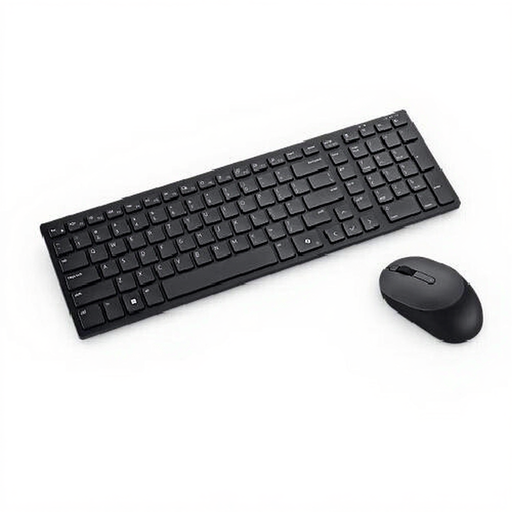
Why this fits the profile: This model is aimed at office work with a Belgian AZERTY keyboard, numeric keypad and a choice of RF or Bluetooth 5.1.
The Belgian AZERTY layout is explicitly stated in the product specifications. The dual connection also prevents reliance on just one connection type.
Full-size format, numeric keypad, three buttons on the mouse and a stated sensor resolution of 4,020 dpi.
We've put together a full, up-to-date list of products that fully meet these strict selection criteria and comply with current European safety regulations.
No. Check whether your laptop has a free USB port for the receiver or supports Bluetooth. Also look at the stated operating system. A USB adapter may be needed if your laptop only has USB-C ports.
That varies by model and usage. Manufacturers often give an estimated usage time. The Trust Lyra states up to six months per charge, according to the product specification. The Trust Trezo Comfort states up to 48 months for the keyboard and up to 12 months for the mouse, according to the product information. Treat such figures as guidelines and check which usage scenario the manufacturer uses.
It can be, especially in a shared space or during online meetings. However, pay attention to the difference between less audible keys and a genuinely quiet keypress. Check the key type, whether dampening is present and whether the mouse buttons are also described as quiet. That way, you'll choose a set that better suits your workspace and daily use.
