
Vandaag of morgen in huis

Kwaliteit gegarandeerd

Welkomstaanbiedingen ontgrendelen: GRATIS bezorging | Tot 80% korting | Gratis 30 dagen JoyPlus-proefperiode
Download de app
A desk cluttered with cables is a source of frustration. They get tangled, collect dust, and restrict your freedom of movement. A wireless keyboard and mouse set seems like the perfect solution for a clean and efficient (home) office setup. But the market is flooded with options promising the world. Unfortunately, many of those promises lead to buyer's remorse.
Before you invest in a new keyboard and mouse combo, it's wise to understand the common pitfalls:
bluetooth keyboard and mouse connection.silent keyboard and mouse combination. They are, at first, but due to the use of cheap materials, the keys and mouse clicks start to squeak, creak, or lose their silent character after just a few months.multi-device keyboard that switches between your laptop, tablet, and phone at the touch of a button sounds ideal. The reality is often that pairing is difficult and switching is slow, turning the promised productivity boost into irritation.As a Joybuy Product Recommendation Officer, I'll help you cut through the marketing jargon. Below, we'll discuss the specifications that truly matter and provide concrete recommendations suited for different users.
To avoid a bad purchase, it's important to look beyond the design. Pay close attention to the following three technical features.
The way your set connects determines its flexibility and stability.
office keyboard set.multi-device keyboard. You don't need a USB port, and you can pair the set with multiple devices (laptop, tablet, smartphone). Pay attention to the Bluetooth version; Bluetooth 5.0 or higher generally offers a more stable connection and lower power consumption than older versions.Some sets offer both options, giving you maximum flexibility.
The mechanism under the keys determines the typing experience and noise level.
silent keyboard and mouse set with scissor switches often offers a pleasant balance between comfort and quietness.An ergonomic set is not an unnecessary luxury if you spend many hours a day at the computer. Pay attention to the shape of the mouse (suitable for left- or right-handed use) and the keyboard layout. A full-size keyboard has a numeric keypad, which is useful for data entry. A more compact TKL (Tenkeyless) model omits the numeric section, creating more space on your desk.
Based on objective specifications, we have selected a few sets that suit specific needs and avoid the pitfalls mentioned earlier.
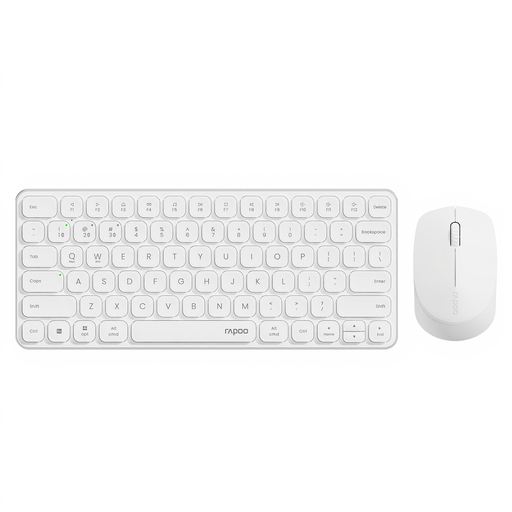
Why This Fits Their Persona: Ideal for the remote worker or professional who constantly switches between a work PC, personal laptop, and tablet. This set is designed for a seamless workflow across multiple devices.
This set tackles the pitfall of 'false' multi-device functionality by providing a stable connection for up to 4 devices. The silent keys and mouse clicks remain quiet in the long run, unlike cheaper alternatives.
Flexible connectivity: Supports both 2.4GHz and Bluetooth 5.0/4.0.
Broad compatibility: Works with Windows, Mac, Linux, and ChromeOS, including hotkeys for both systems.
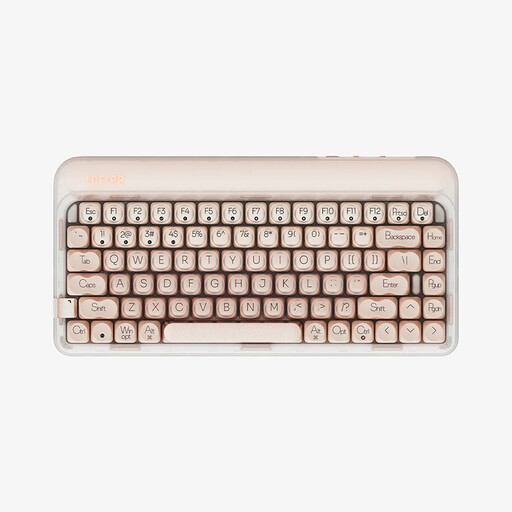
Why This Fits Their Persona: For those whose workspace must be not only functional but also aesthetically pleasing. This mechanical keyboard offers a unique style and a superior typing experience not found in a standard office set.
This is not your average 'silent' set. It embraces the tactile and audible feedback of mechanical keys. The high-quality Gateron switches and solid construction prevent the rapid wear and 'cheap' feel of many other sets.
Customisable Typing Experience: Thanks to the hot-swappable switches, you can replace the keys without soldering.
Tri-mode connection: Works via USB-C, Bluetooth 5.3, and 2.4G for maximum compatibility.

Why This Fits Their Persona: A no-nonsense choice for students and office workers seeking a reliable, compact, and eco-conscious set. Easy to take with you and use in different locations.
This set offers a stable multi-device connection for 3 devices and is rechargeable, which prevents the hassle of dead batteries and unstable connections. The low-profile scissor switches provide a comfortable and quiet typing experience that lasts.
Sustainable Choice: According to Trust, the set is made from 84% recycled plastic.
Rechargeable: The built-in battery is rechargeable, which eliminates the need to replace batteries.
We have compiled a complete, up-to-date list of products that fully meet these strict selection criteria.
This varies greatly by model and usage. Sets that run on replaceable AA or AAA batteries can, according to manufacturers, often last for months or even years. Rechargeable sets have a shorter cycle but save you the cost and hassle of buying new batteries. Always check the product specifications for the estimated battery life.
Not necessarily "better," but different. A USB dongle (2.4GHz RF) typically offers the most stable and direct connection for use on a single computer. Bluetooth is superior if you want to switch between multiple devices like a laptop, tablet, and phone without using a USB port. The ideal set supports both.
Most modern sets are a keyboard for Mac and Windows. They work on both systems, but the functionality may differ. Look specifically for whether the set has dedicated function keys for both operating systems (e.g., Command/Option for Mac and Ctrl/Alt for Windows). Some sets have a switch or software to adjust the layout for an optimal experience on each platform.
