
Vandaag of morgen in huis

Kwaliteit gegarandeerd

Welkomstaanbiedingen ontgrendelen: GRATIS bezorging | Tot 80% korting | Gratis 30 dagen JoyPlus-proefperiode
Download de app
A desk without cables: it sounds ideal. A single wireless keyboard and mouse set for your laptop, tablet, and maybe even your phone. Yet, the search often ends in frustration. A set that lags, keys that are too close together, or batteries that always die at the worst moment.
Before you make a purchase, it's good to know where the pitfalls lie. A lot of marketing promises the world, but reality is often more challenging.
compact QWERTY keyboard saves space but can come at the expense of your productivity. Keys that are too small, an illogical layout, or the absence of essential function keys leads to typos and discomfort.rechargeable keyboard and mouse is often a wiser choice in the long run.To avoid these problems, focus on a few core specifications. These will determine if a set truly works for you.
The way your set connects is crucial. You typically have two options:
Bluetooth keyboard set connects directly to your device without a dongle. This is ideal for a multi-device keyboard and mouse setup, as you can easily switch between your laptop, tablet, and smartphone. Modern sets often offer both options, which provides the most flexibility.The feel and sound of the keys determine your typing experience. For an office environment or a quiet home office, a silent keyboard for the office is a must.
The size of the keyboard should match your workflow.
Always ensure you choose a QWERTY layout, which is a common standard.
Below are some popular choices, matched to different user profiles. These recommendations are based on objective product specifications that meet the needs of professionals, students, and home workers.
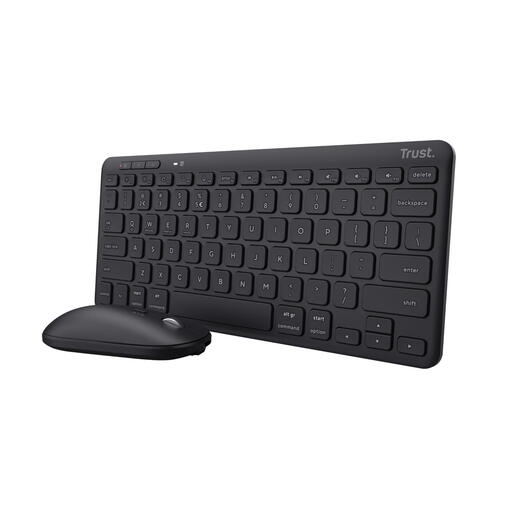
Why This Fits Their Persona: This set is designed for those who seamlessly switch between a laptop, tablet, and smartphone. Its compact size keeps the desk tidy, both at home and in the office.
The set connects via Bluetooth to up to 3 devices and switches quickly with a button. The built-in rechargeable battery avoids the hidden costs of disposable batteries.
Quiet scissor-switch keys for a pleasant typing experience without noise disturbance. Made from recycled plastic, making it a more sustainable choice.
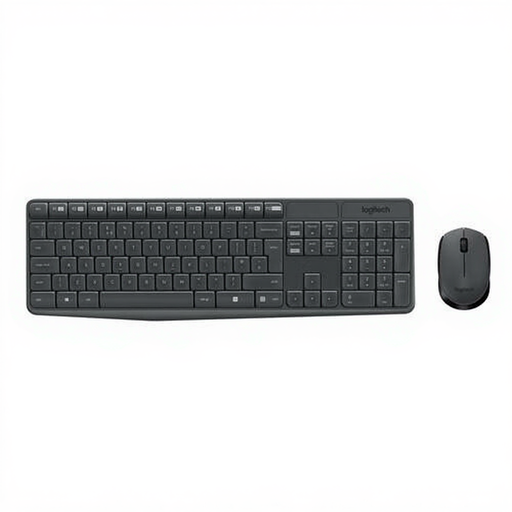
Why This Fits Their Persona: For those who need a reliable, no-nonsense set for a fixed workstation. The full-size format with a numeric keypad is ideal for administrative tasks and data entry.
This set focuses on one thing: a rock-solid 2.4GHz connection via a USB receiver. No hassle with Bluetooth pairing. The extremely long battery life (up to 3 years for the keyboard, according to Logitech) minimises maintenance.
A familiar full-size design with a spill-resistant construction. The keys have an anti-fading coating, ensuring the letters remain legible after prolonged use.
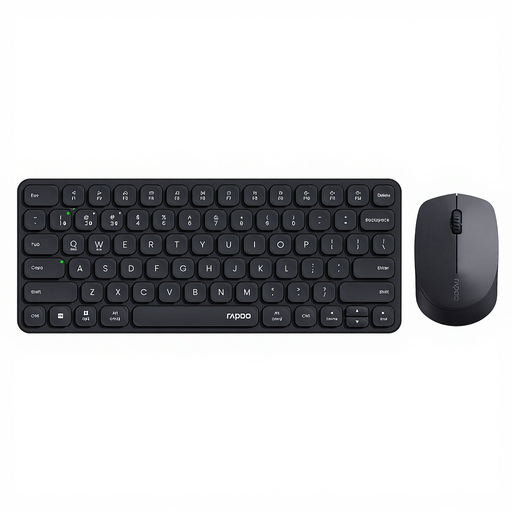
Why This Fits Their Persona: For the user who demands maximum flexibility and works with a PC, Mac, tablet, and phone simultaneously. This set is built for complex, cross-platform workflows.
This set surpasses the standard "multi-device" claim by supporting connection to up to 4 devices via both Bluetooth (4.0 and 5.0) and a 2.4GHz receiver. Switching is smooth and reliable.
The combination of a quiet scissor-switch keyboard and a mouse with silent clicks makes this set ideal for shared workspaces. The mouse also features an adjustable DPI for precision work.
A good wireless set can significantly boost your productivity. If the choices above aren't exactly what you're looking for, check out our full range.
The battery life per charge varies greatly by model, from several weeks to multiple months. For example, manufacturers like Trust state a usage time of up to 6 months on a single charge for their Lyra set. The total lifespan of the built-in battery is typically designed to last for several years, comparable to the battery in a smartphone.
Neither is necessarily "better"; it depends on your use case. A USB dongle (2.4GHz) often provides a slightly more stable connection and is plug-and-play. Bluetooth is more versatile, as you don't need a USB port and can easily connect to tablets and phones. The most popular sets today offer both options, so you can choose based on the situation.
Most modern wireless sets are compatible with both Windows and macOS. For tablets and smartphones (Android, iPadOS), a Bluetooth keyboard set is almost always required. Always check the product page for the specific operating systems that are supported to ensure compatibility.
