
Vandaag of morgen in huis

Kwaliteit gegarandeerd

Welkomstaanbiedingen ontgrendelen: GRATIS bezorging | Tot 80% korting | Gratis 30 dagen JoyPlus-proefperiode
Download de app
A wireless keyboard and mouse set might seem easy to choose: check the price, pick a design you like and plug the receiver into a USB port. In practice, problems often only appear after a few weeks. The keys may be too loud, the mouse may respond imprecisely or the battery may run out sooner than expected.
For people working from home, students and office workers, three things matter most: the layout, the connection type and everyday comfort. Read on to find out what to look for in a quiet wireless keyboard and mouse combo for your laptop, PC or Mac.
A keyboard with a US layout can look almost identical to a Dutch model, but the keys are in different places. Check that QWERTY is clearly stated, and look at the positions of the Enter, Shift and punctuation keys too.
A QWERTY keyboard and mouse is practical for many users, but if you’re used to a specific Dutch layout, compare the product photos and specifications carefully. The term “international keyboard” doesn’t always tell you enough.
Brands use terms such as “silent”, “quiet” or “low noise” to describe different types of keys. According to the ET set manufacturer’s product description, this model is designed to be “ultra-quiet”. This is a manufacturer’s product claim, not an independently verified noise level.
So check the full description and user feedback. A quiet wireless keyboard and mouse combo can be particularly useful in a shared workspace if you type a lot, but noise levels can vary from key to key and from one user to another.
A set may work via Bluetooth, a USB nano receiver or both. A 2.4 GHz wireless mouse often uses a receiver supplied with it. This usually works easily with devices that have a suitable USB port, but if your modern laptop only has USB-C, you may need an adapter or docking station.
Also check whether the keyboard and mouse share one receiver. This saves a USB port, but it also means you’ll need to keep the receiver somewhere safe.
A range of up to 10 metres can be useful if you control your computer from a distance or have a large desk. Your actual experience will depend on obstacles, interference and the position of the receiver. For everyday office work, a stable connection at your desk is what matters most.
A set with one receiver keeps things simple. If possible, plug the receiver into the front or side of your computer, and avoid metal obstacles if the connection becomes unreliable.
A full-size keyboard with 104 keys has room for a numeric keypad. This is useful for spreadsheets, admin and entering financial information. The trade-off is that it takes up more desk space than a compact model.
An ergonomic keyboard with a wrist rest can provide extra support during long working sessions. However, a wrist rest won’t correct your posture. Position the keyboard directly in front of you, keep your shoulders relaxed and avoid keeping your wrists bent upwards.
Check which batteries the set uses, whether it has an on/off switch and how long the battery is expected to last. The ET product description lists a power-saving system and battery life of up to 12 months. This is the maximum stated in the product information; actual battery life depends on usage, battery quality and settings.
Remove the batteries if you won’t be using the mouse for several weeks. According to the safety information, this can help prevent potential corrosion damage. Also, don’t use the optical mouse on glass or a reflective surface, as this may interfere with tracking.
The cards below match the available products to specific use cases. Not every product is a keyboard set: some are designed to complement a mobile or fixed workspace. Before buying, always check the ports, compatibility and dimensions of your own device.

Why it suits this user: This wireless office keyboard set combines a 104-key keyboard with an optical mouse and a single USB receiver. It’s a tidy solution for home use and studying.
The product information lists QWERTY, a single receiver and a range of up to 10 metres. Check that this layout suits the way you type.
104 keys, a wrist rest, adjustable mouse resolution and stated battery life of up to 12 months, according to the product description.
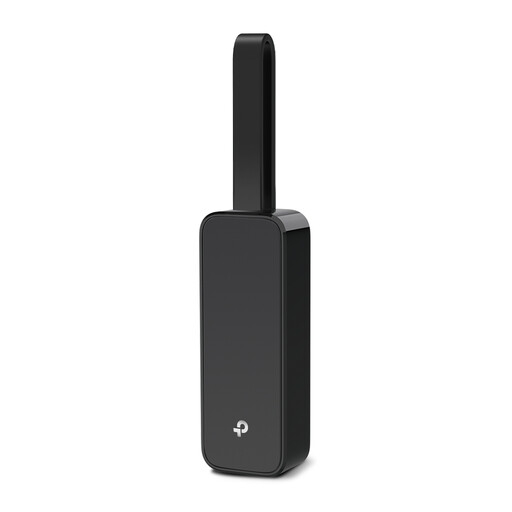
Why it suits this user: This isn’t a keyboard set, but it’s a practical add-on if your laptop doesn’t have enough ports for a wireless receiver and other peripherals.
The USB 3.0 connection and plug-and-play functionality can help if your laptop doesn’t have a free, suitable port. Check your operating system beforehand.
Gigabit Ethernet, USB 3.0 and a compact, foldable design, according to the product specifications.
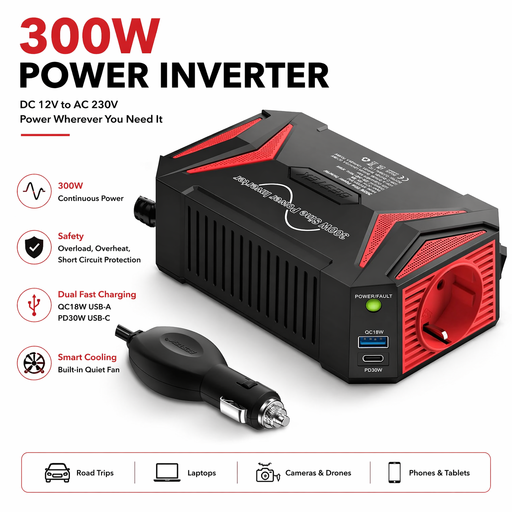
Why it suits this user: For working on the move in a car or campervan, this is a separate power solution. It doesn’t replace a keyboard and mouse, but it can support a laptop workspace on the go.
The stated capacity and connections make it clearer what the product is designed for. Don’t exceed the stated 300 watts, and make sure there’s adequate ventilation.
12V to 230V, a USB-C port and a stated continuous power output of 300 watts, according to the product information.
We’ve put together a complete, up-to-date list of products that meet these strict selection criteria and the applicable European safety regulations.
A set with a USB receiver usually needs a free USB port. If your laptop only has USB-C, you may need a suitable adapter or hub. Also check whether the product description lists support for your operating system.
It varies by model, battery type and how often you use it. According to the product information, the ET set has a stated battery life of up to 12 months. Treat this as a maximum, and switch the set off if you won’t be using it for an extended period.
It depends on the size, key resistance, mouse shape and your posture. A full-size keyboard with a wrist rest can be practical if you do a lot of typing. Take regular breaks, position your screen at a suitable height and choose a mouse you can hold comfortably without gripping it tightly.
