
Vandaag of morgen in huis

Kwaliteit gegarandeerd

Welkomstaanbiedingen ontgrendelen: GRATIS bezorging | Tot 80% korting | Gratis 30 dagen JoyPlus-proefperiode
Download de app
A wireless keyboard and mouse set might seem like a straightforward purchase at first. But small differences in layout, connection and size can become a daily annoyance. The wrong keyboard layout can make typing less comfortable, a USB receiver may not suit a modern laptop, and “silent” doesn’t mean the same thing on every model.
For people working from home, students and office workers, these are the three main pitfalls to watch out for:
Choosing the wrong keyboard layout
An AZERTY keyboard works differently from a QWERTY keyboard. Check whether it has a Belgian AZERTY, US QWERTY or UK QWERTY layout.
Choosing Bluetooth without checking compatibility
Bluetooth is convenient, but not every device supports the same connection. A set with a USB receiver may be more practical for a desktop PC. Check which ports and operating systems you use before you buy.
Comfort claims without specific details
“Ergonomic” and “silent” aren’t fixed technical standards. Look for objective features such as a wrist rest, adjustable keyboard angle, key mechanism, mouse shape and adjustable dpi.
For many users in the Netherlands, QWERTY is the standard layout. If you use a Belgian keyboard, you may prefer an AZERTY keyboard and mouse. Your choice affects the position of letters, punctuation and shortcut keys.
On the product page, check:
A full-size model is useful for spreadsheets and admin work. A TKL model without a numeric keypad takes up less space, but may take some getting used to if you enter numbers often.
A wireless keyboard and mouse usually connects via a 2.4 GHz USB receiver, Bluetooth or both.
Check the range, too. Some models specify a range of up to 10 metres, but walls, metal objects and other wireless devices can affect the distance you get in practice. A separate receiver isn’t always included with a Bluetooth keyboard and mouse.
A silent keyboard and mouse set can be useful in a shared home office, library or workplace. Scissor and membrane keys generally make a different sound from mechanical switches. On mice, “silent click” is a feature that varies by model, so check the product description.
Also look for:
Long battery life means fewer battery changes or charging sessions, but actual battery life depends on how you use the set, its settings and the type of battery.

Why it suits this profile: This US QWERTY set is designed for everyday use at home, in the office or while studying. Connecting both devices with a single USB receiver makes setup simple.
The product description specifies a fixed US QWERTY layout, a USB receiver and an adjustable mouse speed of 800 to 1600 dpi. This makes the key details clear before you buy.
One receiver for both devices, an adjustable typing angle, media keys and compatibility with Windows, macOS, Linux and Chrome OS.
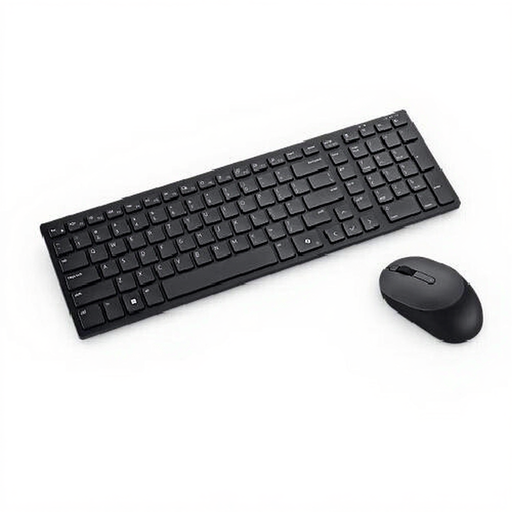
Why it suits this profile: This model combines a Belgian AZERTY layout with both RF and Bluetooth 5.1 connectivity. It’s a good fit if you use a fixed workstation alongside several devices.
The layout, size, connection and mouse sensor are all clearly specified. You don’t have to rely on general claims such as “comfortable” or “silent”.
Belgian AZERTY, numeric keypad, multimedia and programmable keys, Bluetooth 5.1 and an optical mouse with 4020 dpi.

Why it suits this profile: This full-size set is designed for extended typing sessions in a home office or shared workspace. The integrated wrist rest and numeric keypad are practical features for everyday office work.
The set is clearly described as having a membrane keyboard, silent keys, US QWERTY layout and a 2.4GHz receiver. So you know it’s designed for office use and comfort, rather than gaming with mechanical keys.
Full-size layout, numeric keypad, wrist rest, silent keys and mouse, 10-metre range and adjustable mouse speed of 1000, 1400 or 1800 dpi.

Why it suits this profile: This compact wireless keyboard and mouse combination is designed for users who switch between a laptop, tablet and phone and have limited desk space.
The set supports three devices via USB and Bluetooth. It’s also clearly a TKL model without a separate numeric keypad.
Bluetooth 5.0, USB receiver, scissor keys, compact design, a mouse for left- and right-handed use and a battery life of up to six months, according to Trust.
Use these points before ordering a keyboard and mouse combo:
We’ve put together a complete, up-to-date list of products that meet these strict selection criteria and the applicable European safety requirements.
With an RF set, plug the included USB receiver into a spare USB port and switch on both devices. For Bluetooth, turn on Bluetooth on your computer or tablet and follow the pairing steps. If you’re unsure, check the instructions for your specific model.
It varies by model, battery type and usage. Manufacturers sometimes give an estimated battery life, such as months or years. Treat this as a product specification based on certain conditions. A rechargeable set needs to be charged regularly; a model that uses AA or AAA batteries will need new ones when the charge runs low.
Yes, as long as the layout, connection and size suit your work. If you type a lot and make video calls, silent keys, media keys and a reliable USB or Bluetooth connection can be useful. If you work with numbers often, a full-size keyboard with a numeric keypad may be a better choice.
