
Vandaag of morgen in huis

Kwaliteit gegarandeerd

Welkomstaanbiedingen ontgrendelen: GRATIS bezorging | Tot 80% korting | Gratis 30 dagen JoyPlus-proefperiode
Download de app
A wireless keyboard and mouse set may seem easy to choose. Yet many buyers are tempted by a low price, a long list of features or a promising term such as “ergonomic”. After a few weeks, it may become clear that the layout is unsuitable, the mouse feels inaccurate or the keyboard makes more noise than expected.
For home workers, students and office staff, three pitfalls are particularly important:
@, ", : and ? may be in different places.If you enter a lot of figures, a keyboard with a numeric keypad is useful. A full-size model is more practical for this than a compact 60% or 75% keyboard. Compact models take up less space, but often lack a separate numeric section.
Also check whether you really need a QWERTY US keyboard. “QWERTY” only refers to the order of the first letters; the language and key layout may still differ. For use with Windows, Mac or Chrome OS, it is wise to check that the special characters and keyboard shortcuts you need match your computer settings.
A 2.4 GHz wireless keyboard usually uses a USB nano receiver. This is often plug and play: insert the batteries, plug the receiver into a USB-A port and the system recognises the set.
Bluetooth is useful if you use several devices or have few USB ports. A wireless keyboard and mouse combination with both connection options offers greater flexibility, for example for a laptop, tablet and desktop computer. Do check that your device supports Bluetooth and that the USB receiver is included in the box.
A wireless connection keeps cables off your desk, but you need to consider the batteries, where to store the receiver and possible compatibility with USB-C ports. An adapter may be required for a laptop without USB-A.
For shared workspaces and video conferences, a quiet keyboard for the office is a practical choice. Membrane keys or low-profile scissor keys are generally constructed differently from mechanical switches. A mechanical model may provide more feedback, but it is not automatically quiet.
An ergonomic keyboard with wrist rest can support your hands during long typing sessions. However, the rest needs to suit the height of your desk and your sitting position. A keyboard that is too thick may place your wrists higher than is comfortable.
Also consider battery life. Manufacturers often state a maximum usage time under specific conditions. According to Trust’s product information, the Trezo Comfort battery can last up to 48 months for the keyboard and 12 months for the mouse. This is a claim made by Trust; actual battery life depends on usage and settings. For the Rapoo 9010M, a battery life of up to approximately 12 months is stated, depending on use.

Why it suits this profile: This full-size set combines a US/QWERTY layout, numeric keypad and wrist rest with a simple 2.4 GHz connection. It is well suited to working from home and everyday office tasks without complicated installation.
The product information mentions muted keys and mouse buttons, so “quiet” does not refer to the keyboard alone. The layout and presence of the numeric keypad are clearly specified.
2.4 GHz with a stated range of up to 10 metres, integrated wrist rest, full-size design and Duracell batteries included.
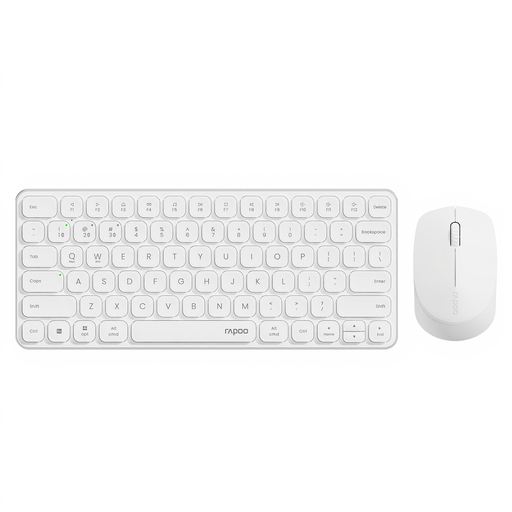
Why it suits this profile: This combination is designed for users who switch between a computer, laptop, tablet or phone. The choice between 2.4 GHz and Bluetooth makes the set suitable for flexible workspaces.
The product description mentions low-profile scissor keys and quiet mouse clicks. Before buying, check that the slim design and key layout match your preferences.
Support for up to four paired devices, 2.4 GHz and Bluetooth 4.0/5.0, adjustable mouse sensitivity and compatibility with Windows, Mac, Linux and Chrome OS.

Why it suits this profile: This set is aimed at users looking for a slim, full-size model with US QWERTY, a wrist rest and one receiver for a home office or shared workspace.
The stated 104 keys make the size easy to verify, while the specifications mention both adjustable mouse resolution and a range of up to 10 metres. Check the battery details against your level of use.
One wireless receiver, full-size layout, wrist rest, optical mouse and a stated energy-saving system.
We have compiled a complete, up-to-date list of products that fully meet these strict selection criteria and the applicable European safety regulations.
With a set that uses a nano receiver, insert the batteries first. Then plug the USB receiver into an available USB port. With plug-and-play models, the operating system installs the required support automatically. For Bluetooth models, pair the keyboard and mouse separately via the Bluetooth settings.
This depends on the model, how often you use it and its energy-saving features. Manufacturers usually state a maximum or estimated usage time. According to Trust’s product information, the Trezo Comfort can last up to 48 months for the keyboard and 12 months for the mouse. Treat this as an indication rather than a guaranteed battery life.
Yes, provided the connection, layout and noise level suit the workplace. Choose a quiet keyboard and mouse when colleagues or housemates work nearby. Also check whether the computer has a USB-A port, or choose a Bluetooth model if you want to minimise cables and adapters.
